# Weed Patches Detection and Herbicide VRA Rx Map

## When to use this workflow

* **Early–mid season** when weed patches create clear spectral contrast vs. crop/soil.
* **Post‑emerge targeted sprays** or **patch‑spray clean‑ups**.
* Fields with **known weedy headlands, drowned‑out spots, compaction bands,** or prior escape areas.

> Upsampling to 1 m improves map geometry (smoother polygons for controllers) but doesn’t invent new detail beyond the sensor’s native resolution.

## Option A — Zoning Workflow (1 min video)

{% hint style="warning" %}
The tutorial below supports multiple languages. Choose the one that best fits you from the language icon <img src="https://3272281156-files.gitbook.io/~/files/v0/b/gitbook-x-prod.appspot.com/o/spaces%2FYICBELdyAXXebKAzfLOR%2Fuploads%2FBI5BLx6lztxQTYIHqvsr%2Fimage.png?alt=media&#x26;token=0d402011-668e-4a9c-8853-0fb4f56ace99" alt="" data-size="line">.&#x20;
{% endhint %}

{% @arcade/embed flowId="57JEr489MVHJ2PpreES0" url="<https://app.arcade.software/share/57JEr489MVHJ2PpreES0>" %}

{% stepper %}
{% step %}

### Select Image

<figure><img src="https://3272281156-files.gitbook.io/~/files/v0/b/gitbook-x-prod.appspot.com/o/spaces%2FYICBELdyAXXebKAzfLOR%2Fuploads%2Fd2u313oDkc81CuW21WAD%2FScreenshot%202025-10-17%20at%2015.41.52.png?alt=media&#x26;token=340504b3-f8af-438f-8dbf-234d17186851" alt="Planet labs imagery with applied contrast WDRVI index in GeoPard"><figcaption><p>Planet labs imagery with applied contrast WDRVI index in GeoPard</p></figcaption></figure>
{% endstep %}

{% step %}

### Create VRA Rx map&#x20;

<figure><img src="https://3272281156-files.gitbook.io/~/files/v0/b/gitbook-x-prod.appspot.com/o/spaces%2FYICBELdyAXXebKAzfLOR%2Fuploads%2FMWIdAJC9bxJAQjygv75U%2FScreenshot%202025-10-17%20at%2015.40.17.png?alt=media&#x26;token=a1938698-3a85-4479-8560-f0a477ca3987" alt="VRA herbicide map saves you $2200 per operation"><figcaption></figcaption></figure>
{% endstep %}

{% step %}

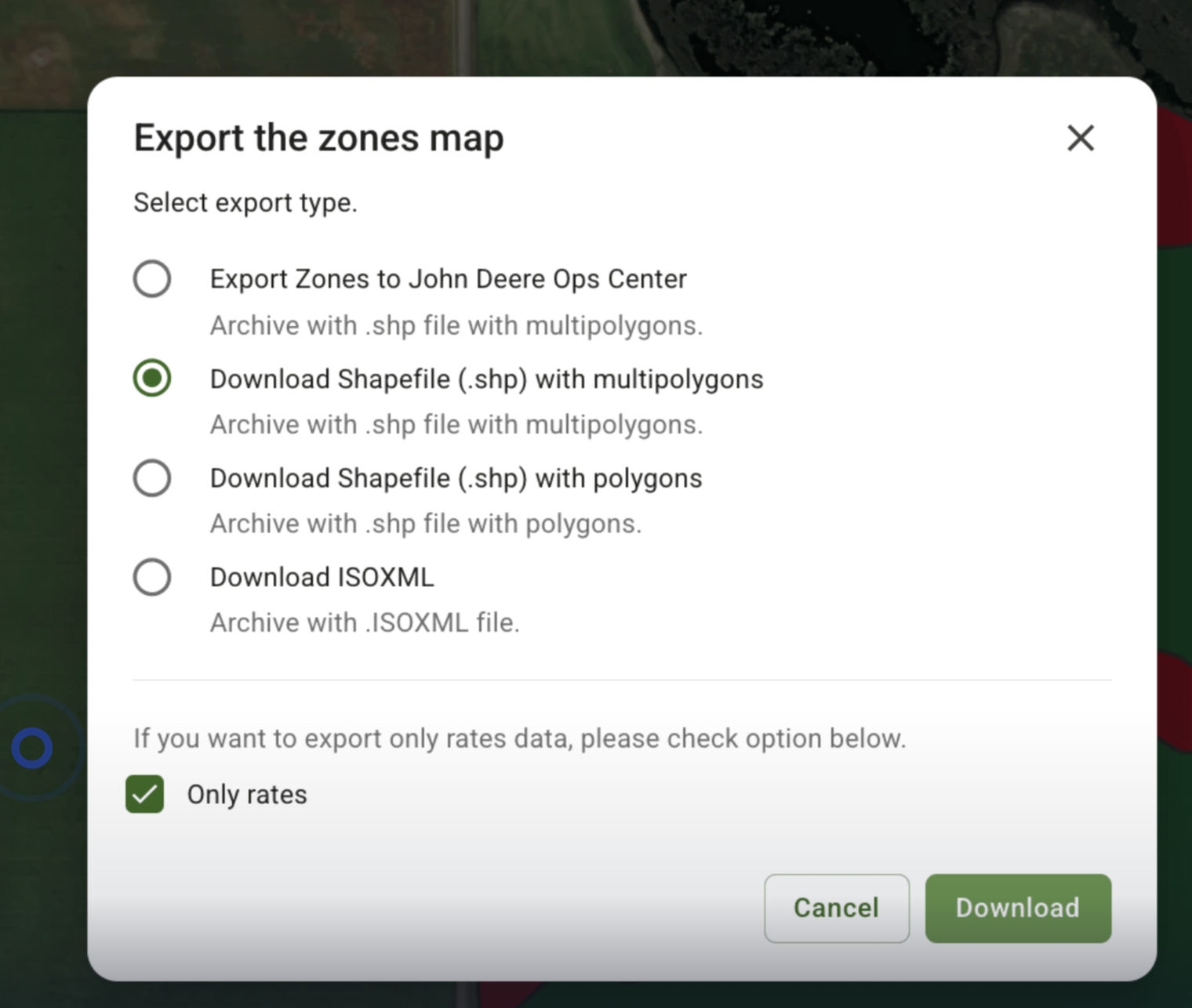
### Export machine-ready Prescription map file

<figure><img src="https://3272281156-files.gitbook.io/~/files/v0/b/gitbook-x-prod.appspot.com/o/spaces%2FYICBELdyAXXebKAzfLOR%2Fuploads%2FmUmBIrsnKBruYwCwWM9M%2FScreenshot%202025-10-17%20at%2015.38.11.png?alt=media&#x26;token=6f536907-e9bf-496d-b73f-118d3b3826e6" alt="Export machine-ready Prescription map file"><figcaption><p>Export VR herbicide application map as shp, iso or send directly to the connected machines</p></figcaption></figure>
{% endstep %}
{% endstepper %}

## Option B — Equation‑Based

[Equation based](https://docs.geopard.tech/geopard-tutorials/product-tour-web-app/equation-based-analytics) map could also be used for VRA herbicide application map.

## Financial outcomes & ROI

| Metric                                            |                                                Value |
| ------------------------------------------------- | ---------------------------------------------------: |
| Field size                                        |                                         **311.3 ac** |
| VRA zones (area share)                            | **OFF:** 142.8 ac (45.9%) • **ON:** 168.5 ac (54.1%) |
| ON rate (herbicide)                               |                                         **1.3 L/ac** |
| Average rate with VRA                             |                                         **0.7 L/ac** |
| Total volume if flat rate (1.3 L/ac on all acres) |                                          **404.7 L** |
| Total volume with VRA (ON/OFF)                    |                                          **219.1 L** |
| **Volume saved vs. flat rate**                    |                                  **185.6 L (45.9%)** |
| Price per liter                                   |                                         **$12.00/L** |
| **Product cost saved vs. flat rate**              |                                         **$2 227.8** |
| **Alt. scenario – vs. your “custom” rate mix**    |                         **154.5 L saved → $1 854.2** |

##

## Q\&A&#x20;

* **Visual overlay**: Toggle imagery + zones; check headlands and wetlands.
* **Spot‑check**: 3–5 biggest patches on the ground or via high‑res drone/phone.
* **Edge artifacts**: If you see boundary stripes, add **boundary buffer (−3 to −6 m)** or re‑threshold.
* **Cloud/shadow**: If present, switch date or mask using the cloud layer.
* **Patches look noisy** → Raise **min area**, add **smoothing**, or use **Planet 3 m image**.

***

## Recommended defaults (tune per field)

* **Index**: Start with [**OSAVI**](https://docs.geopard.tech/geopard-tutorials/product-tour-web-app/satellite-monitoring/indices-for-crops-and-soils) until canopy closes; try **CIred‑edge** from **6–9 leaf** stage onward.
* **Min patch size**: **≥ 2× section area** (example: 12 m boom, 3 m section ⇒ \~72 m²). Round up for smoother control.
* **Buffers**: **−3 m** field edge; **no‑spray zones** as per label/regulation.

***

## Export tips by controller

* **SHP**: Ensure attribute `RATE` (numeric).
* **ISOXML**: Name the Operation type, **Product**, and **Units** exactly as your terminal expects.
* **John Deere Ops Center**: few-clicks export into Ops Center as [Rx file](https://docs.geopard.tech/geopard-tutorials/product-tour-web-app/export-download/export-to-myjohndeere) or [WorkPlan](https://docs.geopard.tech/geopard-tutorials/product-tour-web-app/john-deere-operations-center-integration/8.-export-rx-maps-to-john-deere-operations-center-as-work-plans)

***

## Compliance & agronomy notes

* Follow **label rates**, **buffer zones**, **wind** and **drift** rules.
* Patch‑spray success improves if you **re‑run this workflow 7–14 days** after emergence for escapes.
* Keep a **before/after** photo set to prove efficacy and refine thresholds next time.