# Flood Insurance Report

<figure><img src="/files/B5uN0JEUkxIclG72lCdJ" alt="Use Case Tutorial: Flood Detection and Insurance Reporting with GeoPard Agriculture"><figcaption><p>Flood Detection and Insurance Reporting with GeoPard Agriculture</p></figcaption></figure>

## Use Case Tutorial: Flood Detection and Insurance Reporting with GeoPard Agriculture
This tutorial provides a step-by-step guide for using GeoPard Agriculture for flood detection and insurance reporting. It is based on a real-world example from Salinas Valley, California, after a flood event in March 2023. GeoPard flood map analysis helps identify areas with excess water that may lead to crop damage, enabling farmers to file insurance claims and allowing insurers to assess flood cases efficiently.

***

### Who Can Use This Module?

* **Farmers**: To document flood damage and submit insurance claims.
* **Insurance Companies**: To detect flood cases, verify claims, and assess the extent of crop damage.

***

### Overview

GeoPard's flood map analysis uses advanced remote sensing and analytics to identify flooded areas, track flood progression, and quantify damage. This tutorial demonstrates how to leverage these tools to:

* Detect flooding in agricultural fields.
* Analyze flood severity using data layers and statistics.
* Generate reports for insurance claims.
* Plan corrective actions to mitigate future risks.

The example focuses on the "Potter Rd (342.93 ha)" field in Salinas Valley, comparing flood maps from **March 15, 2023**, and **March 25, 2023**, to visualize flood progression.

***

### Step 1: Accessing the GeoPard Platform

1. **Log in** to the GeoPard Agriculture platform using your credentials at [GeoPard Agriculture](https://geopard.tech/).
2. Navigate to the **"Fields"** section in the sidebar.
3. Select the specific field or area you want to analyze. For this example, choose the **"Potter Rd (342.93 ha)"** field in Salinas Valley.

***

### Step 2: Selecting the Data Layers for Flood Detection

1. GeoPard offers various data layers for remote sensing and analytics. For flood detection, the **NDWI (Normalized Difference Water Index)** layer is ideal, as it highlights areas with high water content.
2. Select the satellite imagery date.
3. Select the **NDWI** layer.
4. Optionally, explore other layers like **RGB** or **NDVI** for additional insights into crop health post-flood.

***

### Step 3: Comparing Layers to Track Flood Progression

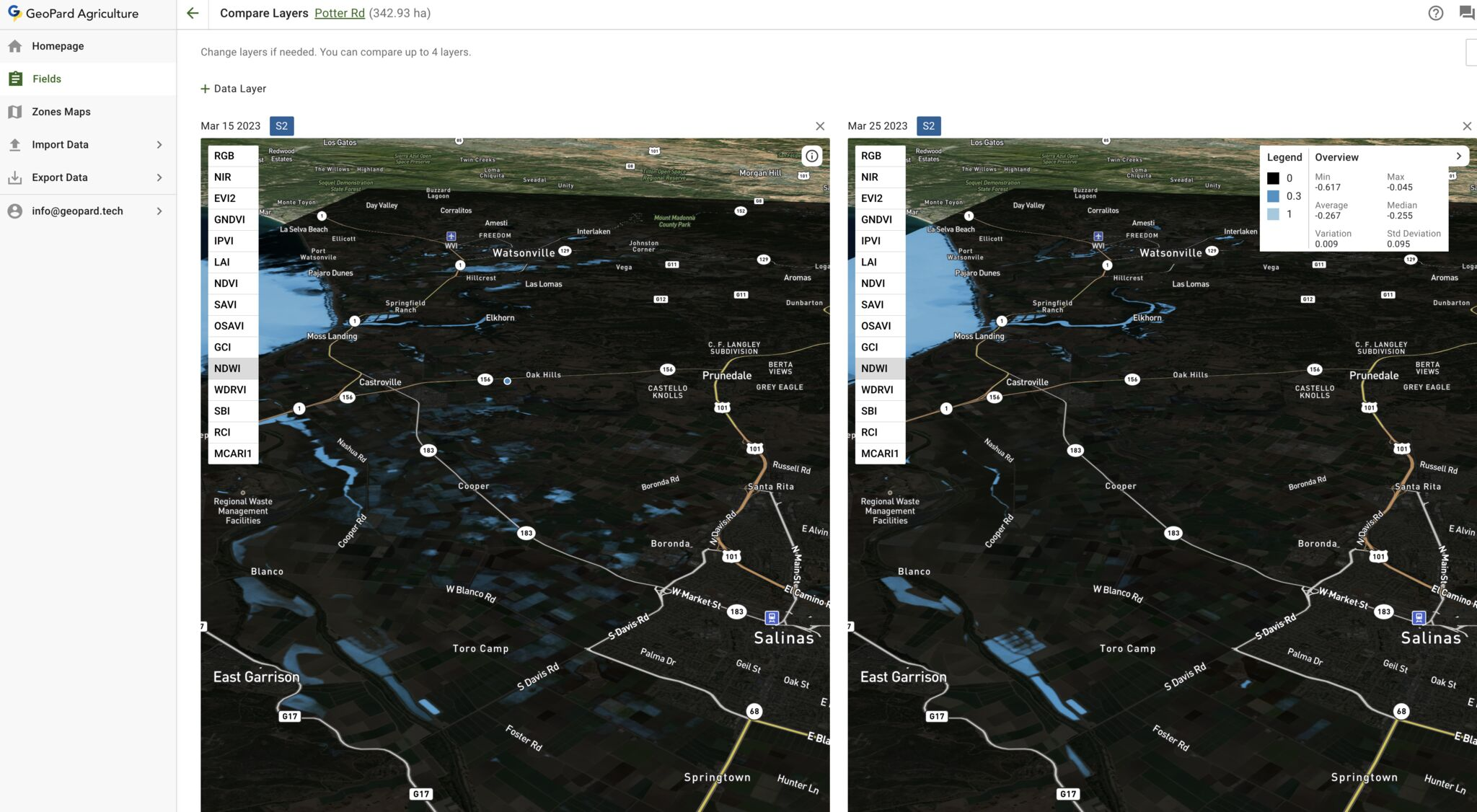
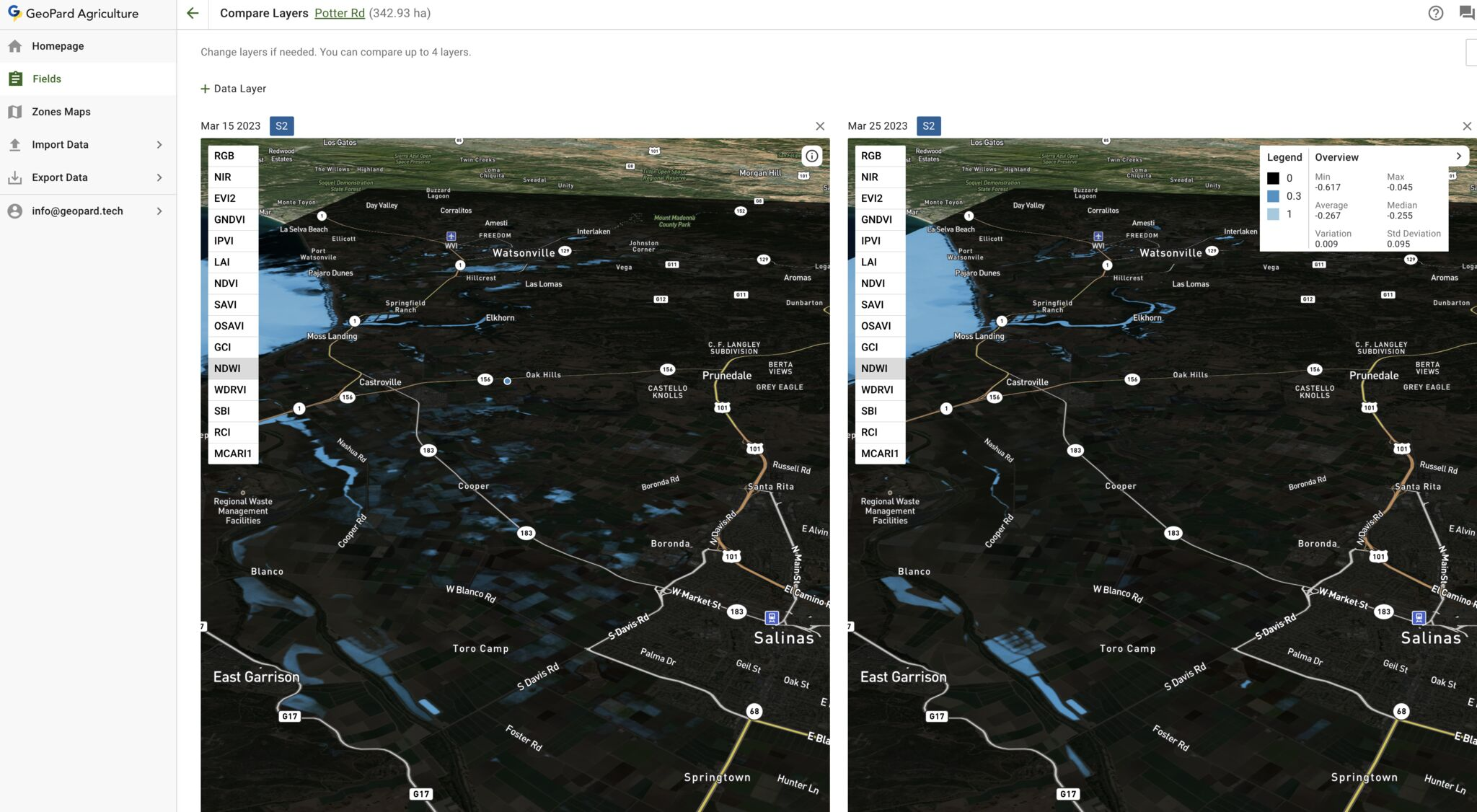
<figure><img src="/files/RRzpeYMaoRXwrGoTQThV" alt=""><figcaption><p>Compare NDWI layers after the flood event and in 10 days.</p></figcaption></figure>

1. Use the **"Compare Layers"** feature to analyze flood progression over time.
2. Select up to four layers for comparison. In this example, compare NDWI layers from:
   * **March 15, 2023** (before peak flooding).
   * **March 25, 2023** (after peak flooding).
3. This comparison visualizes how the flood evolved, with flooded areas highlighted in light blue/blue.

***

### Step 4: Analyzing the Flood Maps

1. The flood maps display areas of excess water in light blue, with a color scale ranging from black (no water) to light blue (high water presence).
2. Use the **zoom** feature to focus on specific areas, such as fields near the Salinas River.
3. Refer to the **legend** for the color scale, which shows water intensity values, for example from 0 to 1.
4. Review the **statistical data** provided:
   * Average: 0.067
   * Median: 0.035
   * Standard deviation: 0.095 These metrics help quantify flood severity.
5. If `NDWI > 0`, it usually indicates a flood event or standing water.

***

### Step 5: Generating Reports for Insurance Claims

1. **Farmers**:
   * Use the flood maps and statistical data to document crop damage for insurance claims.
   * Use the **"Export Data"** feature to download the flood maps and relevant analytics.
   * Options: PDF, Shapefile, or GeoJSON
   * Submit the exported reports to your insurance provider as evidence of flood damage.
   * In the case below, not all farm areas were damaged.<br>

     <figure><img src="/files/52gE5uDTo6dZCbyJtQo7" alt=""><figcaption><p>Export Flood Analysis as PDF, with index values and areas damaged</p></figcaption></figure>
2. **Insurance companies**:
   * Use the same data to verify claims, assess the extent of damage, and expedite the claims process.
   * Optimize processes by using reliable remote sensing software and analytics for any area. GeoPard supports 50+ countries.

***

### Step 6: Take corrective actions and analyze the area (history and topography)

1. Beyond insurance reporting, use the flood maps to identify areas needing immediate attention, such as persistent waterlogging.
2. Plan corrective measures, such as:
   * Improving drainage systems.
   * Adjusting crop management practices to mitigate future risks.
3. Analyze historical field productivity and topography.

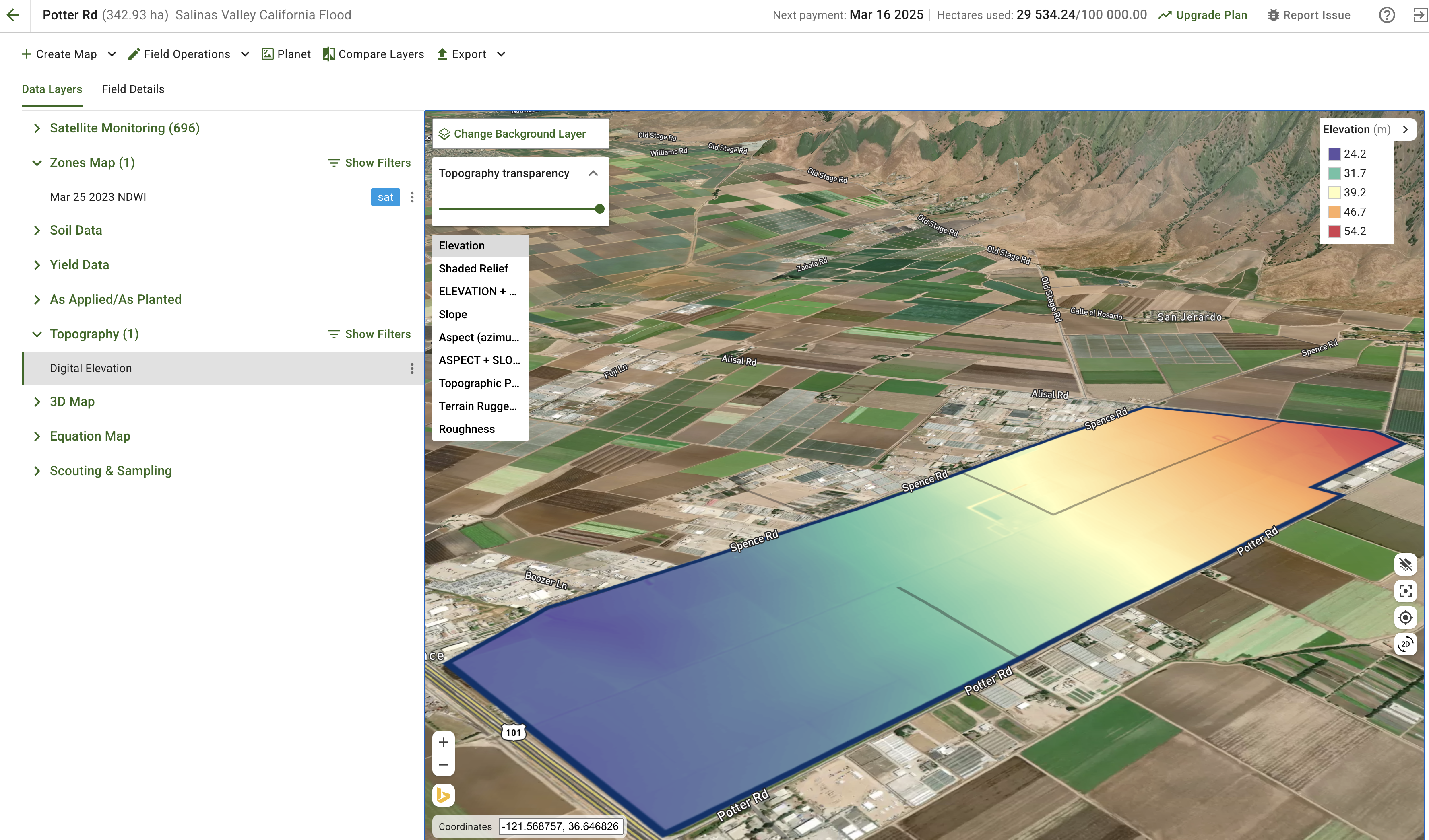
<figure><img src="/files/tuVBFFvTsuXbLoqiZ1ld" alt=""><figcaption><p>Low Elevation areas appeared to be damaged by flood</p></figcaption></figure>

***

### Key Features Highlighted

* **NDWI Layer**: Essential for detecting water presence and flood extent.
* **Layer Comparison**: Allows tracking of flood progression over time.
* **Statistical Data**: Provides quantitative insights into flood severity.
* **Export Functionality**: Enables easy sharing of data for insurance claims.

***

### Why This Matters

* **Timely Analysis**: Early detection of flooding allows for faster response times, reducing crop losses.
* **Insurance efficiency**: Streamlines the claims process for both farmers and insurers.
* **Risk Mitigation**: Helps farmers and local agencies take proactive steps to protect crops and ensure food security.

***

1. **External Articles about the case**:<br>
   * [The Guardian: California Farm Workers and Flooding](https://www.theguardian.com/us-news/2023/mar/27/california-farm-workers-pajaro-california-flooding)\
     Discusses the impact of flooding on farm workers in Pajaro, California.
   * [LA Times: Salinas River Flooding](https://www.latimes.com/california/story/2023-03-14/salinas-river-communities-brace-for-flooding-crop-losses)\
     Covers flood preparation and crop losses near the Salinas River.
   * **YouTube Video**: [Markon Cooperative on Flood Impact](https://www.youtube.com/watch?v=7TS1YfuErjY\&ab_channel=MarkonCooperative)\
     Provides insights into the flood's impact on Salinas Valley agriculture.

***

### Conclusion

GeoPard's flood detection and insurance reporting tools help farmers and insurance companies respond effectively to natural disasters. By using advanced remote sensing and analytics, teams can detect floods early, assess damage accurately, and take corrective actions to protect agricultural productivity and livelihoods. This tutorial shows how to use GeoPard in a real-world flood scenario and get faster, more reliable reporting.


---

# Agent Instructions: Querying This Documentation

If you need additional information that is not directly available in this page, you can query the documentation dynamically by asking a question.

Perform an HTTP GET request on the current page URL with the `ask` query parameter:

```
GET https://docs.geopard.tech/geopard-tutorials/agronomy/flood-insurance-report.md?ask=<question>
```

The question should be specific, self-contained, and written in natural language.
The response will contain a direct answer to the question and relevant excerpts and sources from the documentation.

Use this mechanism when the answer is not explicitly present in the current page, you need clarification or additional context, or you want to retrieve related documentation sections.