> For the complete documentation index, see [llms.txt](https://docs.geopard.tech/geopard-tutorials/llms.txt). Markdown versions of documentation pages are available by appending `.md` to page URLs; this page is available as [Markdown](https://docs.geopard.tech/geopard-tutorials/ukrainian/zhurnal-zmin-i-relizi-produktu/release-web-august-2024-data-layer-previews-spatially-localized-zones-reusable-zones.md).
# Реліз вебверсії, серпень 2024 (попередній перегляд шарів даних, просторово локалізовані зони, повторно використовувані зони)
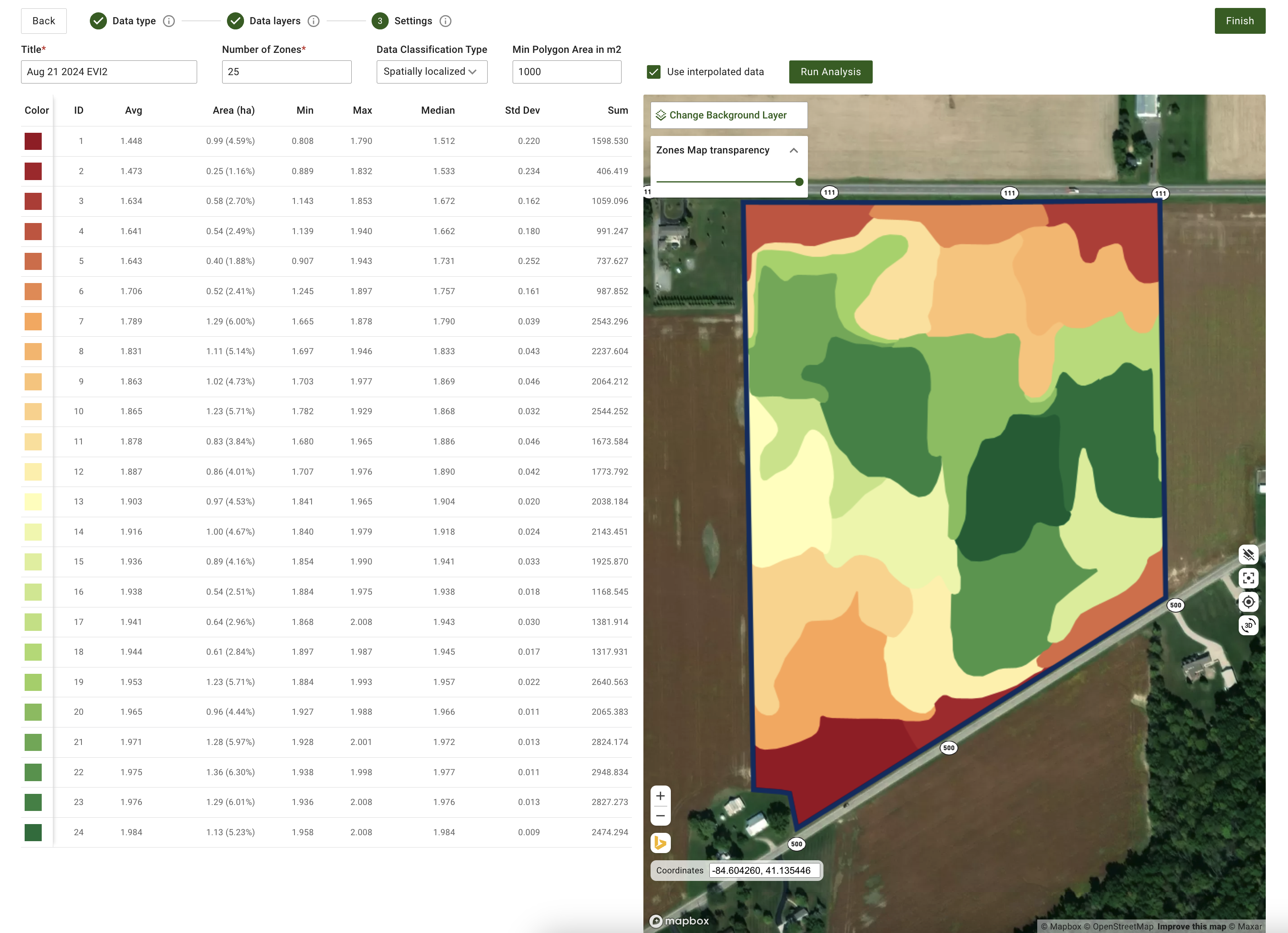
Це оновлення покращує попередній перегляд шарів даних під час створення карти зон і додає підтримку до 50 просторово локалізованих зон.
### Покращений попередній перегляд шарів даних під час створення карт зон
Тепер під час створення карт зон можна переглядати вибрані шари даних, зокрема супутникові знімки та набори даних про ґрунт, урожайність і фактично внесені матеріали. На етапі «Шари даних» під час створення карти зон унизу сторінки відображаються мініатюри цих шарів. На кожному попередньому перегляді є позначка з датою супутникового знімка або назвою набору даних. Також можна видаляти шари або переглядати докладнішу інформацію в підказках. Назва активного супутникового знімка чи набору даних відображається над картою, що полегшує відстеження вибраних елементів.
### Оновлені налаштування генерації просторово локалізованих зон
Ми додали більше гнучкості до генерації просторово локалізованих зон. Тепер система підтримує створення понад 11 зон — від 3 до 50. Просто введіть потрібну кількість зон у поле введення. Це оновлення забезпечує точніше налаштування й достатню геопросторову деталізацію.
### Інші покращення та виправлення
Окрім цих функцій, команда розробників продовжує вдосконалювати ядро GeoPard. Цього місяця ці покращення включають розширення покриття автоматизованими тестами та тонке налаштування хмарної інфраструктури для підвищення загальної продуктивності.
---
# Agent Instructions
This documentation is published with GitBook. GitBook is the documentation platform designed so that both humans and AI agents can read, navigate, and reason over technical content effectively. Learn more at gitbook.com.
## Querying This Documentation
If you need additional information that is not directly available in this page, you can query the documentation by asking a question.
Perform an HTTP GET request on the following URL with the `ask` and `goal` query parameters:
```
GET https://docs.geopard.tech/geopard-tutorials/ukrainian/zhurnal-zmin-i-relizi-produktu/release-web-august-2024-data-layer-previews-spatially-localized-zones-reusable-zones.md?ask=&goal=
```
`ask` is the immediate question: it should be specific, self-contained, and written in natural language.
`goal` is what the user is ultimately trying to achieve, the reason they need the answer. Sharing it helps GitBook give you a better, more relevant answer. A goal is most helpful when it describes the outcome the user wants rather than restating the question. For example, with `ask=how do I create an API token`, a goal like `automate deployments from our CI pipeline` lets GitBook tailor the answer to that use case.
The response will contain a direct answer to the question and relevant excerpts and sources from the documentation.
Use this mechanism when the answer is not explicitly present in the current page, you need clarification or additional context, or you want to retrieve related documentation sections.