> For the complete documentation index, see [llms.txt](https://docs.geopard.tech/geopard-tutorials/llms.txt). Markdown versions of documentation pages are available by appending `.md` to page URLs; this page is available as [Markdown](https://docs.geopard.tech/geopard-tutorials/ukrainian/oglyad-produktu-vebdodatok/karti-zon-i-analitika/stvoriti-kartu-zon-za-danimi-gruntu-vrozhainosti-abo-vnesennya.md).
# Створити карту зон за даними ґрунту, врожайності або внесення
Створюйте зони управління на основі даних ґрунту, врожайності або техніки, щоб відобразити реальну варіабельність поля.
Якщо ви хочете створити карту зон із набору даних, спочатку завантажте дані в поле.
1. Виберіть поле у списку, натисніть **Створити карту зон** кнопку, виберіть **Одношаровий**, а потім натисніть **Далі**.
2. Виберіть **Дані про ґрунт** тип, щоб продовжити. Ви також можете використовувати дані про врожайність або внесені дані.
3. На наступному кроці виберіть конкретний набір даних про ґрунт, який ви хочете використати, і натисніть **Далі**.
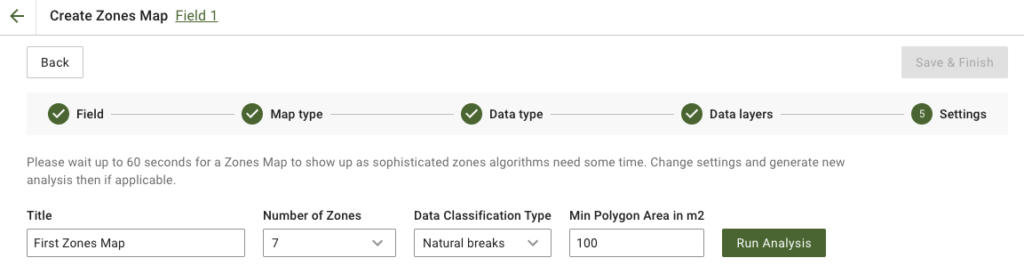
4. На наступному кроці ви можете відредагувати назву, змінити кількість зон, [вибрати тип класифікації даних](/geopard-tutorials/ukrainian/oglyad-produktu-vebdodatok/karti-zon-i-analitika/vikoristannya-klasifikaciyi-danikh.md), і визначити мінімальну площу полігона в квадратних метрах. Натисніть **Запустити аналіз** щоб продовжити.
Аналіз може тривати до 60 секунд, залежно від заданих вами параметрів.
5. Після завершення натисніть **Зберегти й завершити**.
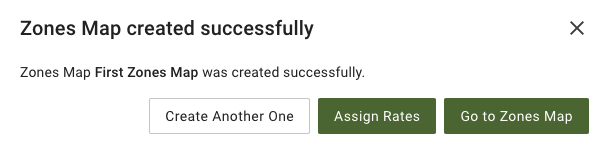
Після збереження ви побачите таке повідомлення:
Ви можете створити ще одну карту зон, призначити норми або відкрити щойно створену карту зон. Якщо ви її відкриєте, побачите подібний вигляд.
---
# Agent Instructions
This documentation is published with GitBook. GitBook is the documentation platform designed so that both humans and AI agents can read, navigate, and reason over technical content effectively. Learn more at gitbook.com.
## Querying This Documentation
If you need additional information that is not directly available in this page, you can query the documentation by asking a question.
Perform an HTTP GET request on the following URL with the `ask` and `goal` query parameters:
```
GET https://docs.geopard.tech/geopard-tutorials/ukrainian/oglyad-produktu-vebdodatok/karti-zon-i-analitika/stvoriti-kartu-zon-za-danimi-gruntu-vrozhainosti-abo-vnesennya.md?ask=&goal=
```
`ask` is the immediate question: it should be specific, self-contained, and written in natural language.
`goal` is what the user is ultimately trying to achieve, the reason they need the answer. Sharing it helps GitBook give you a better, more relevant answer. A goal is most helpful when it describes the outcome the user wants rather than restating the question. For example, with `ask=how do I create an API token`, a goal like `automate deployments from our CI pipeline` lets GitBook tailor the answer to that use case.
The response will contain a direct answer to the question and relevant excerpts and sources from the documentation.
Use this mechanism when the answer is not explicitly present in the current page, you need clarification or additional context, or you want to retrieve related documentation sections.