> For the complete documentation index, see [llms.txt](https://docs.geopard.tech/geopard-tutorials/llms.txt). Markdown versions of documentation pages are available by appending `.md` to page URLs; this page is available as [Markdown](https://docs.geopard.tech/geopard-tutorials/ukrainian/oglyad-produktu-vebdodatok/karti-zon-i-analitika/koeficiyent-vidnosnoyi-variaciyi.md).
# Коефіцієнт відносної варіації
Кількісно оцінюйте просторову варіацію відносно середнього, щоб порівнювати варіабельність між полями та наборами даних.
Виявлення змін, що сталися на полі протягом останніх одного-двох тижнів чи одного-двох місяців або навіть кількох років, допомагає отримати уявлення про розвиток культур.
Коефіцієнт відносної варіації або Індекс відносної варіації можна використовувати для:
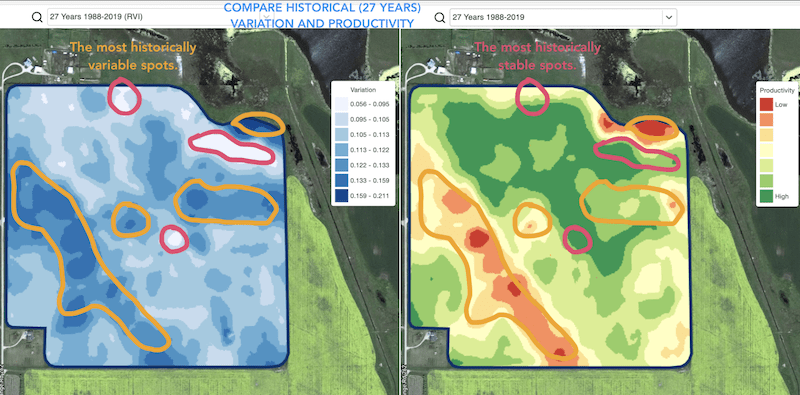
* визначення ділянок із подібними показниками протягом 5-10-20 років і розміщення випробувань в районах із подібними умовами, щоб зменшити ймовірність помилки
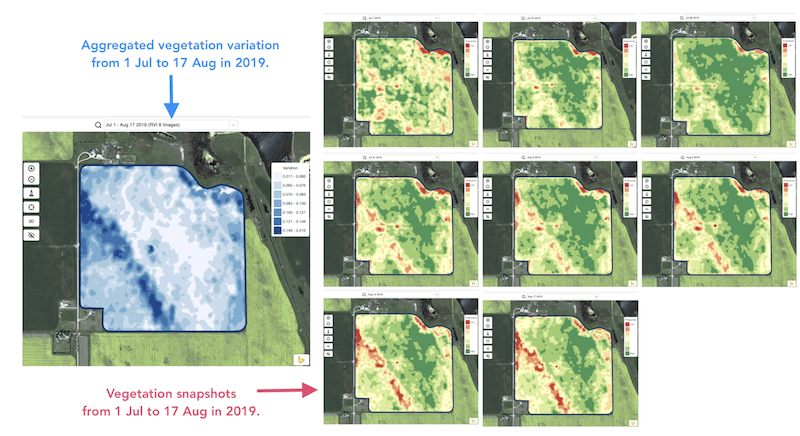
* відстеження змін протягом сезону та оцінювання стану посівів під час росту
* виявлення пошкоджених ділянок після погодного лиха, хвороби або атаки шкідників і розрахунку площі пошкоджень
* виявлення різниці між двома останніми знімками та контроль стану посівів.
Індекс відносної варіації GeoPard (RVI) охоплює всі ці випадки та багато інших. RVI надасть більше уявлення про розвиток культур, якщо використовувати його разом із сезонними та історичними зонами управління.
Просто виберіть своє поле та супутникові знімки, щоб відстежувати зміни на них і отримувати уявлення про кожну ділянку вашого поля.
---
# Agent Instructions
This documentation is published with GitBook. GitBook is the documentation platform designed so that both humans and AI agents can read, navigate, and reason over technical content effectively. Learn more at gitbook.com.
## Querying This Documentation
If you need additional information that is not directly available in this page, you can query the documentation by asking a question.
Perform an HTTP GET request on the following URL with the `ask` and `goal` query parameters:
```
GET https://docs.geopard.tech/geopard-tutorials/ukrainian/oglyad-produktu-vebdodatok/karti-zon-i-analitika/koeficiyent-vidnosnoyi-variaciyi.md?ask=&goal=
```
`ask` is the immediate question: it should be specific, self-contained, and written in natural language.
`goal` is what the user is ultimately trying to achieve, the reason they need the answer. Sharing it helps GitBook give you a better, more relevant answer. A goal is most helpful when it describes the outcome the user wants rather than restating the question. For example, with `ask=how do I create an API token`, a goal like `automate deployments from our CI pipeline` lets GitBook tailor the answer to that use case.
The response will contain a direct answer to the question and relevant excerpts and sources from the documentation.
Use this mechanism when the answer is not explicitly present in the current page, you need clarification or additional context, or you want to retrieve related documentation sections.