> For the complete documentation index, see [llms.txt](https://docs.geopard.tech/geopard-tutorials/llms.txt). Markdown versions of documentation pages are available by appending `.md` to page URLs; this page is available as [Markdown](https://docs.geopard.tech/geopard-tutorials/ukrainian/dokumentaciya-api/getting-started-with-the-geopard-api.md).
# Початок роботи з GeoPard API
Команда GeoPard наполегливо радить почати з Altair, щоб детально ознайомитися з можливостями API GeoPard. Він завжди отримує найновішу версію доступних сутностей, запитів, мутацій і підписок. Дивіться наведений нижче посібник зі швидкого початку роботи:
1. Установіть розширення Altair GraphQL для Chrome за цим [ПОСИЛАННЯМ](https://chrome.google.com/webstore/detail/altair-graphql-client/flnheeellpciglgpaodhkhmapeljopja) або скористайтеся клієнтом Altair GraphQL безпосередньо у [браузері](https://altairgraphql.dev/).
2. Кожен запит має бути автентифікований за допомогою `Authorization` ЗАГОЛОВКА, який має містити потрібний токен. Для швидкого тестування значення `Authorization` ЗАГОЛОВКА можна отримати із запитів після входу в GeoPard Agriculture.\
\&#xNAN;*Коротке пояснення наведено на знімку екрана нижче.*
3. Кореневу кінцеву точку GraphQL розміщено за адресою [`https://api.geopard.tech/data`](https://api.geopard.tech/data).\
\&#xNAN;*Коротке пояснення наведено на знімку екрана нижче.*
4. Доступ до схеми GraphQL можна отримати за допомогою кнопки "Документація" в інтерфейсі Altair. У цьому розділі можна переглядати всі доступні запити, мутації та підписки. Крім того, тут наведено інформацію про різні сутності та їхню структуру, що дає змогу повністю зрозуміти налаштування GraphQL у системі.\
\&#xNAN;*Коротке пояснення наведено на знімку екрана нижче.*
5. Переконайтеся, що вихідні запити працюють належним чином, використовуючи консоль розробника браузера. Можна застосувати фільтри запитів, наприклад `/data`.
6. Схему можна переглянути за цим [ПОСИЛАННЯМ](https://docs.geopard.tech/geopard-tutorials/ukrainian/dokumentaciya-api/geopard-api-data-schema.md).
7. Для завантаження файлів ми використовуємо [ці кінцеві точки](https://docs.geopard.tech/geopard-tutorials/ukrainian/dokumentaciya-api/geopard-api-requests-overview/55.-upload-zip-files-over-6-mb.md).
8. Для доступу до растрових і векторних даних ми використовуємо формати OGC WMS (растрові зображення для швидкого відображення) і WFS (`shp`, `geojson`). Докладніше дивіться в розділі [Геокінцеві точки](https://docs.geopard.tech/geopard-tutorials/ukrainian/dokumentaciya-api/geo-endpoints-for-spatial-data-access.md).
{% hint style="info" %}
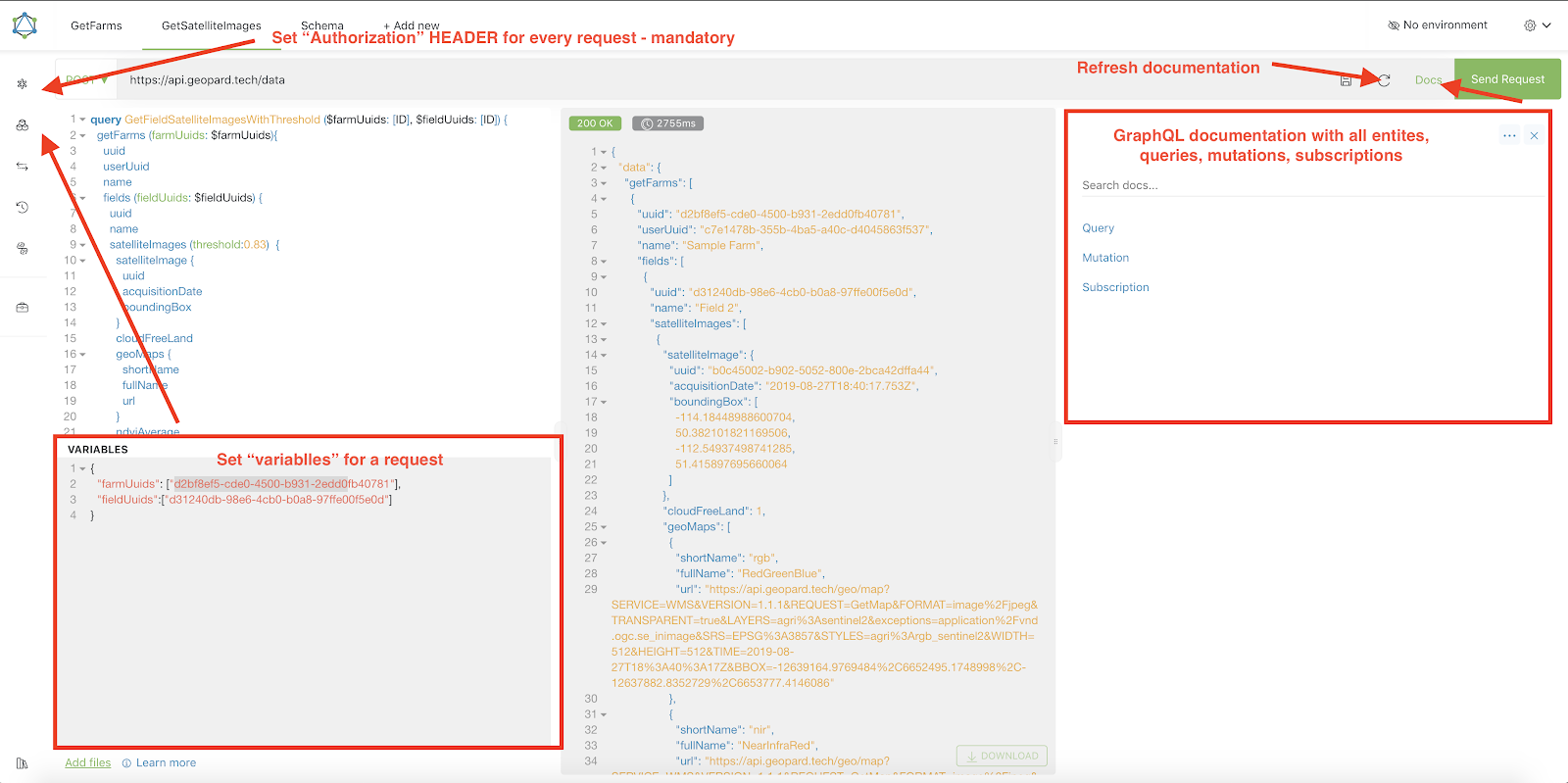
Короткий посібник із порадами щодо роботи в Altair наведено на знімку екрана нижче.
{% endhint %}
Altair: короткий посібник
---
# Agent Instructions
This documentation is published with GitBook. GitBook is the documentation platform designed so that both humans and AI agents can read, navigate, and reason over technical content effectively. Learn more at gitbook.com.
## Querying This Documentation
If you need additional information that is not directly available in this page, you can query the documentation by asking a question.
Perform an HTTP GET request on the following URL with the `ask` and `goal` query parameters:
```
GET https://docs.geopard.tech/geopard-tutorials/ukrainian/dokumentaciya-api/getting-started-with-the-geopard-api.md?ask=&goal=
```
`ask` is the immediate question: it should be specific, self-contained, and written in natural language.
`goal` is what the user is ultimately trying to achieve, the reason they need the answer. Sharing it helps GitBook give you a better, more relevant answer. A goal is most helpful when it describes the outcome the user wants rather than restating the question. For example, with `ask=how do I create an API token`, a goal like `automate deployments from our CI pipeline` lets GitBook tailor the answer to that use case.
The response will contain a direct answer to the question and relevant excerpts and sources from the documentation.
Use this mechanism when the answer is not explicitly present in the current page, you need clarification or additional context, or you want to retrieve related documentation sections.