> For the complete documentation index, see [llms.txt](https://docs.geopard.tech/geopard-tutorials/llms.txt). Markdown versions of documentation pages are available by appending `.md` to page URLs; this page is available as [Markdown](https://docs.geopard.tech/geopard-tutorials/ukrainian/dokumentaciya-api/diagrami-z-bazovimi-potokami/2.-pidpiska-graphql.md).
# 2. Підписка GraphQL
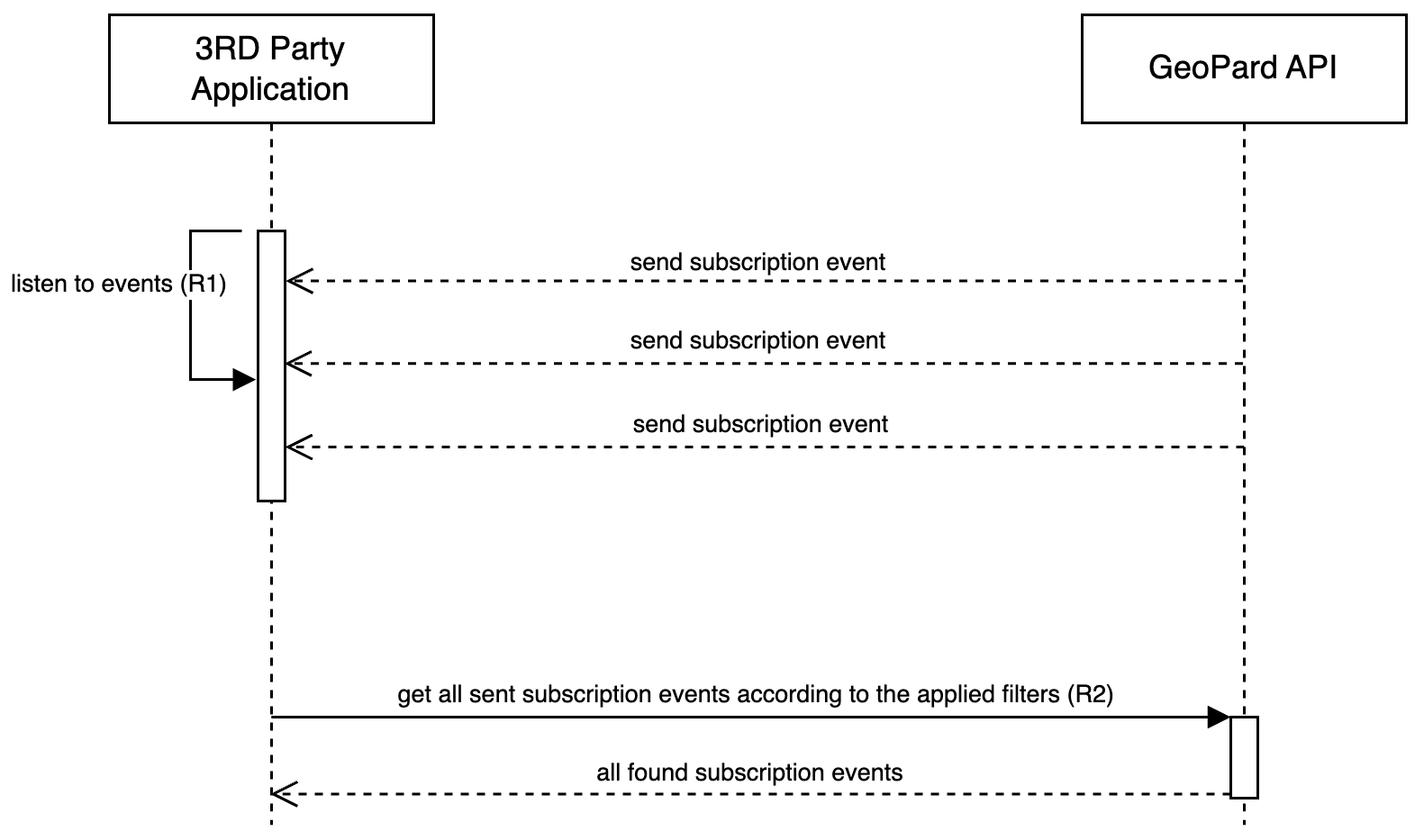
Діаграма послідовності для GraphQL підписок ілюструє, як скористатися архітектурою, орієнтованою на події, реалізованою в ядрі GeoPard. При будь-яких змінах пов'язаних сутностей
API GeoPard оперативно генерує подію, що фіксує постраждалі сутності та відповідну операцію (`INSERT`, `MODIFY`, `REMOVE`). Обсяг цих підписок є широким і охоплює всі сутності, такі як Farm, Field, SatelliteImage, SoilDataset, AsAppliedDataset, YieldDataset, TopographyMap, Notes тощо.
GraphQL підписка ([Запит 1 або R1](/geopard-tutorials/ukrainian/dokumentaciya-api/oglyad-zapitiv-geopard-api/1.-pidpiska-otrimati-podiyi.md)) працює через WebSocket, де всі події доставляються майже в режимі реального часу, забезпечуючи миттєве повідомлення про будь-які зміни.
{% hint style="danger" %}
Отримувач подій підписки повинен функціонувати як базовий сервіс, відповідальний за маршрутизацію отриманих подій до наступного сервісу, де застосовується логіка обробки. Вкрай важливо, щоб цей отримувач самостійно не виконував жодних обробних завдань.
{% endhint %}
Крім того, у випадку пропущених або втрачених подій користувачі мають можливість їх отримати. Це досягається виконанням GraphQL-запиту, адаптованого для конкретного діапазону дат і сутностей (User, Farm, Field), що ефективно дозволяє повне відновлення минулих подій ([Запит 2 або R2](/geopard-tutorials/ukrainian/dokumentaciya-api/oglyad-zapitiv-geopard-api/82.-zapit-vidnoviti-podiyi-pidpiski.md)). Такий рівень функціональності гарантує, що жодна інформація не буде втрачена, зберігаючи цілісність та послідовність даних користувача.
Діаграма послідовності: Робота з подіями підписки
---
# Agent Instructions
This documentation is published with GitBook. GitBook is the documentation platform designed so that both humans and AI agents can read, navigate, and reason over technical content effectively. Learn more at gitbook.com.
## Querying This Documentation
If you need additional information that is not directly available in this page, you can query the documentation by asking a question.
Perform an HTTP GET request on the following URL with the `ask` and `goal` query parameters:
```
GET https://docs.geopard.tech/geopard-tutorials/ukrainian/dokumentaciya-api/diagrami-z-bazovimi-potokami/2.-pidpiska-graphql.md?ask=&goal=
```
`ask` is the immediate question: it should be specific, self-contained, and written in natural language.
`goal` is what the user is ultimately trying to achieve, the reason they need the answer. Sharing it helps GitBook give you a better, more relevant answer. A goal is most helpful when it describes the outcome the user wants rather than restating the question. For example, with `ask=how do I create an API token`, a goal like `automate deployments from our CI pipeline` lets GitBook tailor the answer to that use case.
The response will contain a direct answer to the question and relevant excerpts and sources from the documentation.
Use this mechanism when the answer is not explicitly present in the current page, you need clarification or additional context, or you want to retrieve related documentation sections.