> For the complete documentation index, see [llms.txt](https://docs.geopard.tech/geopard-tutorials/llms.txt). Markdown versions of documentation pages are available by appending `.md` to page URLs; this page is available as [Markdown](https://docs.geopard.tech/geopard-tutorials/tr/urun-turu-web-uygulamasi/bolge-haritalari-ve-analitik/toprak-verim-veya-uygulandigi-gibi-verileri-kullanarak-bir-bolge-haritasi-olusturma.md).
# Toprak, Verim veya Uygulandığı Gibi Verileri Kullanarak Bir Bölge Haritası Oluşturma
Bir veri kümesinden bir Bölge Haritası oluşturmak istiyorsanız, önce verileri tarlaya yükleyin.
1. Listeden tarlayı seçin, **Bölge Haritası Oluştur** düğmesine tıklayın, **Tek katmanlı** seçeneğini belirleyin ve ardından **İleri**.
2. seçeneğini seçin **Toprak Verileri** türüne devam edin. Verim veya Uygulama Verisi de kullanabilirsiniz.
3. Bir sonraki adımda, kullanmak istediğiniz belirli toprak veri kümesini seçin ve **İleri**.
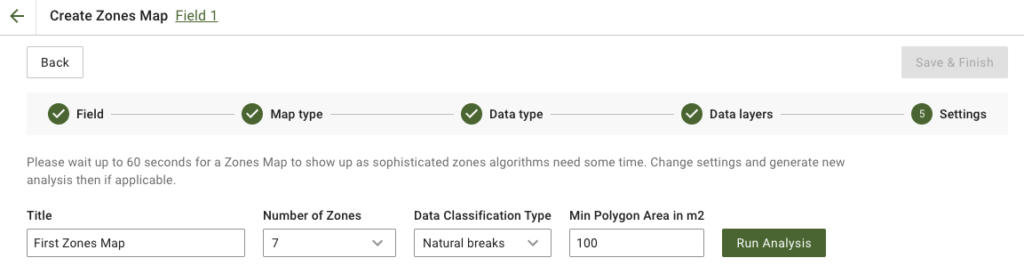
4. Bir sonraki adımda, başlığı düzenleyebilir, bölge sayısını değiştirebilir, [bir Veri Sınıflandırma Türü seçebilir](/geopard-tutorials/tr/urun-turu-web-uygulamasi/bolge-haritalari-ve-analitik/veri-siniflandirmasini-kullanma.md)ve Metrekare cinsinden Minimum Poligon Alanını tanımlayabilirsiniz. Tıklayın **Analizi Çalıştır** ilerlemek için.
Belirttiğiniz parametrelere bağlı olarak analiz 60 saniyeye kadar sürebilir.
5. Tamamlandığında, **Kaydet ve Bitir**.
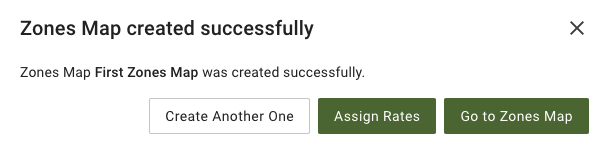
Kayıt edildikten sonra aşağıdaki mesajı göreceksiniz:
Başka bir bölge haritası oluşturabilir, oranlar atayabilir veya az önce oluşturduğunuz Bölge Haritasını açabilirsiniz. Açarsanız, benzer bir görünüm göreceksiniz.
---
# Agent Instructions
This documentation is published with GitBook. GitBook is the documentation platform designed so that both humans and AI agents can read, navigate, and reason over technical content effectively. Learn more at gitbook.com.
## Querying This Documentation
If you need additional information that is not directly available in this page, you can query the documentation dynamically by asking a question.
Perform an HTTP GET request on the current page URL with the `ask` query parameter, and the optional `goal` query parameter:
```
GET https://docs.geopard.tech/geopard-tutorials/tr/urun-turu-web-uygulamasi/bolge-haritalari-ve-analitik/toprak-verim-veya-uygulandigi-gibi-verileri-kullanarak-bir-bolge-haritasi-olusturma.md?ask=&goal=
```
`ask` is the immediate question: it should be specific, self-contained, and written in natural language.
`goal` is optional and describes the broader end goal you are ultimately trying to accomplish on behalf of the user. GitBook uses it to tailor the answer towards what is most useful for that goal.
The response will contain a direct answer to the question and relevant excerpts and sources from the documentation.
Use this mechanism when the answer is not explicitly present in the current page, you need clarification or additional context, or you want to retrieve related documentation sections.