> For the complete documentation index, see [llms.txt](https://docs.geopard.tech/geopard-tutorials/llms.txt). Markdown versions of documentation pages are available by appending `.md` to page URLs; this page is available as [Markdown](https://docs.geopard.tech/geopard-tutorials/tr/urun-turu-web-uygulamasi/bolge-haritalari-ve-analitik/bolge-haritasini-duzenle-birlestir-ve-bol.md).
# Bölge Haritasını Düzenle: Birleştir ve Böl
Haritaları temizlemek ve operasyonel ihtiyaçlara uydurmak için bölge poligonlarını birleştirin ve bölün.
Birleştirme ve bölme bölgeleri özelliklerini kullanarak, poligon(lar)ı veya yönetim bölgelerini (ya da herhangi bir başka veri katmanını) birleştirebilir ve bölebilir, ayrıca bir poligonu veya tüm bir bölgeyi başka bir sınıfa atayabilirsiniz. Bu, ekim, gübreleme veya ilaçlama gibi hassas tarla işlemleri için bölge haritalarını ince ayarlamaya yardımcı olur.
1. Gerekli tarlayı açın, Bölgeler Haritası bölümüne gidin, ardından bir harita seçin, işlem menüsünü açın ve ‘Bölgeler haritası sayfasına git’ öğesine tıklayın:
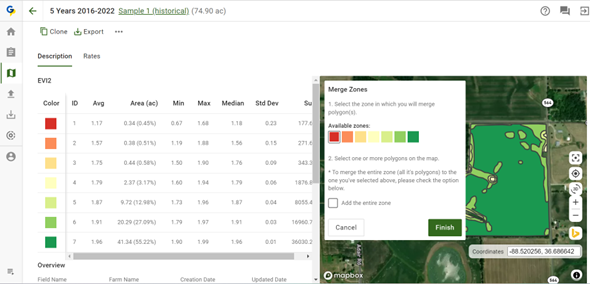
2. "Bölgeleri Düzenle"ye tıklayın ve ardından "Bölgeleri Birleştir"i seçin
3. Bölgeleri birleştirme akışı 2 adımdan oluşur:
a. poligonları birleştireceğiniz bölgeyi (rengi) seçin,
b. harita üzerinde bir veya daha fazla poligon seçin
"Tüm bölgeyi ekle" onay kutusu, bir bölgenin seçilen bir bölgeyle tamamen birleştirilmesini etkinleştirir.
4. "Bitir"e tıklayın
---
# Agent Instructions
This documentation is published with GitBook. GitBook is the documentation platform designed so that both humans and AI agents can read, navigate, and reason over technical content effectively. Learn more at gitbook.com.
## Querying This Documentation
If you need additional information that is not directly available in this page, you can query the documentation dynamically by asking a question.
Perform an HTTP GET request on the current page URL with the `ask` query parameter, and the optional `goal` query parameter:
```
GET https://docs.geopard.tech/geopard-tutorials/tr/urun-turu-web-uygulamasi/bolge-haritalari-ve-analitik/bolge-haritasini-duzenle-birlestir-ve-bol.md?ask=&goal=
```
`ask` is the immediate question: it should be specific, self-contained, and written in natural language.
`goal` is optional and describes the broader end goal you are ultimately trying to accomplish on behalf of the user. GitBook uses it to tailor the answer towards what is most useful for that goal.
The response will contain a direct answer to the question and relevant excerpts and sources from the documentation.
Use this mechanism when the answer is not explicitly present in the current page, you need clarification or additional context, or you want to retrieve related documentation sections.