> For the complete documentation index, see [llms.txt](https://docs.geopard.tech/geopard-tutorials/llms.txt). Markdown versions of documentation pages are available by appending `.md` to page URLs; this page is available as [Markdown](https://docs.geopard.tech/geopard-tutorials/tr/api-dokumanlari/temel-akisli-diyagramlar/7.-izgara-verisini-indir.md).
# 7. Izgara Verisini İndir
Aşağıdaki iki diyagram, farklı veri kümelerinin (SatelliteImage, SoilDataset, AsAppliedDataset, YieldDataset) GeoPard'dan nasıl alınacağını göstermek amacıyla hazırlanmıştır; bunlar ya `GEOJSON` veya `GEOTIFF` formatlarında **ızgara şeklinde** sunulur.
Aşağıdaki diyagram, bir SatelliteImage'ın ızgaralı veri olarak nasıl alınacağını gösterir. [BURADA](/geopard-tutorials/tr/urun-turu-web-uygulamasi/disa-aktar-indir/uydu-goruntusunu-geotiff-veya-geojson-olarak-disa-aktar.md) GeoPard kullanıcı arayüzü eğitimine bağlantıdır ve sunulan içeriği ayrıntılı olarak açıklar. Dışa aktarma işlemi, dışa aktarılacak belirli bir SatelliteImage'ın seçilmesiyle başlar ([İstek 1 veya R1](/geopard-tutorials/tr/api-dokumanlari/geopard-api-isteklerine-genel-bakis/3.-sorgu-satelliteimages-i-getir.md)), ardından bir sourceDataUrl oluşturma tetiklenir ([İstek 2 veya R2](https://docs.geopard.tech/geopard-tutorials/tr/api-dokumanlari/temel-akisli-diyagramlar/pages/1d3ab3b7b2b7302cb9eda196b2b10187da9825ab#1.-request-a-file-to-export)). Bu URL oluşturulduktan sonra, API tüketicileri bu URL'den dosyayı doğrudan indirebilir ([İstek 3 veya R3](https://docs.geopard.tech/geopard-tutorials/tr/api-dokumanlari/temel-akisli-diyagramlar/pages/1d3ab3b7b2b7302cb9eda196b2b10187da9825ab#2.-download-the-generated-file)).
Sıralama diyagramı: SatelliteImage için Izgaralı Verinin İndirilmesi
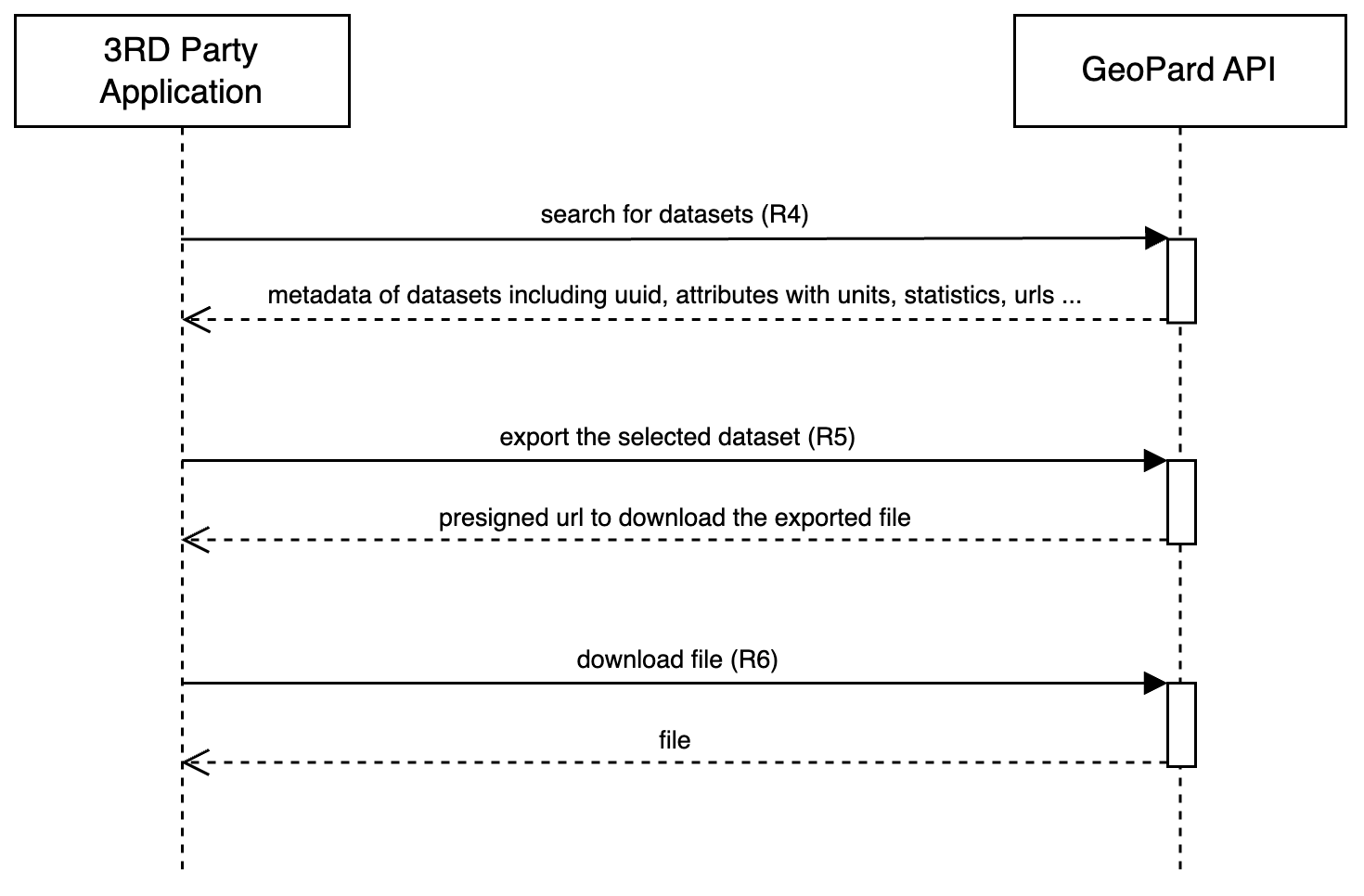
Aşağıdaki diyagram, ilk diyagramda açıklanan sürecin aynısını yansıtır, ancak SoilDataset, AsAppliedDataset ve YieldDataset için uygulanır. Bu veri kümelerinin alınması ve dışa aktarılması adımları SatelliteImage için açıklananlarla aynıdır: Veri Kümesi meta bilgilerini al ve daha fazla indirme için URL oluşturulmasını tetikle.
Sıralama diyagramı: Veri Kümesi için Izgaralı Verinin İndirilmesi
SoilDataset için dokümantasyon: [İstek 4 veya R4](/geopard-tutorials/tr/api-dokumanlari/geopard-api-isteklerine-genel-bakis/17.-sorgu-soildatasets-i-getir.md), [İstek 5 veya R5](https://docs.geopard.tech/geopard-tutorials/tr/api-dokumanlari/temel-akisli-diyagramlar/pages/ab6d90f1f4d5ca6b0d7976bf60e37712792c8fe5#1.-request-a-file-to-export), [İstek 6 veya R6](https://docs.geopard.tech/geopard-tutorials/tr/api-dokumanlari/temel-akisli-diyagramlar/pages/ab6d90f1f4d5ca6b0d7976bf60e37712792c8fe5#2.-download-the-generated-file). \
AsAppliedDataset için dokümantasyon: [İstek 4 veya R4](/geopard-tutorials/tr/api-dokumanlari/geopard-api-isteklerine-genel-bakis/59.-sorgu-asapplieddatasets-i-getir.md), [İstek 5 veya R5](https://docs.geopard.tech/geopard-tutorials/tr/api-dokumanlari/temel-akisli-diyagramlar/pages/45bed7bcb2bc280e755f8ebb6d590431d879d334#1.-request-a-file-to-export), [İstek 6 veya R6](https://docs.geopard.tech/geopard-tutorials/tr/api-dokumanlari/temel-akisli-diyagramlar/pages/45bed7bcb2bc280e755f8ebb6d590431d879d334#2.-download-the-generated-file). \
YieldDataset için dokümantasyon: [İstek 4 veya R4](/geopard-tutorials/tr/api-dokumanlari/geopard-api-isteklerine-genel-bakis/16.-sorgu-yielddatasetsi-getir.md),[ İstek 5 veya R5](https://docs.geopard.tech/geopard-tutorials/tr/api-dokumanlari/temel-akisli-diyagramlar/pages/ac24db79652cc9da57d28b5a32e68be67c63d871#1.-request-a-file-to-export), [İstek 6 veya R6](https://docs.geopard.tech/geopard-tutorials/tr/api-dokumanlari/temel-akisli-diyagramlar/pages/ac24db79652cc9da57d28b5a32e68be67c63d871#2.-download-the-generated-file).
---
# Agent Instructions
This documentation is published with GitBook. GitBook is the documentation platform designed so that both humans and AI agents can read, navigate, and reason over technical content effectively. Learn more at gitbook.com.
## Querying This Documentation
If you need additional information that is not directly available in this page, you can query the documentation by asking a question.
Perform an HTTP GET request on the following URL with the `ask` and `goal` query parameters:
```
GET https://docs.geopard.tech/geopard-tutorials/tr/api-dokumanlari/temel-akisli-diyagramlar/7.-izgara-verisini-indir.md?ask=&goal=
```
`ask` is the immediate question: it should be specific, self-contained, and written in natural language.
`goal` is what the user is ultimately trying to achieve, the reason they need the answer. Sharing it helps GitBook give you a better, more relevant answer. A goal is most helpful when it describes the outcome the user wants rather than restating the question. For example, with `ask=how do I create an API token`, a goal like `automate deployments from our CI pipeline` lets GitBook tailor the answer to that use case.
The response will contain a direct answer to the question and relevant excerpts and sources from the documentation.
Use this mechanism when the answer is not explicitly present in the current page, you need clarification or additional context, or you want to retrieve related documentation sections.