> For the complete documentation index, see [llms.txt](https://docs.geopard.tech/geopard-tutorials/llms.txt). Markdown versions of documentation pages are available by appending `.md` to page URLs; this page is available as [Markdown](https://docs.geopard.tech/geopard-tutorials/tr/api-dokumanlari/getting-started-with-the-geopard-api.md).
# GeoPard API ile Başlarken
GeoPard ekibi, GeoPard API'nin işlevlerini kapsamlı biçimde incelemek için Altair ile başlamanızı önemle önerir. Altair, erişilebilir varlıkların, sorguların, mutasyonların ve aboneliklerin en güncel sürümünü sürekli olarak alır. Aşağıdaki hızlı başlangıç kılavuzuna göz atın:
1. Altair GraphQL Chrome uzantısını şuradan yükleyin: [BAĞLANTI](https://chrome.google.com/webstore/detail/altair-graphql-client/flnheeellpciglgpaodhkhmapeljopja) veya Altair GraphQL Client'ı doğrudan [tarayıcınızda kullanın](https://altairgraphql.dev/).
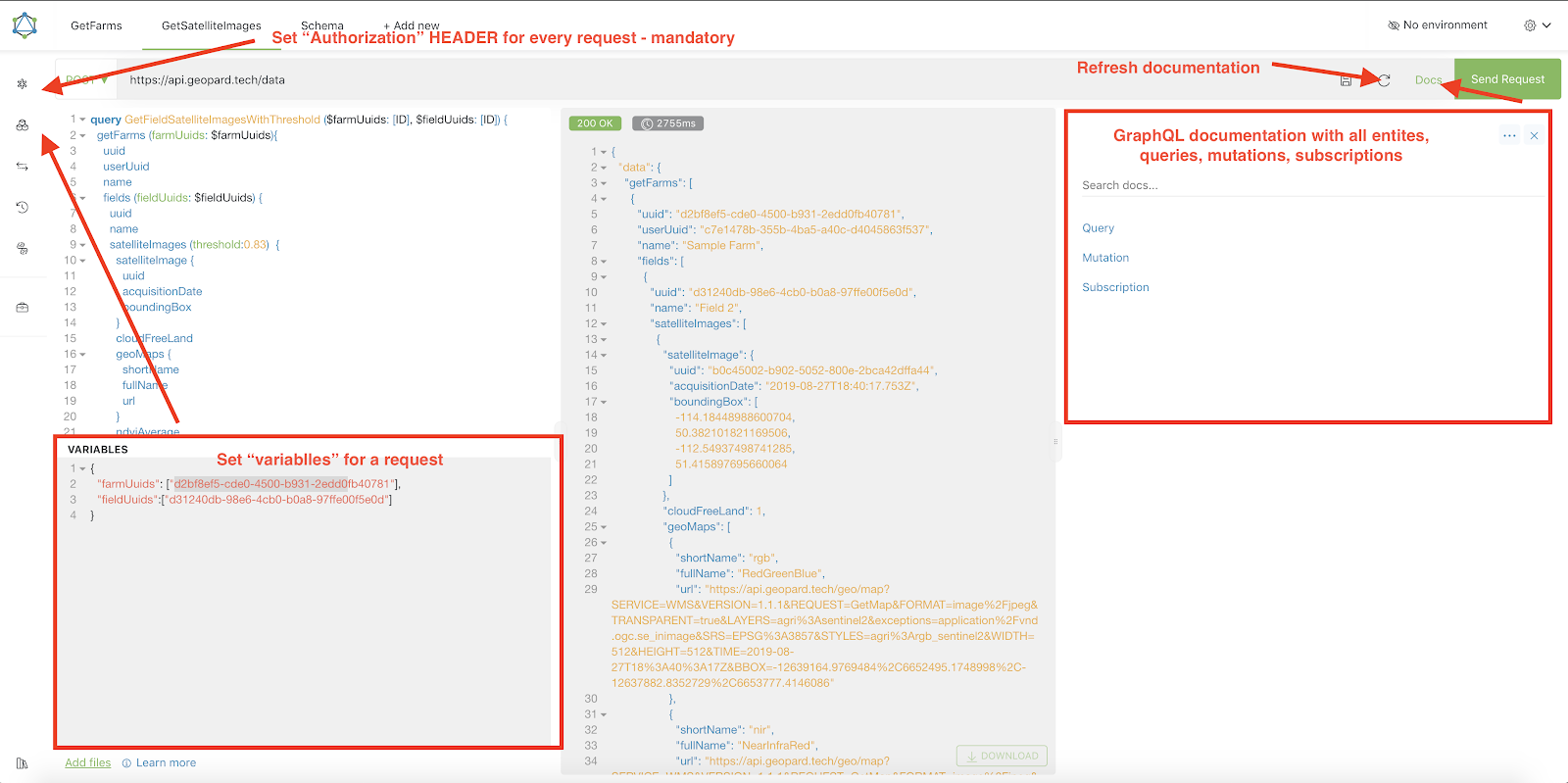
2. Her istek, bir `Authorization` ÜST BİLGİSİ ile kimlik doğrulamasından geçirilmelidir; gerekli belirteç bu üst bilgiye eklenmelidir. Hızlı test için, GeoPard Agriculture'da oturum açtıktan sonra gönderilen isteklerden `Authorization` ÜST BİLGİSİ değeri alınabilir.\
\&#xNAN;*Aşağıdaki ekran görüntüsünde kısa bir açıklama yer almaktadır.*
3. Kök GraphQL uç noktası şu adreste bulunur: [`https://api.geopard.tech/data`](https://api.geopard.tech/data).\
\&#xNAN;*Aşağıdaki ekran görüntüsünde kısa bir açıklama yer almaktadır.*
4. GraphQL şemasına, Altair arayüzündeki "Belgeler" düğmesinden erişebilirsiniz. Bu bölümde mevcut tüm sorgular, mutasyonlar ve abonelikler arasında gezinebilirsiniz. Ayrıca çeşitli varlıkları ve bunların yapılarını inceleyerek sistemin GraphQL yapılandırmasını kapsamlı biçimde anlayabilirsiniz.\
\&#xNAN;*Aşağıdaki ekran görüntüsünde kısa bir açıklama yer almaktadır.*
5. Giden isteklerin doğru çalıştığını tarayıcınızın geliştirici konsolundan doğrulayın. İstek filtreleri olarak şunları kullanabilirsiniz: `/data`.
6. Şemaya buradan erişebilirsiniz: [BURADAN](https://docs.geopard.tech/geopard-tutorials/tr/api-dokumanlari/geopard-api-data-schema.md).
7. Dosya yüklemek için [bu uç noktaları](https://docs.geopard.tech/geopard-tutorials/tr/api-dokumanlari/geopard-api-requests-overview/55.-upload-zip-files-over-6-mb.md).
8. kullanıyoruz. Raster ve vektör verilerine erişmek için OGC WMS (hızlı görüntüleme için raster görüntüler) ve WFS biçimlerinden (`shp`, `geojson`) yararlanıyoruz. Daha fazla bilgi için [Geo Uç Noktası](https://docs.geopard.tech/geopard-tutorials/tr/api-dokumanlari/geo-endpoints-for-spatial-data-access.md)bölümüne bakın.
{% hint style="info" %}
Altair'in nasıl kullanılacağına ilişkin ipuçları içeren kısa bir kılavuz aşağıdaki ekran görüntüsünde gösterilmiştir.
{% endhint %}
Altair: Kısa Kılavuz
---
# Agent Instructions
This documentation is published with GitBook. GitBook is the documentation platform designed so that both humans and AI agents can read, navigate, and reason over technical content effectively. Learn more at gitbook.com.
## Querying This Documentation
If you need additional information that is not directly available in this page, you can query the documentation by asking a question.
Perform an HTTP GET request on the following URL with the `ask` and `goal` query parameters:
```
GET https://docs.geopard.tech/geopard-tutorials/tr/api-dokumanlari/getting-started-with-the-geopard-api.md?ask=&goal=
```
`ask` is the immediate question: it should be specific, self-contained, and written in natural language.
`goal` is what the user is ultimately trying to achieve, the reason they need the answer. Sharing it helps GitBook give you a better, more relevant answer. A goal is most helpful when it describes the outcome the user wants rather than restating the question. For example, with `ask=how do I create an API token`, a goal like `automate deployments from our CI pipeline` lets GitBook tailor the answer to that use case.
The response will contain a direct answer to the question and relevant excerpts and sources from the documentation.
Use this mechanism when the answer is not explicitly present in the current page, you need clarification or additional context, or you want to retrieve related documentation sections.