> For the complete documentation index, see [llms.txt](https://docs.geopard.tech/geopard-tutorials/llms.txt). Markdown versions of documentation pages are available by appending `.md` to page URLs; this page is available as [Markdown](https://docs.geopard.tech/geopard-tutorials/swe/produktvandring-webbapp/ekvationsbaserad-analys/batchanalys-med-ekvationer.md).
# Batchanalys med ekvationer
Kör ekvationsbaserad analys för flera fält parallellt.
Funktionen **Batchanalys** utökar [Ekvationsbaserad analys](/geopard-tutorials/swe/produktvandring-webbapp/ekvationsbaserad-analys.md) genom att låta dig använda en och samma ekvation på flera fält samtidigt. Det snabbar upp skapandet av ekvationskartor och gör det lättare att hantera storskaliga arbetsflöden.
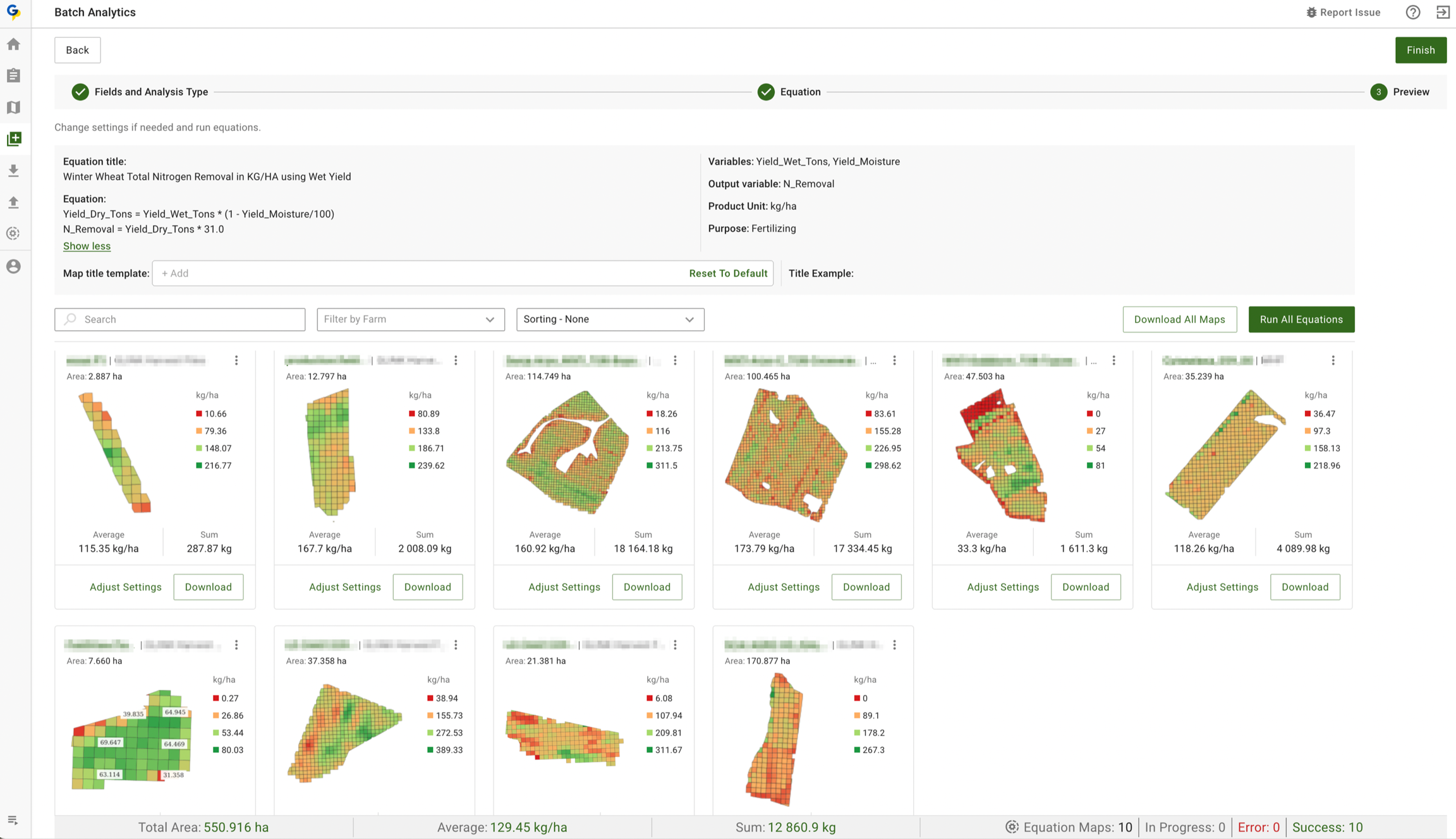
Appen identifierar automatiskt de nödvändiga datamängderna och attributen för varje variabel i din ekvation, så att resultaten blir korrekta. Varje skapad karta innehåller nyckelstatistik som summa och medelvärde, och längst ned på sidan visas en samlad sammanfattning av alla skapade kartor för enkel granskning.
### Viktiga funktioner
* Skapa kartor för alla fältgrupper, inklusive vinstkartor och VRA-kartor för sådd, spridning, gödsling eller upptagsberäkningar.
* Beräkna fältmedelvärden och totala insatsvolymer över alla fält för att planera inköp mer effektivt. Använd valfri GeoPard- eller egen formel, inklusive verkningsgrad, [Gödselutnyttjande](https://geopard.tech/blog/nitrogen-use-efficiency-use-case-from-lva-john-deere-dealer-from-germany), [Vinstkartor](https://geopard.tech/blog/introducing-geopards-profit-maps-a-step-forward-in-precision-agriculture), näringsupptag eller formler baserade på satellitbilder.
* GeoPard kopplar automatiskt variabler till lager och attribut. Du behöver inte manuellt koppla Yield Dry till Yield-datatsetet eller pH till pH i markprovtagningen.
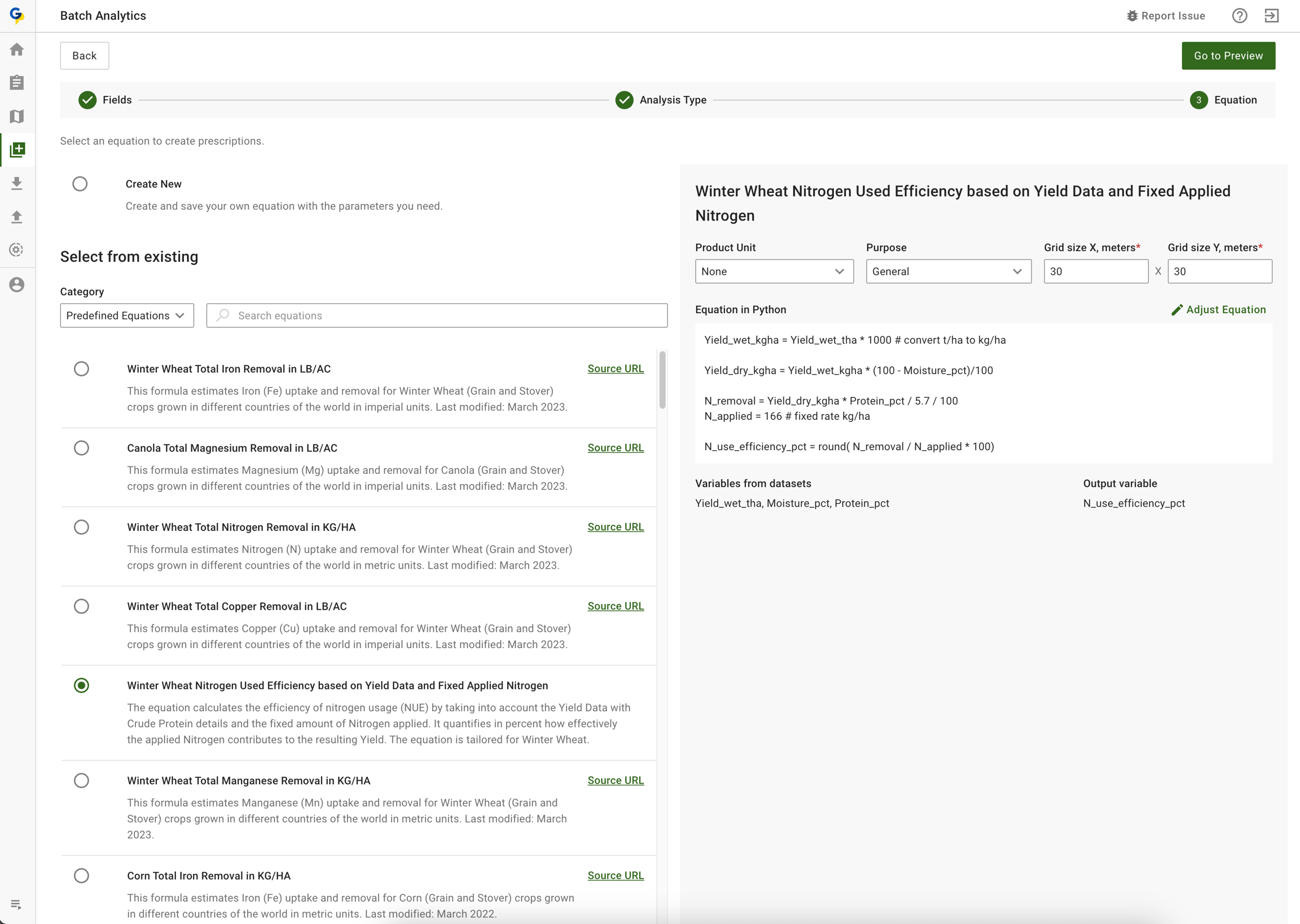
### Steg 1 - Välj (eller skapa) ekvation och fält
Steg 1 - Välj (eller skapa) ekvation och fält
### Steg 2 - Kör batchberäkning av kvävebortförsel baserat på skörd- och fuktdata
Steg 2 - Se resultaten, justera datalager vid behov och formeln.
### Steg 3 - Kör om varje karta enskilt eller i batch
### Steg 4 - Ladda ner alla skapade kartor eller en i taget
---
# Agent Instructions
This documentation is published with GitBook. GitBook is the documentation platform designed so that both humans and AI agents can read, navigate, and reason over technical content effectively. Learn more at gitbook.com.
## Querying This Documentation
If you need additional information that is not directly available in this page, you can query the documentation by asking a question.
Perform an HTTP GET request on the following URL with the `ask` and `goal` query parameters:
```
GET https://docs.geopard.tech/geopard-tutorials/swe/produktvandring-webbapp/ekvationsbaserad-analys/batchanalys-med-ekvationer.md?ask=&goal=
```
`ask` is the immediate question: it should be specific, self-contained, and written in natural language.
`goal` is what the user is ultimately trying to achieve, the reason they need the answer. Sharing it helps GitBook give you a better, more relevant answer. A goal is most helpful when it describes the outcome the user wants rather than restating the question. For example, with `ask=how do I create an API token`, a goal like `automate deployments from our CI pipeline` lets GitBook tailor the answer to that use case.
The response will contain a direct answer to the question and relevant excerpts and sources from the documentation.
Use this mechanism when the answer is not explicitly present in the current page, you need clarification or additional context, or you want to retrieve related documentation sections.