> For the complete documentation index, see [llms.txt](https://docs.geopard.tech/geopard-tutorials/llms.txt). Markdown versions of documentation pages are available by appending `.md` to page URLs; this page is available as [Markdown](https://docs.geopard.tech/geopard-tutorials/swe/plattformsplan/geopard-platform-roadmap.md).
# GeoPard plattformsplan
Se planerade GeoPard-utgåvor och framtida produktförbättringar för agronomi, analys och gårdsflöden.
Det finns gott om önskemål om funktioner och moduler som vi vet att branschen behöver. Se [ändringsloggen för funktioner och förbättringar](https://docs.geopard.tech/geopard-tutorials/swe/andringslogg-och-produktreleaser/release-web-april-2022-3d-maps-and-zoning-tools.md)
Senaste uppdatering: 5 september 2023
### Inom kort
* [ ] Enklare introduktion, inklusive organisationskonfiguration
* [x] Automatiserad betalning
* [x] MyJohnDeere Ops Center – [lanserades i maj 2023](https://docs.geopard.tech/geopard-tutorials/swe/andringslogg-och-produktreleaser/release-web-may-2023-john-deere-integration-improvements.md)
* [x] Logga in med MyJD
* [x] Konfigurera datasynkronisering (välj vilka datalager som ska synkroniseras)
* [x] PDF-rapporter – lanserades i augusti 2023
* [x] Automatisk rensning och kalibrering av skördedata – lanserades i augusti 2023
* [x] Försöksanalys – [lanserades i augusti 2023](https://docs.geopard.tech/geopard-tutorials/swe/agronomi/yield-and-trials/field-trial-analytics.md)
* [x] Anpassade arbetsflöden – lanserades i september 2023
* [x] Analys av fält i grupp – [lanserades i april 2024](https://docs.geopard.tech/geopard-tutorials/swe/andringslogg-och-produktreleaser/release-web-april-2024-batch-equation-maps-and-enhanced-layer-transparency.md)
* [x] Lönsamhetsberäkningar – lanserades med [ekvationer](https://geopard.tech/blog/equation-based-analytics-precision/)
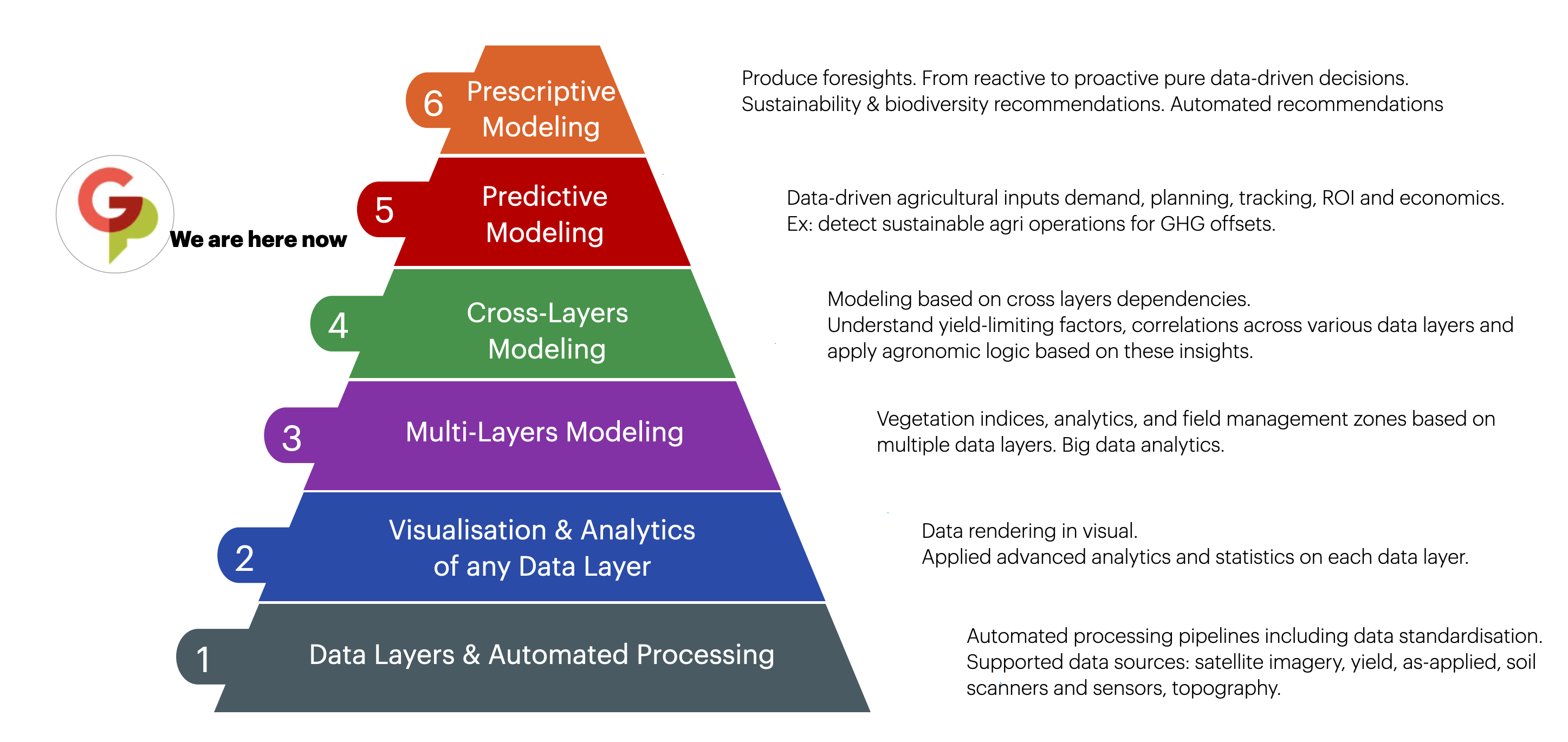
Precisionsjordbrukets pyramid
### På längre sikt
* [ ] Analys mellan gårdar
* [x] [Försökshantering och resultatanalys](https://docs.geopard.tech/geopard-tutorials/swe/agronomi/yield-and-trials/field-trial-analytics.md) – lanserades i augusti 2023
* [ ] Anpassade automatiseringsflöden – delvis lanserade i september 2023
* [ ] Identifiering av faktorer som begränsar skörden
* [ ] Automatiserade agronomiska rekommendationer
* [ ] Fältinventering
* [ ] Gödsling
* [ ] Sådd
* [ ] Växtskydd
* [ ] Nedvissning
* [ ] Tillväxtreglering
* [ ] Avisering om skördetid
* [ ] Plan och rutt för jordprovtagning
* [ ] Integration med CNH-molnet
* [ ] Integration med AgriRouter
* [ ] Koldioxidanalys
---
# Agent Instructions
This documentation is published with GitBook. GitBook is the documentation platform designed so that both humans and AI agents can read, navigate, and reason over technical content effectively. Learn more at gitbook.com.
## Querying This Documentation
If you need additional information that is not directly available in this page, you can query the documentation by asking a question.
Perform an HTTP GET request on the following URL with the `ask` and `goal` query parameters:
```
GET https://docs.geopard.tech/geopard-tutorials/swe/plattformsplan/geopard-platform-roadmap.md?ask=&goal=
```
`ask` is the immediate question: it should be specific, self-contained, and written in natural language.
`goal` is what the user is ultimately trying to achieve, the reason they need the answer. Sharing it helps GitBook give you a better, more relevant answer. A goal is most helpful when it describes the outcome the user wants rather than restating the question. For example, with `ask=how do I create an API token`, a goal like `automate deployments from our CI pipeline` lets GitBook tailor the answer to that use case.
The response will contain a direct answer to the question and relevant excerpts and sources from the documentation.
Use this mechanism when the answer is not explicitly present in the current page, you need clarification or additional context, or you want to retrieve related documentation sections.