> For the complete documentation index, see [llms.txt](https://docs.geopard.tech/geopard-tutorials/llms.txt). Markdown versions of documentation pages are available by appending `.md` to page URLs; this page is available as [Markdown](https://docs.geopard.tech/geopard-tutorials/swe/api-dokumentation/diagram-med-grundfloden/3.-hamta-satellitbilder.md).
# 3. Hämta satellitbilder
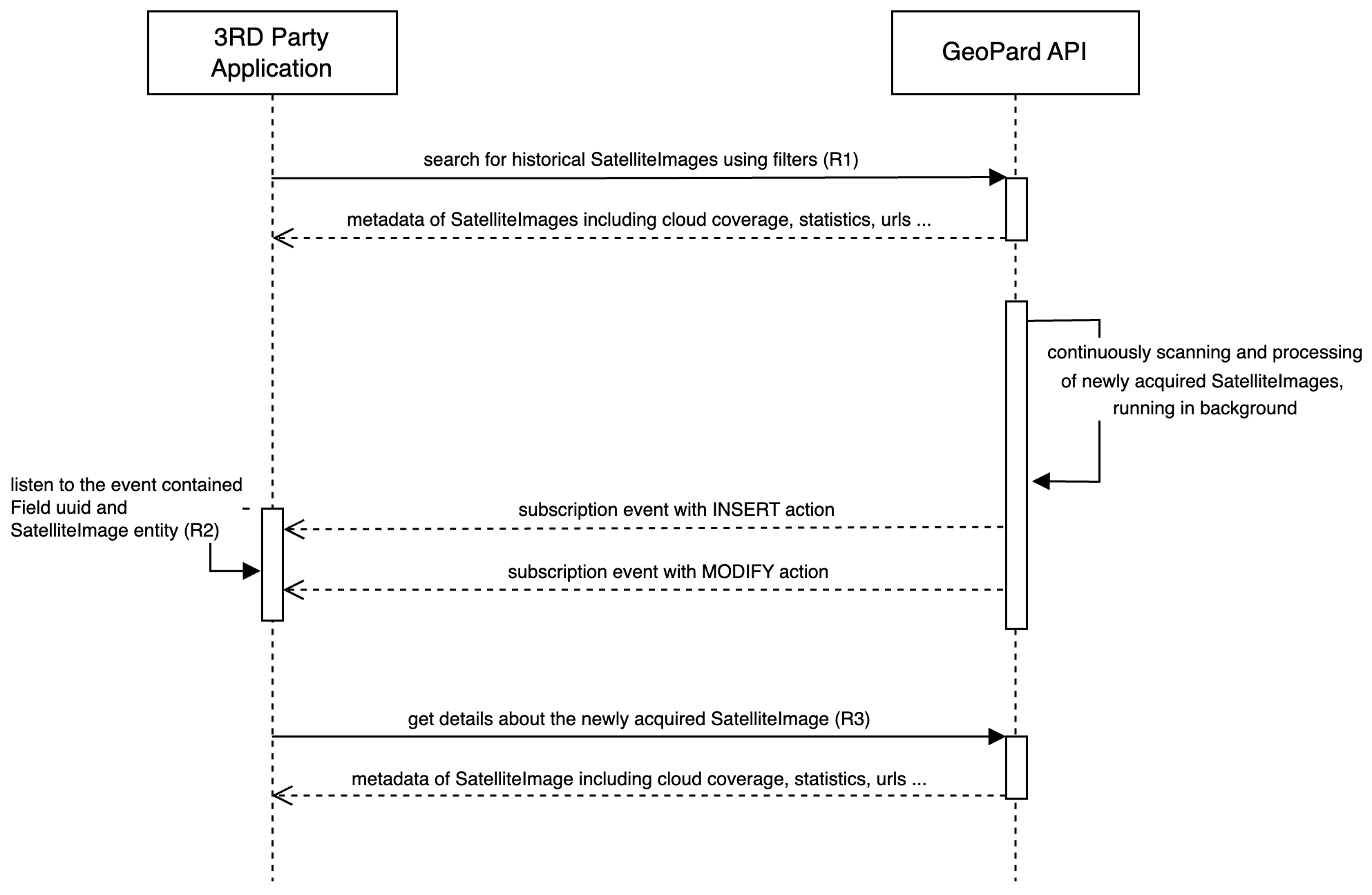
Diagrammet nedan visar hur du hämtar historiska satellitbilder och tar emot nyinsamlade när de blir tillgängliga i GeoPard.
GeoPard stöder flera leverantörer, inklusive Sentinel-2, Landsat 4/5/7/8/9 och Planet. Du kan hämta satellitbilder med generiska frågor som `getFarms` och `getFields`, med tillhörande data i Field-entiteten ([Begäran 1 eller R1](/geopard-tutorials/swe/api-dokumentation/oversikt-over-geopard-api-anrop/3.-fraga-hamta-satelliteimages.md)). API-konsumenter kan filtrera satellitbilder efter datumintervall, leverantör, molntäcke i procent och renderade geokarttyper.
För att hålla dig uppdaterad om nyinsamlade och bearbetade satellitbilder skickar GeoPard API prenumerationshändelser via WebSocket ([Begäran 2 eller R2](/geopard-tutorials/swe/api-dokumentation/oversikt-over-geopard-api-anrop/1.-prenumeration-hamta-handelser.md)). När du får en `MODIFY` händelse för en satellitbild på det relevanta fältet är bilden redo att hämtas från GeoPard API med sitt UUID ([Begäran 3 eller R3](/geopard-tutorials/swe/api-dokumentation/oversikt-over-geopard-api-anrop/4.-fraga-hamta-definierad-satelliteimage.md)).
Denna händelsedrivna arkitektur säkerställer att API-kunder får snabb avisering och kan komma åt den senaste satellitbilden så snart den är bearbetad och tillgänglig.
Sekvensdiagram: Hämta historiska och nyinsamlade satellitbilder
---
# Agent Instructions
This documentation is published with GitBook. GitBook is the documentation platform designed so that both humans and AI agents can read, navigate, and reason over technical content effectively. Learn more at gitbook.com.
## Querying This Documentation
If you need additional information that is not directly available in this page, you can query the documentation by asking a question.
Perform an HTTP GET request on the following URL with the `ask` and `goal` query parameters:
```
GET https://docs.geopard.tech/geopard-tutorials/swe/api-dokumentation/diagram-med-grundfloden/3.-hamta-satellitbilder.md?ask=&goal=
```
`ask` is the immediate question: it should be specific, self-contained, and written in natural language.
`goal` is what the user is ultimately trying to achieve, the reason they need the answer. Sharing it helps GitBook give you a better, more relevant answer. A goal is most helpful when it describes the outcome the user wants rather than restating the question. For example, with `ask=how do I create an API token`, a goal like `automate deployments from our CI pipeline` lets GitBook tailor the answer to that use case.
The response will contain a direct answer to the question and relevant excerpts and sources from the documentation.
Use this mechanism when the answer is not explicitly present in the current page, you need clarification or additional context, or you want to retrieve related documentation sections.