> For the complete documentation index, see [llms.txt](https://docs.geopard.tech/geopard-tutorials/llms.txt). Markdown versions of documentation pages are available by appending `.md` to page URLs; this page is available as [Markdown](https://docs.geopard.tech/geopard-tutorials/swe/andringslogg-och-produktreleaser/release-webb-augusti-2024-forhandsvisning-av-datalager-spatialt-lokaliserade-zoner-ateranvandbara-zo.md).
# Release webb augusti 2024 (förhandsvisning av datalager, spatialt lokaliserade zoner, återanvändbara zoner)
Den här uppdateringen förbättrar förhandsvisningar av datalager när zonkartor skapas och lägger till stöd för upp till 50 spatialt lokaliserade zoner.
### Förbättrade förhandsvisningar av datalager för skapande av zonkartor
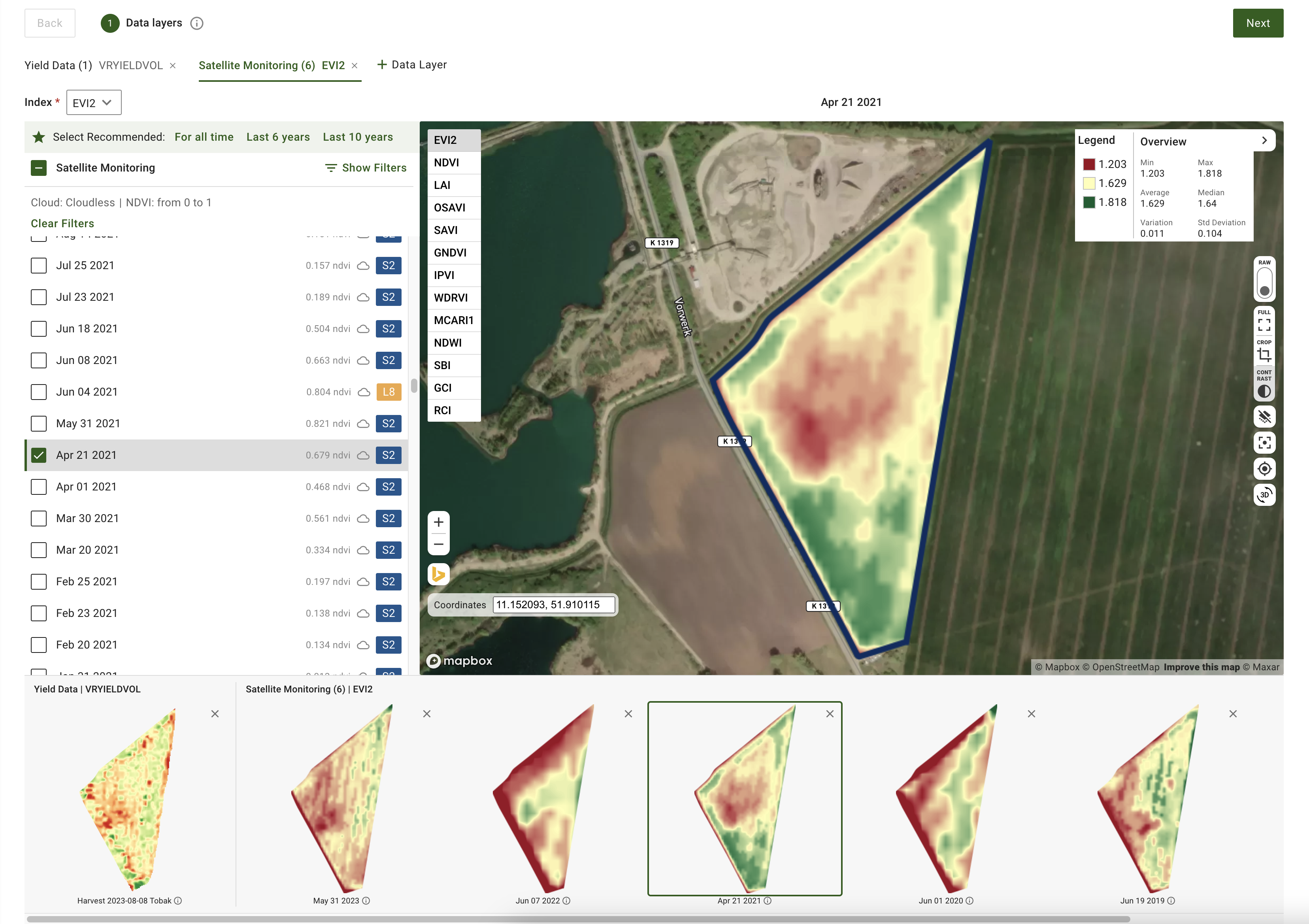
Nu, när du skapar zonkartor, kan du förhandsgranska dina valda datalager, inklusive satellitbilder och dataset som jord, skörd och utfört arbete. I steget Datalager i skapandet av zonkartor ser du miniatyrförhandsvisningar av dessa lager längst ned på sidan. Varje förhandsvisning har en etikett med datum för satellitbilden eller namnet på datasetet. Du kan också ta bort lager eller öppna mer information via verktygstips. Den aktiva satellitbilden eller datasetets namn visas ovanför kartan, vilket gör det enklare att hålla koll på dina val.
### Uppdaterade kontroller för generering av rumsligt lokaliserade zonkartor
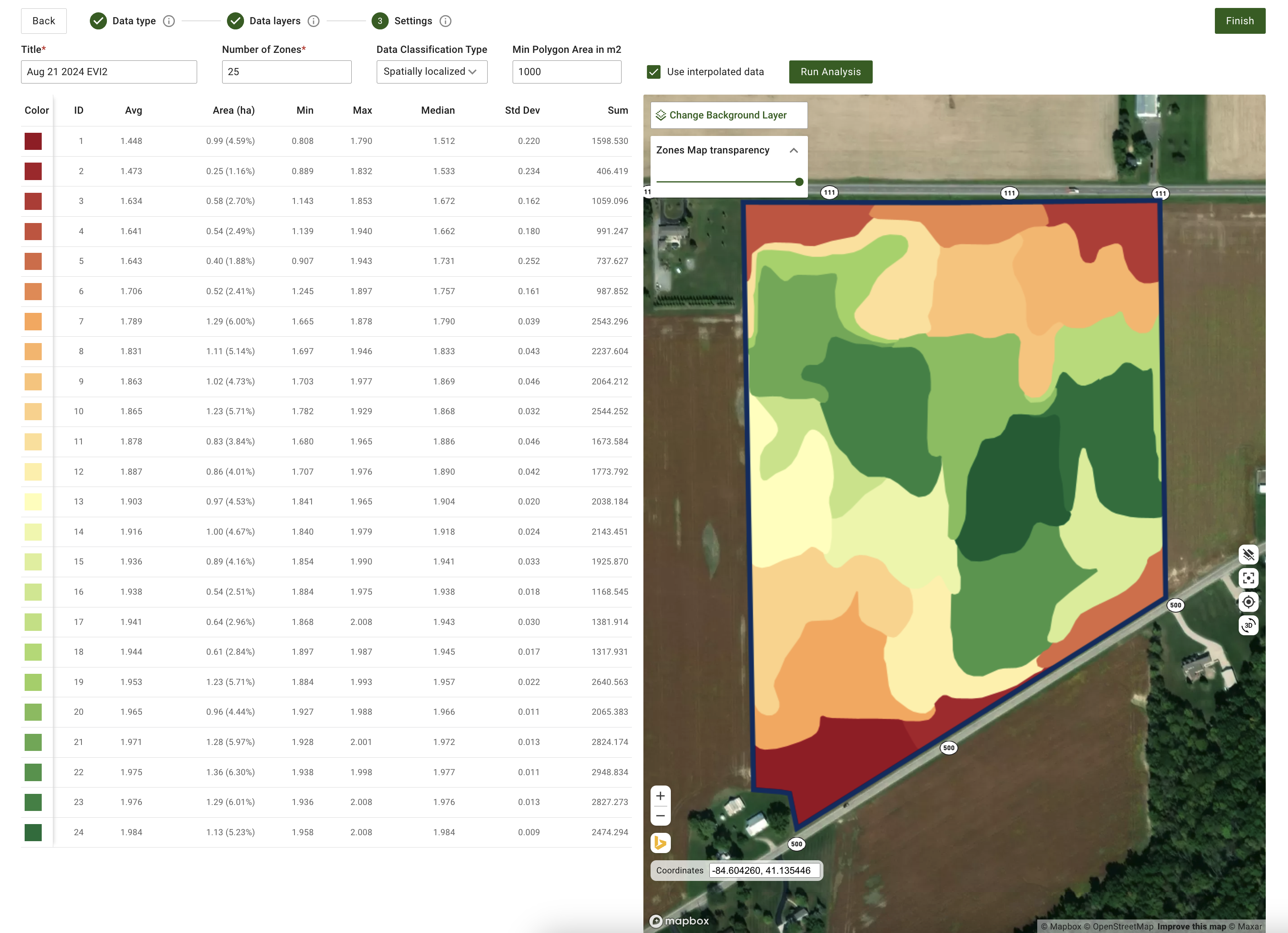
Vi har lagt till mer flexibilitet vid generering av rumsligt lokaliserade zoner. Systemet stöder nu att skapa fler än 11 zoner, med ett intervall från 3 till 50 zoner. Ange helt enkelt önskat antal zoner direkt i inmatningsfältet. Den här uppdateringen ger mer finmaskig kontroll och säkerställer tillräcklig geospatial detaljeringsgrad.
Uppdaterade kontroller för generering av rumsligt lokaliserade zonkartor
### Ytterligare förbättringar och rättningar
Utöver dessa funktioner, fortsätter mjukvaruutvecklingsteamet att förbättra GeoPard-kärnan. Den här månaden omfattar dessa förbättringar utökad täckning av automatiserade tester och finjusterad molninfrastruktur för att förbättra den övergripande prestandan.
---
# Agent Instructions
This documentation is published with GitBook. GitBook is the documentation platform designed so that both humans and AI agents can read, navigate, and reason over technical content effectively. Learn more at gitbook.com.
## Querying This Documentation
If you need additional information that is not directly available in this page, you can query the documentation by asking a question.
Perform an HTTP GET request on the following URL with the `ask` and `goal` query parameters:
```
GET https://docs.geopard.tech/geopard-tutorials/swe/andringslogg-och-produktreleaser/release-webb-augusti-2024-forhandsvisning-av-datalager-spatialt-lokaliserade-zoner-ateranvandbara-zo.md?ask=&goal=
```
`ask` is the immediate question: it should be specific, self-contained, and written in natural language.
`goal` is what the user is ultimately trying to achieve, the reason they need the answer. Sharing it helps GitBook give you a better, more relevant answer. A goal is most helpful when it describes the outcome the user wants rather than restating the question. For example, with `ask=how do I create an API token`, a goal like `automate deployments from our CI pipeline` lets GitBook tailor the answer to that use case.
The response will contain a direct answer to the question and relevant excerpts and sources from the documentation.
Use this mechanism when the answer is not explicitly present in the current page, you need clarification or additional context, or you want to retrieve related documentation sections.