> For the complete documentation index, see [llms.txt](https://docs.geopard.tech/geopard-tutorials/llms.txt). Markdown versions of documentation pages are available by appending `.md` to page URLs; this page is available as [Markdown](https://docs.geopard.tech/geopard-tutorials/svn/pregled-izdelka-spletna-aplikacija/cone-in-analitika-obmocij/ustvari-karto-con-z-uporabo-podatkov-o-tleh-pridelku-ali-aplikacijah.md).
# Ustvari karto con z uporabo podatkov o tleh, pridelku ali aplikacijah
Če želite ustvariti zemljevid con iz nabora podatkov, najprej naložite podatke na parcelo.
1. Na seznamu izberite parcelo in kliknite gumb **Ustvari zemljevid con** , izberite **Enoslojni**, nato pa kliknite **Naprej**.
2. Izberite vrsto **podatkov o tleh** za nadaljevanje. Uporabite lahko tudi podatke o pridelku ali podatke o izvedenem ukrepu.
3. V naslednjem koraku izberite določeni nabor podatkov o tleh, ki ga želite uporabiti, in kliknite **Naprej**.
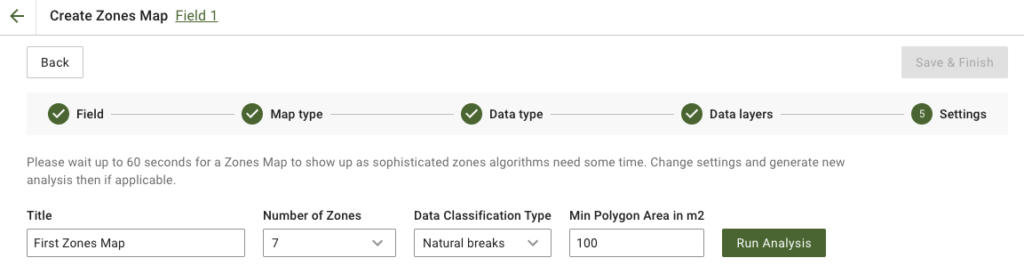
4. V naslednjem koraku lahko uredite naslov, spremenite število con, [izberite vrsto klasifikacije podatkov](/geopard-tutorials/svn/pregled-izdelka-spletna-aplikacija/cone-in-analitika-obmocij/uporaba-klasifikacije-podatkov.md)in določite najmanjšo površino poligona v kvadratnih metrih. Kliknite **Zaženi analizo** za nadaljevanje.
Analiza lahko traja do 60 sekund, odvisno od parametrov, ki ste jih določili.
5. Ko je končana, kliknite **Shrani in končaj**.
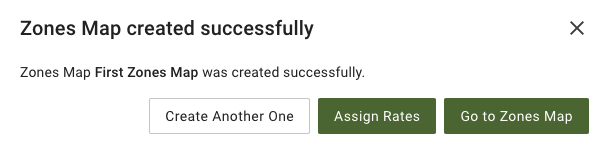
Ko je shranjeno, boste videli naslednje sporočilo:
Ustvarite lahko še en zemljevid con, dodelite odmerke ali odprete pravkar ustvarjen zemljevid con. Če ga odprete, boste videli podoben pogled.
---
# Agent Instructions
This documentation is published with GitBook. GitBook is the documentation platform designed so that both humans and AI agents can read, navigate, and reason over technical content effectively. Learn more at gitbook.com.
## Querying This Documentation
If you need additional information that is not directly available in this page, you can query the documentation dynamically by asking a question.
Perform an HTTP GET request on the current page URL with the `ask` query parameter, and the optional `goal` query parameter:
```
GET https://docs.geopard.tech/geopard-tutorials/svn/pregled-izdelka-spletna-aplikacija/cone-in-analitika-obmocij/ustvari-karto-con-z-uporabo-podatkov-o-tleh-pridelku-ali-aplikacijah.md?ask=&goal=
```
`ask` is the immediate question: it should be specific, self-contained, and written in natural language.
`goal` is optional and describes the broader end goal you are ultimately trying to accomplish on behalf of the user. GitBook uses it to tailor the answer towards what is most useful for that goal.
The response will contain a direct answer to the question and relevant excerpts and sources from the documentation.
Use this mechanism when the answer is not explicitly present in the current page, you need clarification or additional context, or you want to retrieve related documentation sections.