> For the complete documentation index, see [llms.txt](https://docs.geopard.tech/geopard-tutorials/llms.txt). Markdown versions of documentation pages are available by appending `.md` to page URLs; this page is available as [Markdown](https://docs.geopard.tech/geopard-tutorials/svn/dnevnik-sprememb-in-izdaje-izdelka/izdaja-spletne-razlicice-avgust-2024-predogledi-podatkovnih-plasti-prostorsko-lokalizirane-cone-pono.md).
# Izdaja spletne različice avgust 2024 (predogledi podatkovnih plasti, prostorsko lokalizirane cone, ponovno uporabne cone)
Ta posodobitev izboljšuje predoglede podatkovnih plasti pri ustvarjanju zemljevidov con in dodaja podporo za do 50 prostorsko lokaliziranih con.
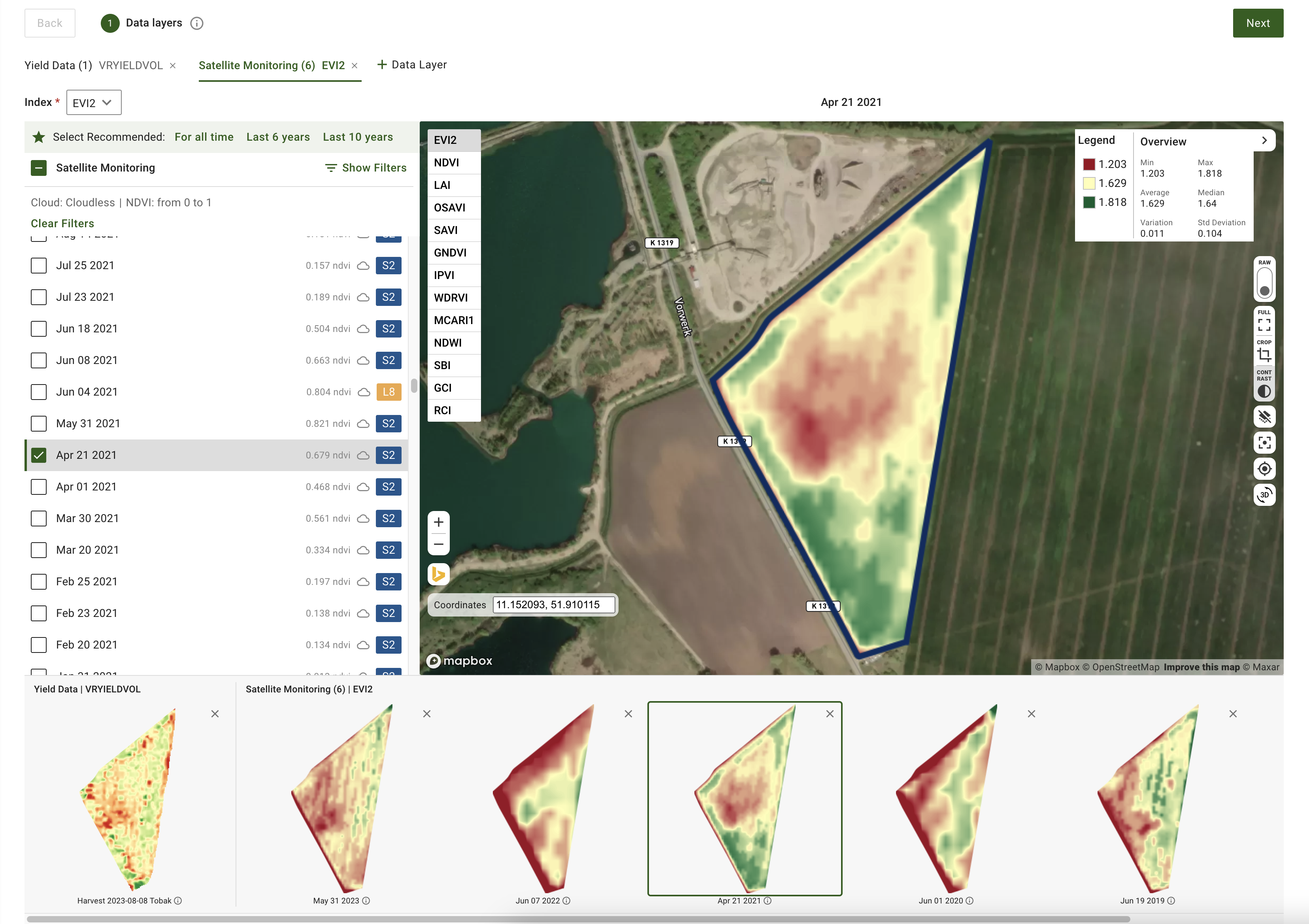
### Izboljšani predogledi podatkovnih slojev za ustvarjanje connih kart
Zdaj lahko pri ustvarjanju connih kart predogledate izbrane podatkovne sloje, vključno s satelitskimi slikami in nabori podatkov, kot so tla, pridelek in izvedeni poseg. V koraku Podatkovni sloji pri ustvarjanju connih kart boste na dnu strani videli sličice predogledov teh slojev. Vsak predogled vključuje oznako z datumom satelitske slike ali imenom nabora podatkov. Sloje lahko tudi odstranite ali prek namigov odprete več podrobnosti. Aktivna satelitska slika ali ime nabora podatkov je prikazano nad zemljevidom, kar olajša spremljanje vaših izbir.
### Posodobljeni upravljalniki za prostorsko lokalizirano generiranje connih kart
Dodali smo večjo prilagodljivost pri ustvarjanju prostorsko lokaliziranih con. Sistem zdaj podpira ustvarjanje več kot 11 con, v razponu od 3 do 50 con. Želeno število con preprosto vnesite neposredno v vnosno polje. Ta posodobitev omogoča bolj natančen nadzor in zagotavlja dovolj geozemeljske natančnosti.
Posodobljeni upravljalniki za prostorsko lokalizirano generiranje connih kart
### Dodatne izboljšave in popravki
Poleg teh funkcij ekipa za programski inženiring še naprej izboljšuje jedro GeoPard. Ta mesec te izboljšave vključujejo razširjeno pokritost avtomatiziranih testov in natančneje prilagojeno oblačno infrastrukturo za izboljšanje splošne zmogljivosti.
---
# Agent Instructions
This documentation is published with GitBook. GitBook is the documentation platform designed so that both humans and AI agents can read, navigate, and reason over technical content effectively. Learn more at gitbook.com.
## Querying This Documentation
If you need additional information that is not directly available in this page, you can query the documentation by asking a question.
Perform an HTTP GET request on the following URL with the `ask` and `goal` query parameters:
```
GET https://docs.geopard.tech/geopard-tutorials/svn/dnevnik-sprememb-in-izdaje-izdelka/izdaja-spletne-razlicice-avgust-2024-predogledi-podatkovnih-plasti-prostorsko-lokalizirane-cone-pono.md?ask=&goal=
```
`ask` is the immediate question: it should be specific, self-contained, and written in natural language.
`goal` is what the user is ultimately trying to achieve, the reason they need the answer. Sharing it helps GitBook give you a better, more relevant answer. A goal is most helpful when it describes the outcome the user wants rather than restating the question. For example, with `ask=how do I create an API token`, a goal like `automate deployments from our CI pipeline` lets GitBook tailor the answer to that use case.
The response will contain a direct answer to the question and relevant excerpts and sources from the documentation.
Use this mechanism when the answer is not explicitly present in the current page, you need clarification or additional context, or you want to retrieve related documentation sections.