> For the complete documentation index, see [llms.txt](https://docs.geopard.tech/geopard-tutorials/llms.txt). Markdown versions of documentation pages are available by appending `.md` to page URLs; this page is available as [Markdown](https://docs.geopard.tech/geopard-tutorials/svn/api-dokumentacija/uvod-v-geopard-api.md).
# Uvod v GeoPard API
Ekipa GeoPard močno priporoča, da začnete z Altairjem in temeljito preučite funkcionalnosti API-ja GeoPard. Ta vedno pridobi najnovejšo različico razpoložljivih entitet, poizvedb, mutacij in naročnin. Glejte spodnji hitri vodnik za začetek:
1. Namestite razširitev Altair GraphQL za Chrome iz tega [POVEZAVE](https://chrome.google.com/webstore/detail/altair-graphql-client/flnheeellpciglgpaodhkhmapeljopja) ali pa uporabite Altair GraphQL Client neposredno v [vašem brskalniku](https://altairgraphql.dev/).
2. Vsaka zahteva mora biti overjena z `Avtorizacija` GLAVO, pri čemer mora biti vključen zahtevani žeton. Za hitro testiranje lahko `Avtorizacija` vrednost GLAVE pridobite iz zahtev po prijavi v GeoPard Agriculture.\
\&#xNAN;*Kratek opis je prikazan na spodnji sliki.*
3. Koreninska končna točka GraphQL se nahaja na [`https://api.geopard.tech/data`](https://api.geopard.tech/data).\
\&#xNAN;*Kratek opis je prikazan na spodnji sliki.*
4. Do sheme GraphQL lahko dostopate prek gumba "Docs" v vmesniku Altair. Ta razdelek vam omogoča krmarjenje po vseh razpoložljivih poizvedbah, mutacijah in naročninah. Poleg tega ponuja vpogled v različne entitete in njihove strukture ter tako zagotavlja celovito razumevanje nastavitev GraphQL sistema.\
\&#xNAN;*Kratek opis je prikazan na spodnji sliki.*
5. Preverite, da odhodne zahteve delujejo pravilno, z uporabo razvojne konzole vašega brskalnika. Uporabite lahko filtre zahtev, kot je `/data`.
6. Do sheme lahko dostopate iz tega [TUKAJ](/geopard-tutorials/svn/api-dokumentacija/podatkovna-shema-geopard-api-ja.md).
7. Za nalaganje datotek uporabljamo [te končne točke](/geopard-tutorials/svn/api-dokumentacija/pregled-zahtevkov-geopard-api-ja/55.-nalozi-zip-datoteke-vec-kot-6-mb.md).
8. Za dostop do rastrskih in vektorskih podatkov uporabljamo formata OGC WMS (rastrske slike za hitro upodabljanje) in WFS (`shp`, `geojson`). Za več informacij si oglejte naš [Geo Endpoint](/geopard-tutorials/svn/api-dokumentacija/geo-koncne-tocke-za-dostop-do-prostorskih-podatkov.md) razdelke.
{% hint style="info" %}
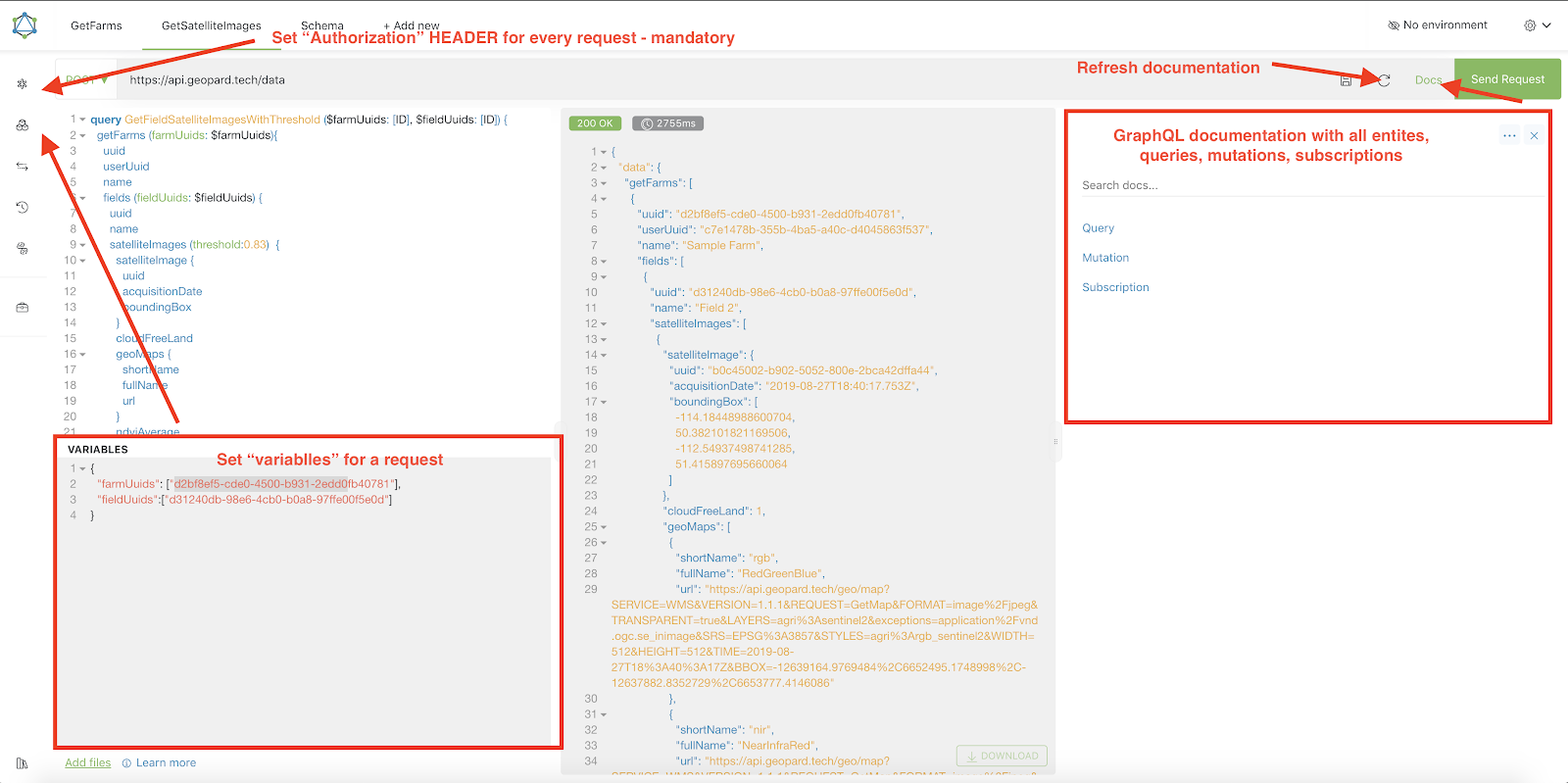
Kratek vodnik z nasveti, kako uporabljati Altair, je poudarjen na spodnjem posnetku zaslona.
{% endhint %}
Altrair: Kratek vodnik
---
# Agent Instructions
This documentation is published with GitBook. GitBook is the documentation platform designed so that both humans and AI agents can read, navigate, and reason over technical content effectively. Learn more at gitbook.com.
## Querying This Documentation
If you need additional information that is not directly available in this page, you can query the documentation dynamically by asking a question.
Perform an HTTP GET request on the current page URL with the `ask` query parameter, and the optional `goal` query parameter:
```
GET https://docs.geopard.tech/geopard-tutorials/svn/api-dokumentacija/uvod-v-geopard-api.md?ask=&goal=
```
`ask` is the immediate question: it should be specific, self-contained, and written in natural language.
`goal` is optional and describes the broader end goal you are ultimately trying to accomplish on behalf of the user. GitBook uses it to tailor the answer towards what is most useful for that goal.
The response will contain a direct answer to the question and relevant excerpts and sources from the documentation.
Use this mechanism when the answer is not explicitly present in the current page, you need clarification or additional context, or you want to retrieve related documentation sections.