> For the complete documentation index, see [llms.txt](https://docs.geopard.tech/geopard-tutorials/llms.txt). Markdown versions of documentation pages are available by appending `.md` to page URLs; this page is available as [Markdown](https://docs.geopard.tech/geopard-tutorials/ru/zhurnal-izmenenii-i-relizy-produkta/release-web-august-2024-data-layer-previews-spatially-localized-zones-reusable-zones.md).
# Релиз веб-версии, август 2024 (предпросмотр слоёв данных, пространственно локализованные зоны, повторно используемые зоны)
Это обновление улучшает предпросмотр слоёв данных при создании карты зон и добавляет поддержку до 50 пространственно локализованных зон.
### Расширенные предпросмотры слоёв данных при создании карт зон
Теперь при создании карт зон можно просматривать выбранные слои данных, включая спутниковые снимки и наборы данных, например о почве, урожайности и выполненных операциях. На этапе «Слои данных» при создании карты зон внизу страницы отображаются миниатюры предпросмотра этих слоёв. На каждой миниатюре указана дата спутникового снимка или название набора данных. Слои также можно удалить или открыть подробную информацию о них во всплывающих подсказках. Название активного спутникового снимка или набора данных отображается над картой, чтобы было проще отслеживать выбранные слои.
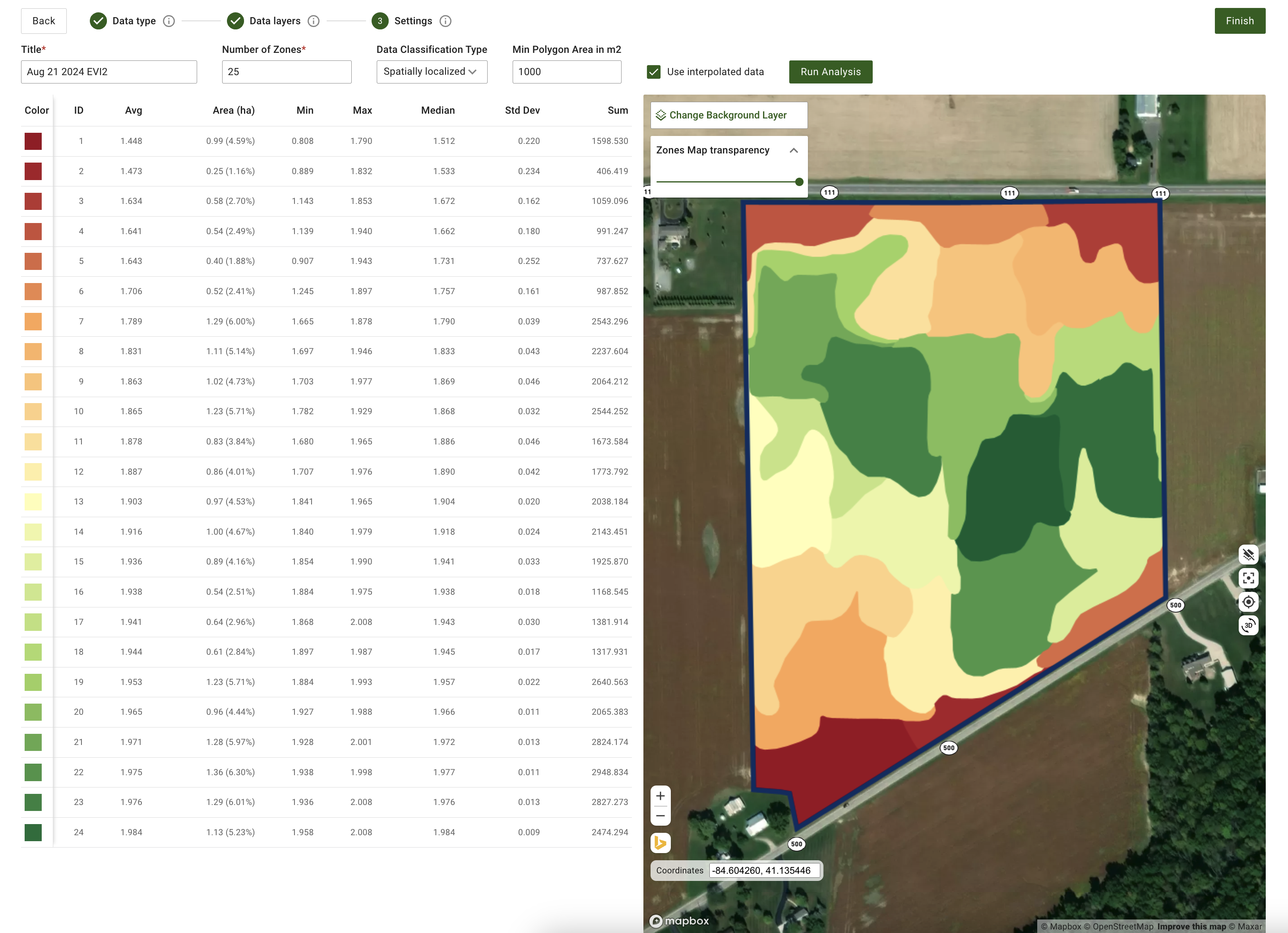
### Обновлённые настройки создания пространственно локализованных зон на карте
Мы добавили больше гибкости при создании пространственно локализованных зон. Теперь система поддерживает создание от 3 до 50 зон вместо ограничения в 11 зон. Просто введите нужное количество зон в поле ввода. Это обновление позволяет точнее управлять детализацией и обеспечивает необходимую пространственную точность.
Обновлённые настройки создания пространственно локализованных зон на карте
### Другие улучшения и исправления
Кроме того, команда разработчиков продолжает совершенствовать ядро GeoPard. В этом месяце улучшения включают расширение покрытия автоматизированными тестами и тонкую настройку облачной инфраструктуры для повышения общей производительности.
---
# Agent Instructions
This documentation is published with GitBook. GitBook is the documentation platform designed so that both humans and AI agents can read, navigate, and reason over technical content effectively. Learn more at gitbook.com.
## Querying This Documentation
If you need additional information that is not directly available in this page, you can query the documentation by asking a question.
Perform an HTTP GET request on the following URL with the `ask` and `goal` query parameters:
```
GET https://docs.geopard.tech/geopard-tutorials/ru/zhurnal-izmenenii-i-relizy-produkta/release-web-august-2024-data-layer-previews-spatially-localized-zones-reusable-zones.md?ask=&goal=
```
`ask` is the immediate question: it should be specific, self-contained, and written in natural language.
`goal` is what the user is ultimately trying to achieve, the reason they need the answer. Sharing it helps GitBook give you a better, more relevant answer. A goal is most helpful when it describes the outcome the user wants rather than restating the question. For example, with `ask=how do I create an API token`, a goal like `automate deployments from our CI pipeline` lets GitBook tailor the answer to that use case.
The response will contain a direct answer to the question and relevant excerpts and sources from the documentation.
Use this mechanism when the answer is not explicitly present in the current page, you need clarification or additional context, or you want to retrieve related documentation sections.