> For the complete documentation index, see [llms.txt](https://docs.geopard.tech/geopard-tutorials/llms.txt). Markdown versions of documentation pages are available by appending `.md` to page URLs; this page is available as [Markdown](https://docs.geopard.tech/geopard-tutorials/ru/obzor-produkta-veb-prilozhenie/analitika-na-osnove-formul/paketnaya-analitika-po-formulam.md).
# Пакетная аналитика по формулам
Запускайте аналитику на основе формул для нескольких полей параллельно.
Функция **пакетной аналитики** расширяет [аналитику на основе уравнений](/geopard-tutorials/ru/obzor-produkta-veb-prilozhenie/analitika-na-osnove-formul.md) за счёт того, что позволяет применить одно уравнение сразу к нескольким полям. Это ускоряет создание карт по уравнениям и упрощает управление крупномасштабными рабочими процессами.
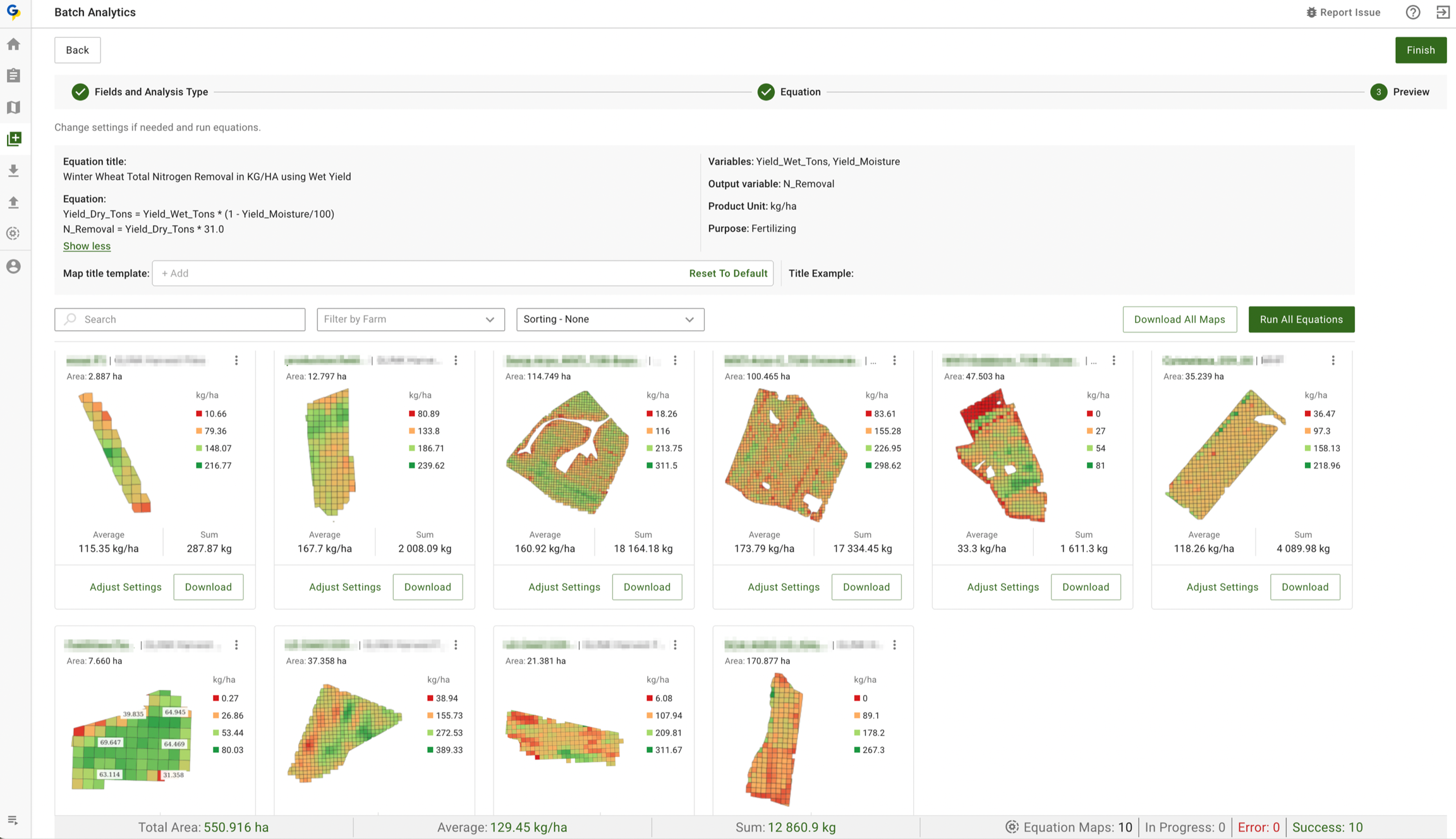
Приложение автоматически определяет необходимые наборы данных и атрибуты для каждой переменной в вашем уравнении, обеспечивая точные результаты. Каждая созданная карта включает ключевую статистику, такую как сумма и среднее значение, а в нижней части страницы приводится сводка всех созданных карт для удобного просмотра.
### Ключевые возможности
* Создавайте карты для любой группы полей, включая карты прибыли и карты VRA для сева, опрыскивания, внесения удобрений или расчётов выноса.
* Рассчитывайте средние значения по полям и общие объёмы внесения по всем полям, чтобы эффективнее планировать закупки. Используйте любую формулу GeoPard или собственную формулу, включая эффективность, [Эффективность использования удобрений](https://geopard.tech/blog/nitrogen-use-efficiency-use-case-from-lva-john-deere-dealer-from-germany), [Карты прибыли](https://geopard.tech/blog/introducing-geopards-profit-maps-a-step-forward-in-precision-agriculture)вынос питательных веществ или формулы на основе спутниковых снимков.
* GeoPard автоматически связывает переменные со слоями и атрибутами. Вам не нужно вручную сопоставлять Yield Dry с набором данных Yield или pH с pH в почвенном отборе.
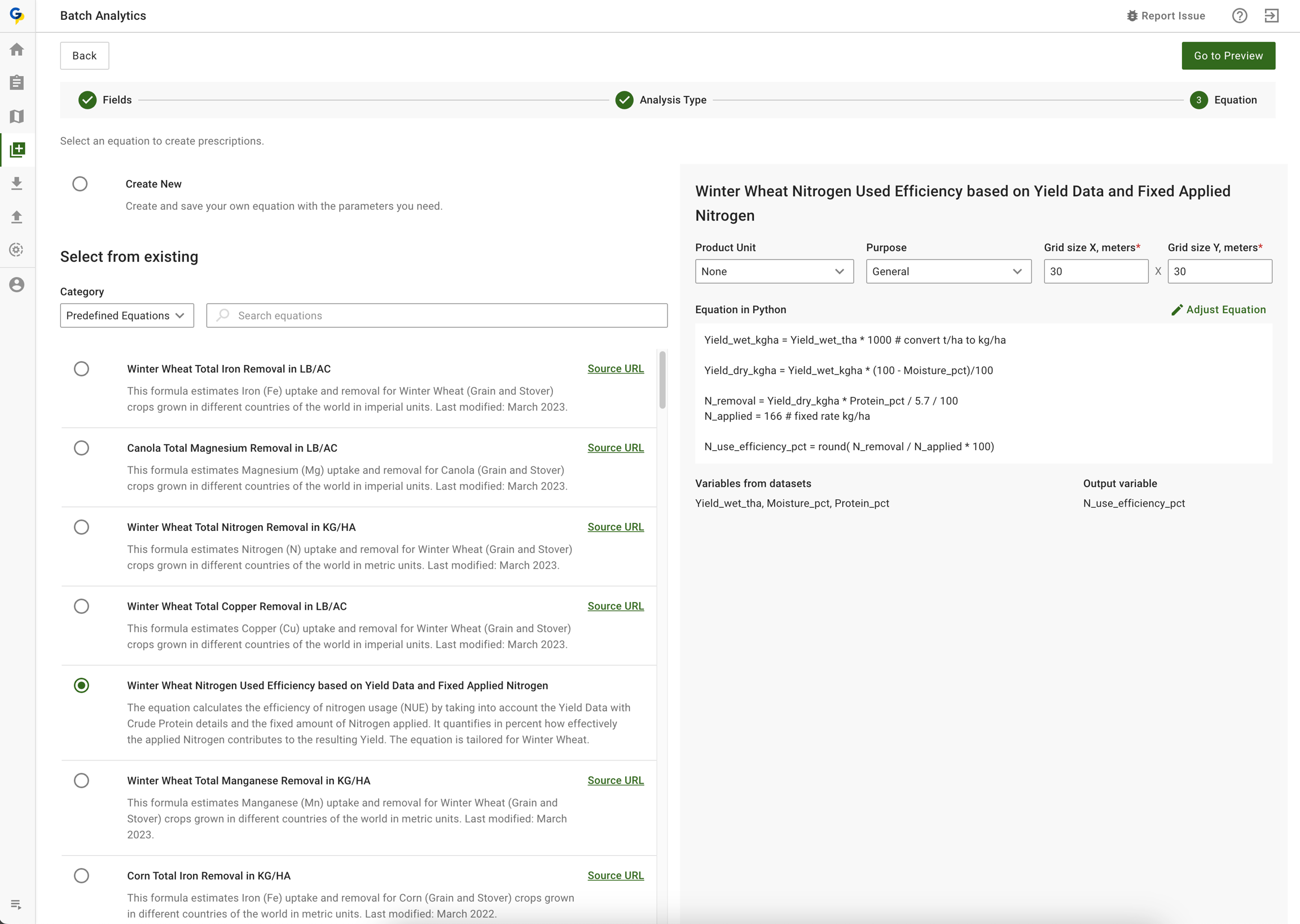
### Шаг 1 - Выберите (или создайте) уравнение и поля
Шаг 1 - Выберите (или создайте) уравнение и поля
### Шаг 2 - Запустите пакетный расчёт выноса азота на основе данных урожайности и влажности
Шаг 2 - Посмотрите результаты, при необходимости скорректируйте слои данных и формулу.
### Шаг 3 - Перезапустите каждую карту по отдельности или пакетно
### Шаг 4 - Скачайте все созданные карты или по одной
---
# Agent Instructions
This documentation is published with GitBook. GitBook is the documentation platform designed so that both humans and AI agents can read, navigate, and reason over technical content effectively. Learn more at gitbook.com.
## Querying This Documentation
If you need additional information that is not directly available in this page, you can query the documentation by asking a question.
Perform an HTTP GET request on the following URL with the `ask` and `goal` query parameters:
```
GET https://docs.geopard.tech/geopard-tutorials/ru/obzor-produkta-veb-prilozhenie/analitika-na-osnove-formul/paketnaya-analitika-po-formulam.md?ask=&goal=
```
`ask` is the immediate question: it should be specific, self-contained, and written in natural language.
`goal` is what the user is ultimately trying to achieve, the reason they need the answer. Sharing it helps GitBook give you a better, more relevant answer. A goal is most helpful when it describes the outcome the user wants rather than restating the question. For example, with `ask=how do I create an API token`, a goal like `automate deployments from our CI pipeline` lets GitBook tailor the answer to that use case.
The response will contain a direct answer to the question and relevant excerpts and sources from the documentation.
Use this mechanism when the answer is not explicitly present in the current page, you need clarification or additional context, or you want to retrieve related documentation sections.