> For the complete documentation index, see [llms.txt](https://docs.geopard.tech/geopard-tutorials/llms.txt). Markdown versions of documentation pages are available by appending `.md` to page URLs; this page is available as [Markdown](https://docs.geopard.tech/geopard-tutorials/ru/dokumentaciya-api/geopard-api-requests-overview/87.-mutation-save-custom-vectoranalysismap-zonesmap.md).
# 87. Мутация: сохранить пользовательский VectorAnalysisMap (ZonesMap)
Ниже приведены инструкции по сохранению карты Custom ZonesMap с пользовательской цветовой схемой.
### 1. Сохраните геометрию ZonesMap
{% hint style="danger" %}
VectorAnalysisMap (ZonesMap) `zonesMapGeojson` атрибут должен использовать проекцию WGS84 (EPSG:4326) и соответствовать спецификации GeoJSON [ ](https://geojson.org/).
Ожидаемый `geojson` тип — `FeatureCollection` с `MultiPolygon`.
{% endhint %}
Обзор мутации `saveVectorAnalysisMap` :
* Атрибут `fieldUuid` связывает карту с существующим полем.
* Атрибут `name` задаёт название ZonesMap.
* Значение атрибута type — элемент перечисления, обозначающий тип операции. Допустимы следующие значения: `GENERAL` , `SPRAYING`, `SEEDING`, `FERTILIZING` или `IRRIGATION`. Атрибут необязательный.
* Ключевой атрибут, содержащий все данные, включая нормы внесения для VRA, — это `zonesMapGeojson` в виде экранированной строки JSON.
* Номер зоны указан в `properties` >> `zone`.
* Нормы внесения добавляются в `properties` >> `attributes`.
Атрибут `properties` — это объект JSON, расширенный данными `zone`, `rates`, `ratesHeaders`, `ratesPrices` и `ratesUnits` .\
Инструкции по назначению норм внесения доступны [ЗДЕСЬ](https://docs.geopard.tech/geopard-tutorials/ru/dokumentaciya-api/geopard-api-requests-overview/85.-mutation-assign-rates-to-vectoranalysismap-zonesmap.md).
{% code overflow="wrap" lineNumbers="true" %}
```json
{
\"zone\":1,
\"attributes\":{
\"rates\":[100],
\"ratesHeaders\":[\"Product1\"],
\"ratesPrices\":[0],
\"ratesUnits\":[\"KG_HA\"]
}
}
```
{% endcode %}
Пример мутации без заданных норм внесения:
{% code overflow="wrap" lineNumbers="true" %}
```graphql
mutation saveVectorAnalysisMap {
saveVectorAnalysisMap(
input: {
fieldUuid:"abef3a63-a64b-4d84-aab0-43eaa8fbe0cd"
name:"Custom Zones"
zonesMapGeojson:"{\"type\":\"FeatureCollection\",\"features\":[{\"type\":\"Feature\",\"properties\":{\"zone\":1,\"attributes\":{}},\"geometry\":{\"type\":\"MultiPolygon\",\"coordinates\":[[[[10.426584494429108,52.872847225483895],[10.426789204309529,52.87282914352929],[10.42676923261385,52.87256092698456],[10.42679456306152,52.87240585041315],[10.427391783218683,52.87195386627311],[10.427338425939524,52.872087776901424],[10.427073800972806,52.87238914697767],[10.426899048635903,52.872624214183844],[10.42701887880915,52.872889416681545],[10.427403333950082,52.87288037571423],[10.427498199505067,52.872940648795804],[10.427403333950082,52.8731003720562],[10.42777780324397,52.873242012946434],[10.428022456514952,52.87323297205208],[10.428167251308338,52.8731244811766],[10.42807737867767,52.87286832108788],[10.42809735037332,52.87259407743369],[10.428501777209902,52.872404215426826],[10.428611621536277,52.87250969442229],[10.42882132434022,52.87257900905101],[10.429100928079123,52.87232585943539],[10.429155850242694,52.87216914702836],[10.429205779481066,52.87184065187668],[10.429263945397143,52.87180554285836],[10.42928833,52.87242022],[10.42922193,52.8725049],[10.42915175626986,52.87255993568499],[10.429021041297204,52.872554899627374],[10.428771395100966,52.872708596972984],[10.42838693996012,52.872847225483895],[10.428257123938948,52.87296777165494],[10.428370342208543,52.873172781233286],[10.42795711,52.87349687],[10.42718139841625,52.87321758481732],[10.427228581614003,52.87319078118864],[10.427208609918353,52.87305516741958],[10.42683913354881,52.873015990029785],[10.426664381211879,52.87293763514347],[10.426584494429108,52.872847225483895]]],[[[10.427804124872603,52.871641800637654],[10.42875584,52.87092153],[10.42897875,52.87105982],[10.42921404,52.87137376],[10.429231472601687,52.87152239994234],[10.428951140362273,52.871638731603355],[10.42879635972102,52.87193709107814],[10.428666543698995,52.872057639778546],[10.428371961188788,52.872057639778546],[10.42821218762407,52.87183161069021],[10.427967534352206,52.871708047624395],[10.427804124872603,52.871641800637654]]]]}},{\"type\":\"Feature\",\"properties\":{\"zone\":2,\"attributes\":{}},\"geometry\":{\"type\":\"MultiPolygon\",\"coordinates\":[[[[10.426899048635903,52.872624214183844],[10.427073800972806,52.87238914697767],[10.427338425939524,52.872087776901424],[10.427391783218683,52.87195386627311],[10.427804124872603,52.871641800637654],[10.427967534352206,52.871708047624395],[10.42821218762407,52.87183161069021],[10.428371961188788,52.872057639778546],[10.428666543698995,52.872057639778546],[10.42879635972102,52.87193709107814],[10.428951140362273,52.871638731603355],[10.429231472601687,52.87152239994234],[10.42926357,52.87179608],[10.429263945397143,52.87180554285836],[10.429205779481066,52.87184065187668],[10.429155850242694,52.87216914702836],[10.429100928079123,52.87232585943539],[10.42882132434022,52.87257900905101],[10.428611621536277,52.87250969442229],[10.428501777209902,52.872404215426826],[10.42809735037332,52.87259407743369],[10.42807737867767,52.87286832108788],[10.428167251308338,52.8731244811766],[10.428022456514952,52.87323297205208],[10.42777780324397,52.873242012946434],[10.427403333950082,52.8731003720562],[10.427498199505067,52.872940648795804],[10.427403333950082,52.87288037571423],[10.42701887880915,52.872889416681545],[10.426899048635903,52.872624214183844]]]]}},{\"type\":\"Feature\",\"properties\":{\"zone\":3,\"attributes\":{}},\"geometry\":{\"type\":\"MultiPolygon\",\"coordinates\":[[[[10.428257123938948,52.87296777165494],[10.42838693996012,52.872847225483895],[10.428771395100966,52.872708596972984],[10.429021041297204,52.872554899627374],[10.42915175626986,52.87255993568499],[10.428370342208543,52.873172781233286],[10.428257123938948,52.87296777165494]]],[[[10.42619246,52.87286153],[10.42679456306152,52.872405850413145],[10.42676923261385,52.87256092698456],[10.426789204309529,52.87282914352929],[10.426584494429108,52.872847225483895],[10.426664381211879,52.87293763514347],[10.42683913354881,52.873015990029785],[10.427208609918353,52.87305516741958],[10.427228581614003,52.87319078118864],[10.42718139841625,52.87321758481732],[10.42619246,52.87286153]]]]}}]}"
}
) {
uuid
}
}
```
{% endcode %}
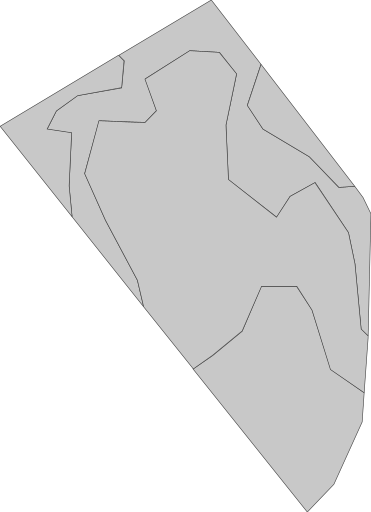
Представление по умолчанию без назначенной цветовой схемы выглядит так. Зоны пользователя в ZonesMap >> `geoMaps` >> `url` похожи на [https://api.geopard.tech/geo/map/reflect?TRANSPARENT=true\&VIEWPARAMS=uuid:4a3929a5-c166-41d7-b547-da1511a9fa1d\&LAYERS=custom\_zone\_map\_view\&SRS=EPSG:3857\&STYLES=default\_zonesmap\&HEIGHT=64\&BBOX=1160638.4354309493,6959157.496681602,1160983.0667152018,6959632.459385279\&geopardApiKey=\](https://api.geopard.tech/geo/map/reflect?TRANSPARENT=true\&VIEWPARAMS=uuid:4a3929a5-c166-41d7-b547-da1511a9fa1d\&LAYERS=custom_zone_map_view\&SRS=EPSG:3857\&STYLES=default_zonesmap\&HEIGHT=64\&BBOX=1160638.4354309493,6959157.496681602,1160983.0667152018,6959632.459385279\&geopardApiKey=%3Cyour_geopard_api_key%3E).
### 2. Назначение пользовательской цветовой схемы
Мутация `setGeoMaps` Обзор:
* Атрибут `fieldUuid` связывает карту с существующим полем.
* Атрибут `vectorAnalysisMapUuid` связывает с картой зон (VectorAnalysisMap), сохранённой на первом шаге.
* Атрибут `shortName` задаёт стиль, который нужно изменить.\
Для карты зон доступны варианты `zones` и `thumbnail`.
* Атрибут `hexColorCodes` задаёт шестнадцатеричные коды цветов.
{% hint style="danger" %}
Количество цветов в `hexColorCodes` должно точно соответствовать количеству существующих зон`.`
{% endhint %}
Объяснение того, как сохранить пользовательские цвета, находится [ЗДЕСЬ](https://docs.geopard.tech/geopard-tutorials/ru/dokumentaciya-api/geopard-api-requests-overview/39.-mutation-set-custom-color-schemas-to-selected-geomaps.md) а о применении пользовательских цветов на лету рассказано [ЗДЕСЬ](https://docs.geopard.tech/geopard-tutorials/ru/dokumentaciya-api/geo-endpoints-for-spatial-data-access/wms-get-raster-pictures-of-spatial-data-layers/6.-zonesmap-custom-color-schema.md).
Пример мутации:
{% code overflow="wrap" lineNumbers="true" %}
```graphql
mutation setGeoMaps{
setGeoMaps(
input: {
geoMaps:[
{
shortName:"zones"
fieldUuid:"abef3a63-a64b-4d84-aab0-43eaa8fbe0cd"
vectorAnalysisMapUuid:"9799e2eb-06d2-4a42-8f47-38655abf11e1"
hexColorCodes:[
"#ffffbf",
"#66bd63",
"#f46d43"
]
}, {
shortName:"thumbnail"
fieldUuid:"abef3a63-a64b-4d84-aab0-43eaa8fbe0cd"
vectorAnalysisMapUuid:"9799e2eb-06d2-4a42-8f47-38655abf11e1"
hexColorCodes:[
"#ffffbf",
"#66bd63",
"#f46d43"
]
}
]
}
) {
shortName
}
}
```
{% endcode %}
В результате визуальное представление из ZonesMap >> `geoMaps` >> `url` похоже на [https://api.geopard.tech/geo/map/reflect?TRANSPARENT=true\&VIEWPARAMS=uuid:9799e2eb-06d2-4a42-8f47-38655abf11e1\&LAYERS=custom\_zone\_map\_view\&SRS=EPSG:3857\&STYLES=default\_zonesmap\&HEIGHT=64\&BBOX=1160638.4354309493,6959157.496681602,1160983.0667152018,6959632.459385279\&env=c1:#ffffbf;c2:#66bd63;c3:#f46d43\&geopardApiKey=\](https://api.geopard.tech/geo/map/reflect?TRANSPARENT=true\&VIEWPARAMS=uuid:9799e2eb-06d2-4a42-8f47-38655abf11e1\&LAYERS=custom_zone_map_view\&SRS=EPSG:3857\&STYLES=default_zonesmap\&HEIGHT=64\&BBOX=1160638.4354309493,6959157.496681602,1160983.0667152018,6959632.459385279\&env=c1:#ffffbf;c2:#66bd63;c3:#f46d43\&geopardApiKey=%3Cyour_geopard_api_key%3E) выглядит следующим образом.
---
# Agent Instructions
This documentation is published with GitBook. GitBook is the documentation platform designed so that both humans and AI agents can read, navigate, and reason over technical content effectively. Learn more at gitbook.com.
## Querying This Documentation
If you need additional information that is not directly available in this page, you can query the documentation by asking a question.
Perform an HTTP GET request on the following URL with the `ask` and `goal` query parameters:
```
GET https://docs.geopard.tech/geopard-tutorials/ru/dokumentaciya-api/geopard-api-requests-overview/87.-mutation-save-custom-vectoranalysismap-zonesmap.md?ask=&goal=
```
`ask` is the immediate question: it should be specific, self-contained, and written in natural language.
`goal` is what the user is ultimately trying to achieve, the reason they need the answer. Sharing it helps GitBook give you a better, more relevant answer. A goal is most helpful when it describes the outcome the user wants rather than restating the question. For example, with `ask=how do I create an API token`, a goal like `automate deployments from our CI pipeline` lets GitBook tailor the answer to that use case.
The response will contain a direct answer to the question and relevant excerpts and sources from the documentation.
Use this mechanism when the answer is not explicitly present in the current page, you need clarification or additional context, or you want to retrieve related documentation sections.