> For the complete documentation index, see [llms.txt](https://docs.geopard.tech/geopard-tutorials/llms.txt). Markdown versions of documentation pages are available by appending `.md` to page URLs; this page is available as [Markdown](https://docs.geopard.tech/geopard-tutorials/ro/documentatie-api/diagrams-with-basic-flows/7.-download-gridded-data.md).
# 7. Descarcă date pe grilă
Următoarele două diagrame au scopul de a ilustra cum se preiau diverse seturi de date (SatelliteImage, SoilDataset, AsAppliedDataset, YieldDataset) din GeoPard, în format `GEOJSON` sau `GEOTIFF` și într-o manieră **pe grilă** .
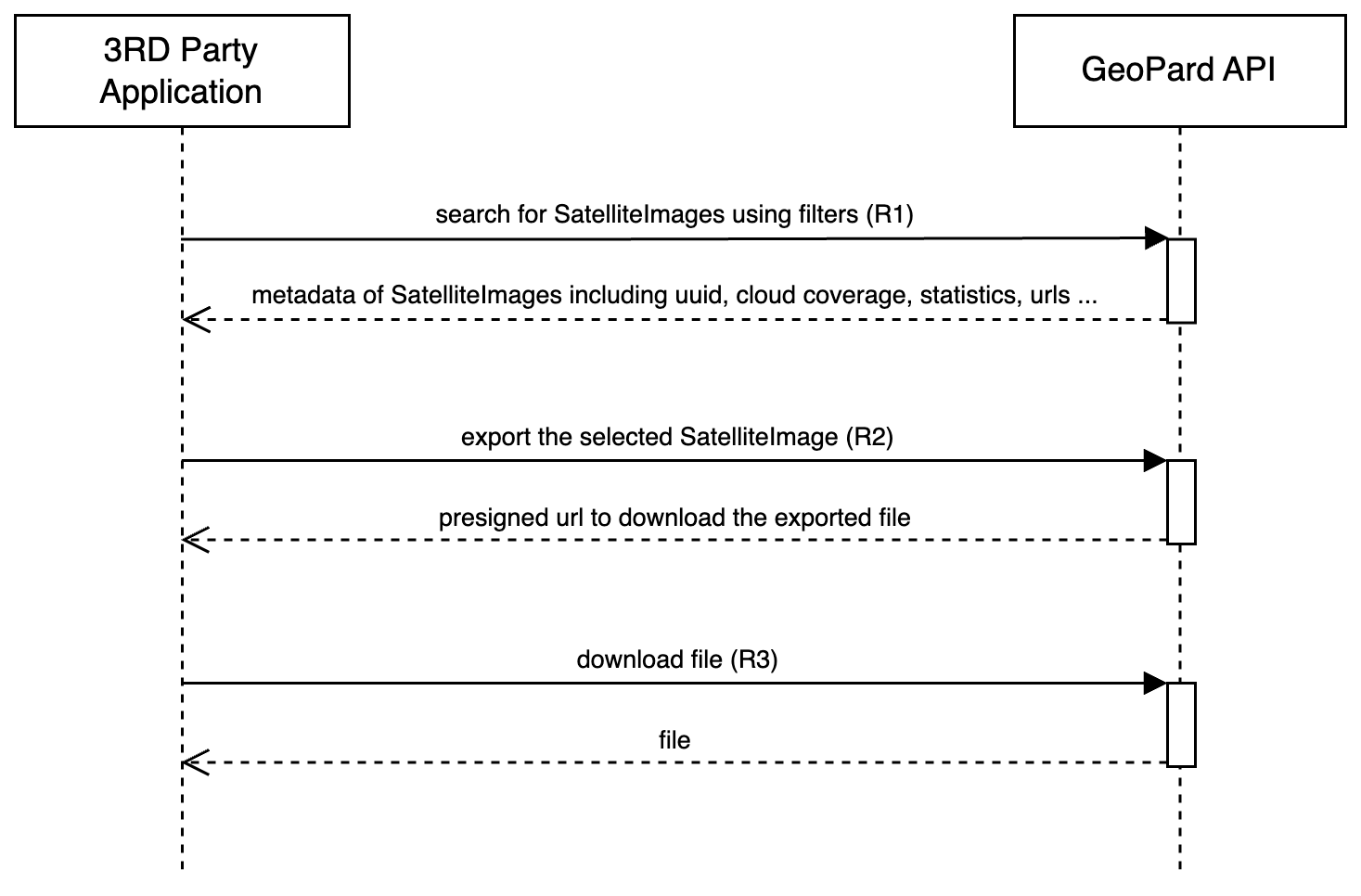
Diagrama de mai jos ilustrează procesul de preluare a unei imagini SatelliteImage ca date pe grilă. [AICI](https://docs.geopard.tech/geopard-tutorials/ro/tur-de-produs-aplicatia-web/export-download/satellite-imagery-export-as-geotiff-or-geojson.md) găsiți un link către tutorialul interfeței GeoPard, care explică în detaliu conținutul livrat. Operațiunea de export începe cu selectarea unei anumite imagini SatelliteImage pentru export ([Request 1 sau R1](https://docs.geopard.tech/geopard-tutorials/ro/documentatie-api/geopard-api-requests-overview/3.-query-get-satelliteimages.md)), apoi se declanșează generarea unui sourceDataUrl ([Request 2 sau R2](https://docs.geopard.tech/pages/25a8346806f5a6989639f6768c9539af91912423#1.-request-a-file-to-export)). După generarea acestui URL, consumatorii API pot descărca fișierul direct de la acest URL ([Request 3 sau R3](https://docs.geopard.tech/pages/25a8346806f5a6989639f6768c9539af91912423#2.-download-the-generated-file)).
Diagramă de secvență: descărcarea datelor pe grilă pentru SatelliteImage
Diagrama de mai jos reflectă procesul prezentat în prima diagramă, dar se aplică seturilor de date SoilDataset, AsAppliedDataset și YieldDataset. Pașii pentru preluarea și exportul acestor seturi de date sunt identici cu cei descriși pentru SatelliteImage: se preiau metadatele setului de date și se declanșează generarea URL-ului pentru descărcare ulterioară.
Diagramă de secvență: descărcarea datelor pe grilă pentru Dataset
Documentație pentru SoilDataset: [Request 4 sau R4](https://docs.geopard.tech/geopard-tutorials/ro/documentatie-api/geopard-api-requests-overview/17.-query-get-soildatasets.md), [Request 5 sau R5](https://docs.geopard.tech/pages/02f0b03fbc88aa4caae51ae2d3685a112b2fa0bc#1.-request-a-file-to-export), [Request 6 sau R6](https://docs.geopard.tech/pages/02f0b03fbc88aa4caae51ae2d3685a112b2fa0bc#2.-download-the-generated-file).\
Documentație pentru AsAppliedDataset: [Request 4 sau R4](https://docs.geopard.tech/geopard-tutorials/ro/documentatie-api/geopard-api-requests-overview/59.-query-get-asapplieddatasets.md), [Request 5 sau R5](https://docs.geopard.tech/pages/8ec0e9bae802f4880350bcf7cc7082cef392d717#1.-request-a-file-to-export), [Request 6 sau R6](https://docs.geopard.tech/pages/8ec0e9bae802f4880350bcf7cc7082cef392d717#2.-download-the-generated-file).\
Documentație pentru YieldDataset: [Request 4 sau R4](https://docs.geopard.tech/geopard-tutorials/ro/documentatie-api/geopard-api-requests-overview/16.-query-get-yielddatasets.md),[ Request 5 sau R5](https://docs.geopard.tech/pages/a2b21ef3446e8a76eb047091118a7d1713856f6e#1.-request-a-file-to-export), [Request 6 sau R6](https://docs.geopard.tech/pages/a2b21ef3446e8a76eb047091118a7d1713856f6e#2.-download-the-generated-file).
---
# Agent Instructions
This documentation is published with GitBook. GitBook is the documentation platform designed so that both humans and AI agents can read, navigate, and reason over technical content effectively. Learn more at gitbook.com.
## Querying This Documentation
If you need additional information that is not directly available in this page, you can query the documentation by asking a question.
Perform an HTTP GET request on the following URL with the `ask` and `goal` query parameters:
```
GET https://docs.geopard.tech/geopard-tutorials/ro/documentatie-api/diagrams-with-basic-flows/7.-download-gridded-data.md?ask=&goal=
```
`ask` is the immediate question: it should be specific, self-contained, and written in natural language.
`goal` is what the user is ultimately trying to achieve, the reason they need the answer. Sharing it helps GitBook give you a better, more relevant answer. A goal is most helpful when it describes the outcome the user wants rather than restating the question. For example, with `ask=how do I create an API token`, a goal like `automate deployments from our CI pipeline` lets GitBook tailor the answer to that use case.
The response will contain a direct answer to the question and relevant excerpts and sources from the documentation.
Use this mechanism when the answer is not explicitly present in the current page, you need clarification or additional context, or you want to retrieve related documentation sections.