> For the complete documentation index, see [llms.txt](https://docs.geopard.tech/geopard-tutorials/llms.txt). Markdown versions of documentation pages are available by appending `.md` to page URLs; this page is available as [Markdown](https://docs.geopard.tech/geopard-tutorials/pt-br/documentacao-da-api/comecando-com-a-api-geopard.md).
# Começando com a API GeoPard
A equipe da GeoPard recomenda fortemente começar com o Altair para examinar minuciosamente as funcionalidades da API da GeoPard. Ele recupera consistentemente a versão mais recente das entidades, consultas, mutações e assinaturas disponíveis. Consulte o guia de início rápido descrito abaixo:
1. Instale a extensão do Chrome Altair GraphQL a partir deste [LINK](https://chrome.google.com/webstore/detail/altair-graphql-client/flnheeellpciglgpaodhkhmapeljopja) ou, alternativamente, use o Altair GraphQL Client diretamente no [seu navegador](https://altairgraphql.dev/).
2. Cada solicitação deve ser autenticada com um `Autorização` CABEÇALHO, onde o token necessário deve ser incluído. Para testes rápidos, o `Autorização` valor do CABEÇALHO pode ser obtido nas solicitações após fazer login no GeoPard Agriculture.\
\&#xNAN;*Uma breve explicação está na captura de tela abaixo.*
3. O endpoint raiz do GraphQL está localizado em [`https://api.geopard.tech/data`](https://api.geopard.tech/data).\
\&#xNAN;*Uma breve explicação está na captura de tela abaixo.*
4. O acesso ao Schema do GraphQL pode ser encontrado no botão "Docs" dentro da interface do Altair. Esta seção permite navegar por todas as Consultas, Mutações e Assinaturas disponíveis. Além disso, oferece uma visão de várias entidades e suas respectivas estruturas, fornecendo uma compreensão abrangente da configuração GraphQL do sistema.\
\&#xNAN;*Uma breve explicação está na captura de tela abaixo.*
5. Confirme se as solicitações de saída estão funcionando corretamente usando o console de desenvolvimento do seu navegador. Você pode aplicar filtros de solicitação como `/data`.
6. O schema pode ser acessado a partir deste [AQUI](/geopard-tutorials/pt-br/documentacao-da-api/esquema-de-dados-da-api-geopard.md).
7. Para upload de arquivos, utilizamos [estes endpoints](/geopard-tutorials/pt-br/documentacao-da-api/visao-geral-das-requisicoes-da-api-geopard/55.-enviar-arquivos-zip-acima-de-6-mb.md).
8. Para acessar dados raster e vetoriais, empregamos os formatos OGC WMS (imagens raster para renderização rápida) e WFS (`shp`, `geojson`). Para mais informações, consulte nossa [Geo Endpoint](/geopard-tutorials/pt-br/documentacao-da-api/endpoints-geo-para-acesso-a-dados-espaciais.md)s.
{% hint style="info" %}
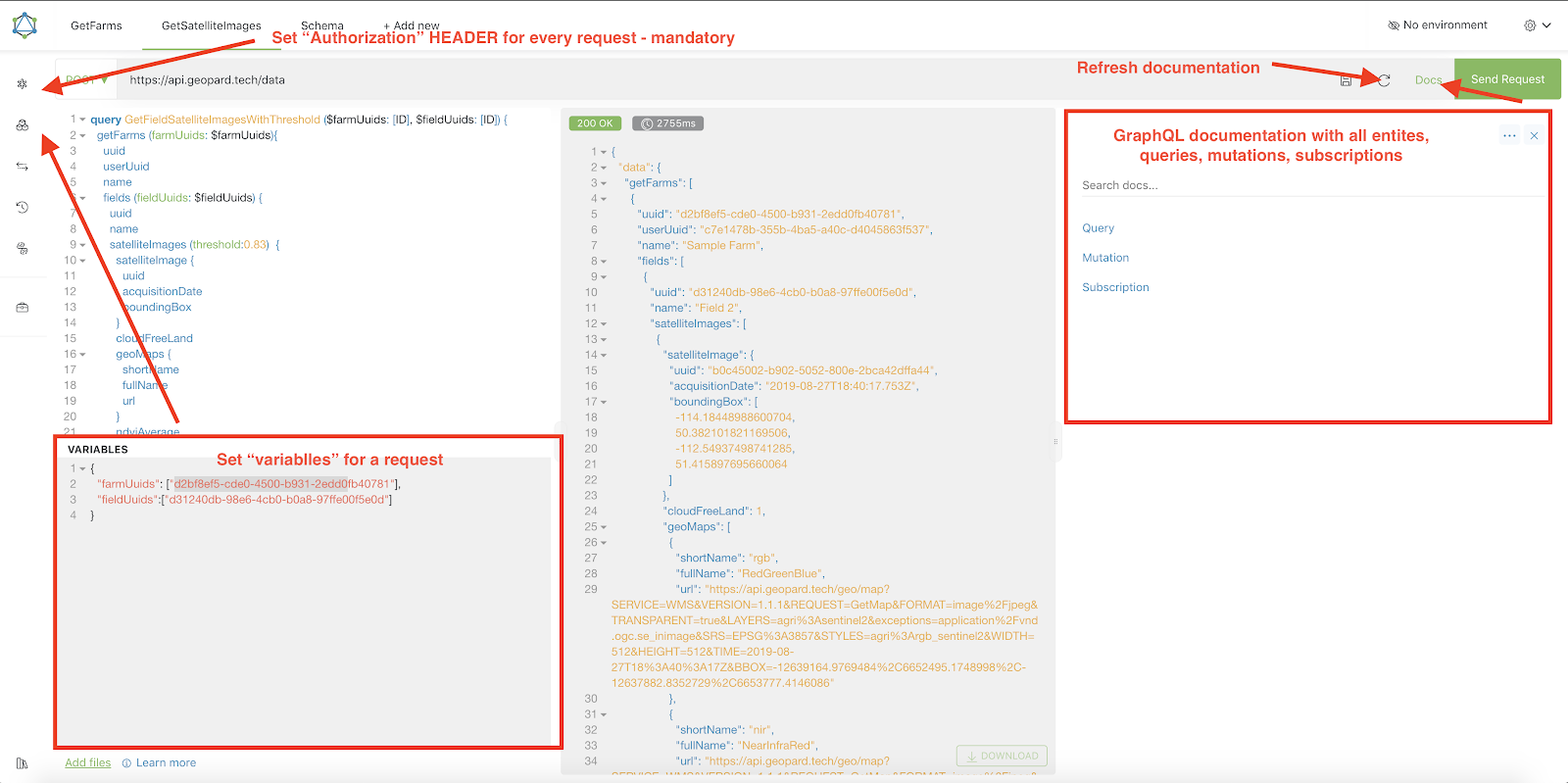
Um breve guia com dicas de como operar o Altair está destacado na captura de tela abaixo.
{% endhint %}
Altrair: Guia Rápido
---
# Agent Instructions
This documentation is published with GitBook. GitBook is the documentation platform designed so that both humans and AI agents can read, navigate, and reason over technical content effectively. Learn more at gitbook.com.
## Querying This Documentation
If you need additional information that is not directly available in this page, you can query the documentation by asking a question.
Perform an HTTP GET request on the following URL with the `ask` and `goal` query parameters:
```
GET https://docs.geopard.tech/geopard-tutorials/pt-br/documentacao-da-api/comecando-com-a-api-geopard.md?ask=&goal=
```
`ask` is the immediate question: it should be specific, self-contained, and written in natural language.
`goal` is what the user is ultimately trying to achieve, the reason they need the answer. Sharing it helps GitBook give you a better, more relevant answer. A goal is most helpful when it describes the outcome the user wants rather than restating the question. For example, with `ask=how do I create an API token`, a goal like `automate deployments from our CI pipeline` lets GitBook tailor the answer to that use case.
The response will contain a direct answer to the question and relevant excerpts and sources from the documentation.
Use this mechanism when the answer is not explicitly present in the current page, you need clarification or additional context, or you want to retrieve related documentation sections.