> For the complete documentation index, see [llms.txt](https://docs.geopard.tech/geopard-tutorials/llms.txt). Markdown versions of documentation pages are available by appending `.md` to page URLs; this page is available as [Markdown](https://docs.geopard.tech/geopard-tutorials/pl/szybkie-wskazowki-gis/qgis-change-string-to-number-values-in-the-shapefile.md).
# QGIS: konwersja pola tekstowego na liczbę w pliku shapefile
Użyj to\_real() lub to\_int() w Kalkulatorze pól QGIS, aby przekształcić wartości tekstowe w liczby, zachować miejsca dziesiętne i naprawić kolumny dawek lub plonów, które nie chcą się zaimportować.
Otwórz tabelę atrybutów, uruchom Kalkulator pól, utwórz nowe pole dziesiętne i wpisz `to_real("your_field")`. Użyj `to_int()` dla liczb całkowitych. Jeśli po zapisaniu znikają miejsca po przecinku, ustaw długość pola wynikowego na 0 lub precyzję większą od zera. Liczby zapisane jako tekst to najczęstsza przyczyna problemów z kolorowaniem mapy według kolumny plonu lub dawki oraz z importowaniem jej jako dawki.
{% hint style="success" %}
Prześlij poprawiony plik i wyświetl go jako mapę: [Rozpocznij za darmo](https://app.geopard.tech/auth/sign-up?utm_source=docs\&utm_medium=cta\&utm_campaign=qgis-change-string-to-number-values-in-the-shapefile)
{% endhint %}
W QGIS możesz przekonwertować ciąg znaków na liczbę za pomocą narzędzia „Kalkulator pól”. Najpierw otwórz tabelę atrybutów warstwy, którą chcesz zmodyfikować. Następnie kliknij przycisk „Otwórz kalkulator pól”. W polu „Wyrażenie” wpisz „to\_real(”, a po nim nazwę pola zawierającego ciąg znaków, który chcesz przekonwertować, i nawias zamykający. Aby na przykład przekonwertować pole tekstowe o nazwie „string\_field” na pole numeryczne, wpisz w polu „Wyrażenie” „to\_real("string\_field")”. Możesz też zmienić nazwę pola wynikowego i jego typ danych, wybierając odpowiednie opcje. Na koniec kliknij „OK”, aby zakończyć konwersję. Oryginalne pole tekstowe pozostanie w tabeli atrybutów, a nowe pole numeryczne zostanie do niej dodane.
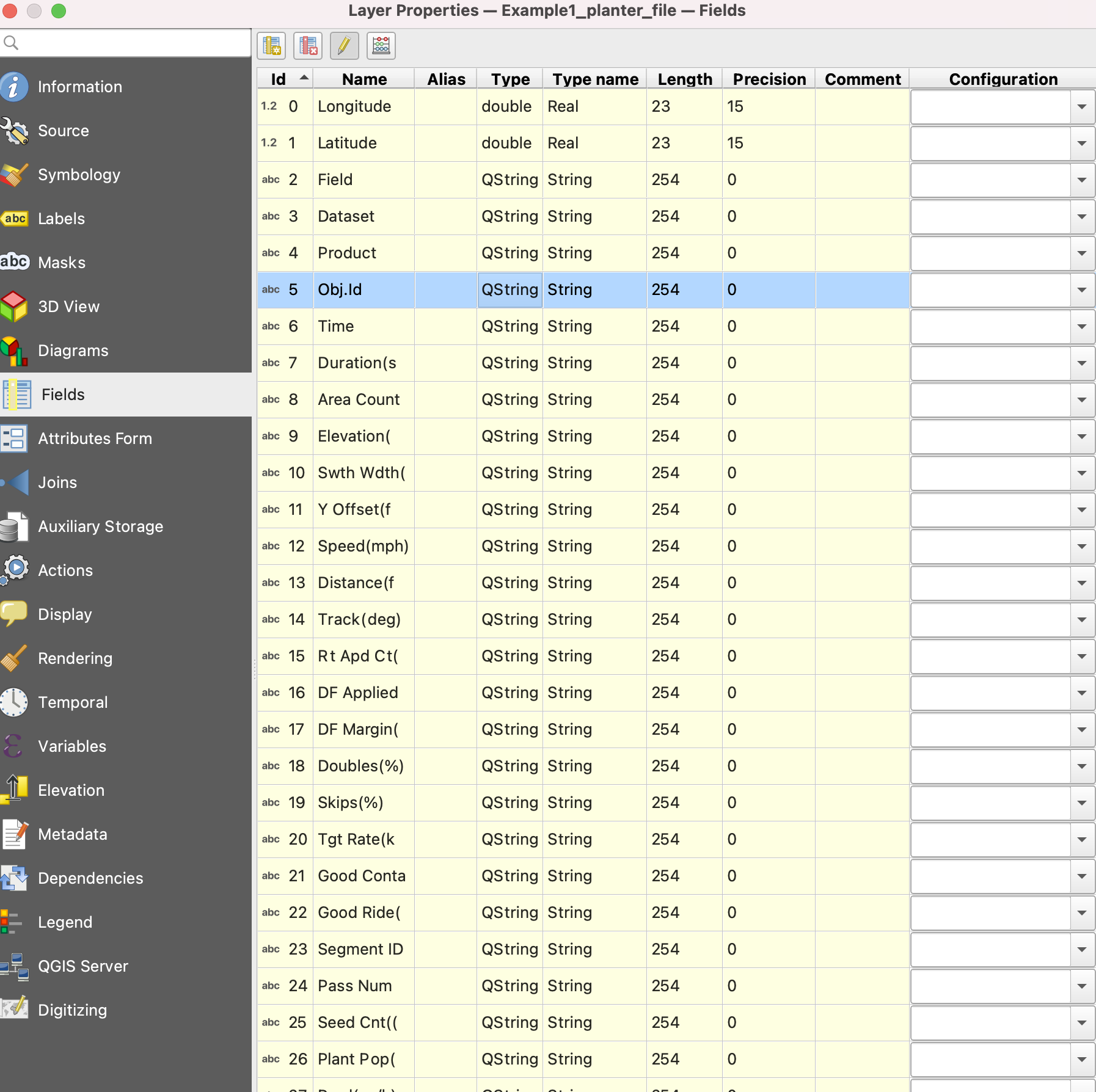
1. Otwórz „Właściwości”
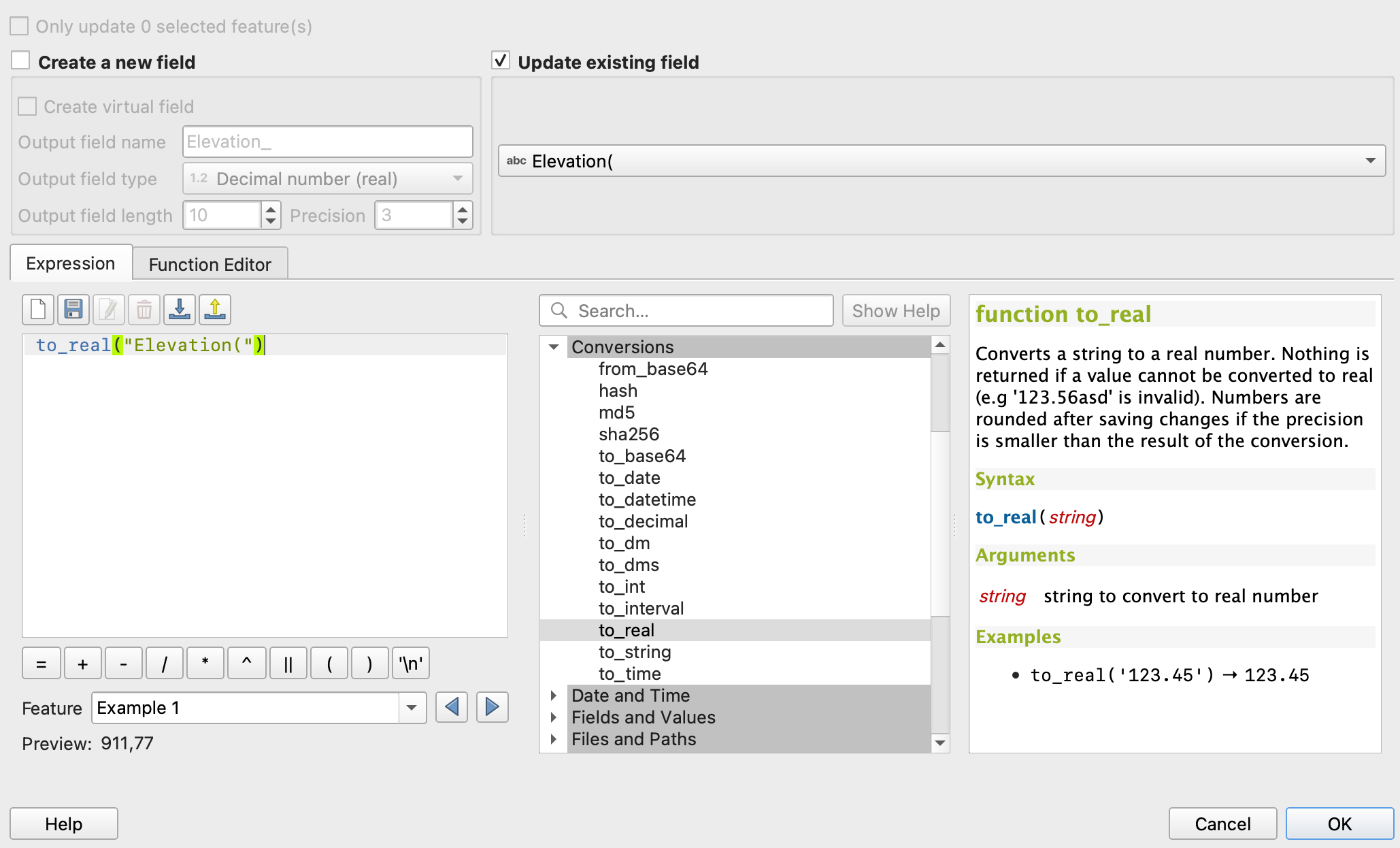
2. Przejdź do „Kalkulatora pól”
3. Zaznacz „Aktualizuj istniejące pole”
4. to\_real("attributeName")
5. Zapisz zmiany
6. Powtórz te same czynności dla każdego atrybutu
{% hint style="success" %}
Prześlij poprawiony plik i wyświetl go jako mapę: [Rozpocznij za darmo](https://app.geopard.tech/auth/sign-up?utm_source=docs\&utm_medium=cta\&utm_campaign=qgis-change-string-to-number-values-in-the-shapefile)
{% endhint %}
---
# Agent Instructions
This documentation is published with GitBook. GitBook is the documentation platform designed so that both humans and AI agents can read, navigate, and reason over technical content effectively. Learn more at gitbook.com.
## Querying This Documentation
If you need additional information that is not directly available in this page, you can query the documentation by asking a question.
Perform an HTTP GET request on the following URL with the `ask` and `goal` query parameters:
```
GET https://docs.geopard.tech/geopard-tutorials/pl/szybkie-wskazowki-gis/qgis-change-string-to-number-values-in-the-shapefile.md?ask=&goal=
```
`ask` is the immediate question: it should be specific, self-contained, and written in natural language.
`goal` is what the user is ultimately trying to achieve, the reason they need the answer. Sharing it helps GitBook give you a better, more relevant answer. A goal is most helpful when it describes the outcome the user wants rather than restating the question. For example, with `ask=how do I create an API token`, a goal like `automate deployments from our CI pipeline` lets GitBook tailor the answer to that use case.
The response will contain a direct answer to the question and relevant excerpts and sources from the documentation.
Use this mechanism when the answer is not explicitly present in the current page, you need clarification or additional context, or you want to retrieve related documentation sections.