> For the complete documentation index, see [llms.txt](https://docs.geopard.tech/geopard-tutorials/llms.txt). Markdown versions of documentation pages are available by appending `.md` to page URLs; this page is available as [Markdown](https://docs.geopard.tech/geopard-tutorials/pl/przewodnik-po-produkcie-aplikacja-webowa/mapy-stref-i-analityka/wspolczynnik-wzglednej-zmiennosci.md).
# Współczynnik względnej zmienności
Określ zmienność przestrzenną względem średniej, aby porównywać zmienność między polami i zestawami danych.
Wykrywanie zmian, które zaszły na polu w ciągu ostatnich jednego–dwóch tygodni, jednego–dwóch miesięcy, a nawet kilku lat, pomaga uzyskać wgląd w rozwój upraw.
Współczynnik zmienności względnej lub Indeks Zmiennej Względnej można wykorzystać do:
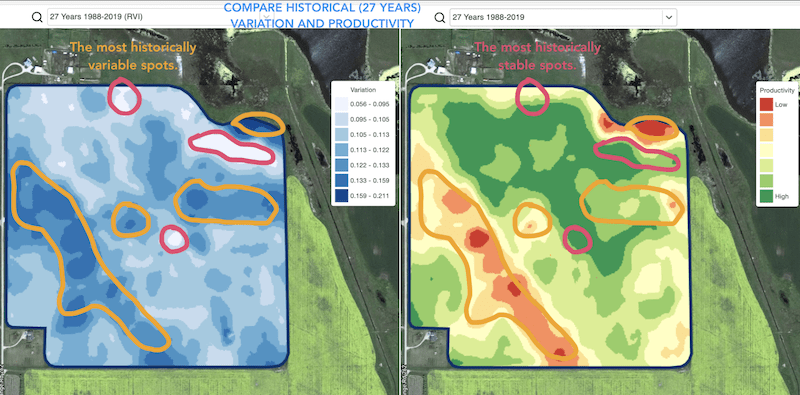
* lokalizowania miejsc o podobnej wydajności na przestrzeni 5–10–20 lat oraz wyznaczania doświadczeń w obszarach o podobnych warunkach, aby zmniejszyć prawdopodobieństwo błędu
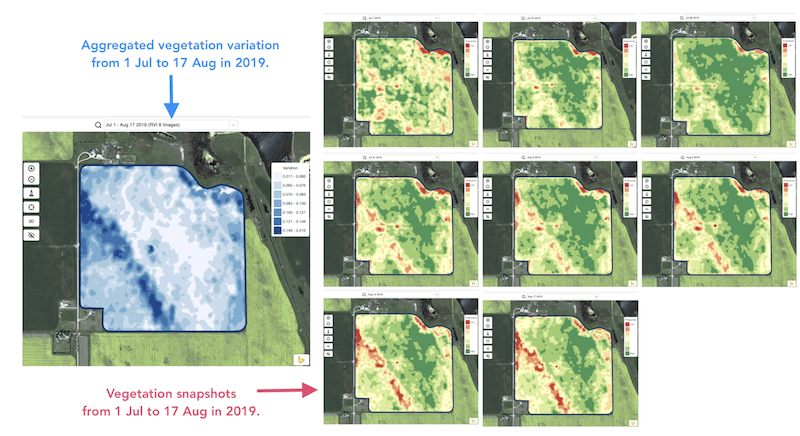
* śledzenia zmian w trakcie sezonu i oceny kondycji upraw podczas wzrostu
* rozpoznawania obszarów uszkodzonych po katastrofie pogodowej, chorobie lub ataku szkodników oraz obliczania powierzchni uszkodzeń
* wykrywania różnicy między dwoma ostatnimi obrazami i kontrolowania kondycji upraw.
Indeks Zmiennej Względnej (RVI) GeoPard obejmuje wszystkie te przypadki i wiele innych. RVI dostarczy więcej informacji o rozwoju upraw, gdy będzie używany łącznie ze strefami zarządzania sezonowymi i historycznymi.
Po prostu wybierz swoje pole i zdjęcia satelitarne, aby śledzić zachodzące na nich zmiany i uzyskać wgląd w każdy fragment Twojego pola.
---
# Agent Instructions
This documentation is published with GitBook. GitBook is the documentation platform designed so that both humans and AI agents can read, navigate, and reason over technical content effectively. Learn more at gitbook.com.
## Querying This Documentation
If you need additional information that is not directly available in this page, you can query the documentation by asking a question.
Perform an HTTP GET request on the following URL with the `ask` and `goal` query parameters:
```
GET https://docs.geopard.tech/geopard-tutorials/pl/przewodnik-po-produkcie-aplikacja-webowa/mapy-stref-i-analityka/wspolczynnik-wzglednej-zmiennosci.md?ask=&goal=
```
`ask` is the immediate question: it should be specific, self-contained, and written in natural language.
`goal` is what the user is ultimately trying to achieve, the reason they need the answer. Sharing it helps GitBook give you a better, more relevant answer. A goal is most helpful when it describes the outcome the user wants rather than restating the question. For example, with `ask=how do I create an API token`, a goal like `automate deployments from our CI pipeline` lets GitBook tailor the answer to that use case.
The response will contain a direct answer to the question and relevant excerpts and sources from the documentation.
Use this mechanism when the answer is not explicitly present in the current page, you need clarification or additional context, or you want to retrieve related documentation sections.