> For the complete documentation index, see [llms.txt](https://docs.geopard.tech/geopard-tutorials/llms.txt). Markdown versions of documentation pages are available by appending `.md` to page URLs; this page is available as [Markdown](https://docs.geopard.tech/geopard-tutorials/pl/prezentacja-produktu-aplikacja-webowa/mapy-stref-i-analityka/strefy-wieloletnie.md).
# Strefy wieloletnie
Twórz stabilne strefy zarządzania na podstawie danych wieloletnich, aby wspierać długoterminowe decyzje agronomiczne.
Historyczne (wieloletnie) strefy zarządzania dostarczają informacji o każdym miejscu w polu.
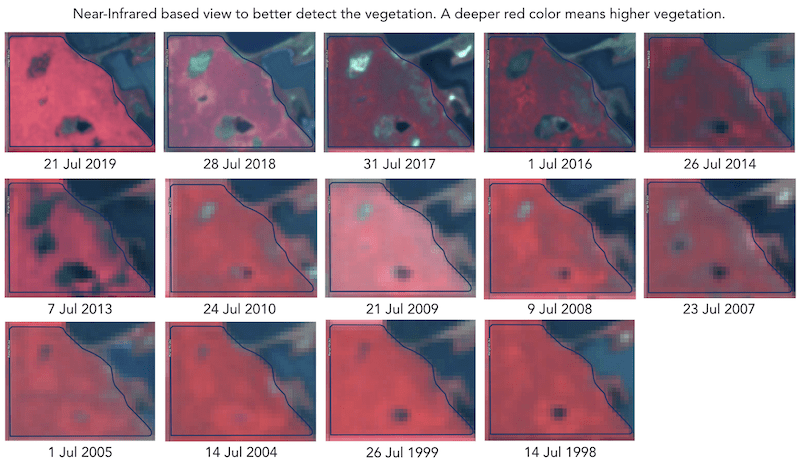
Historyczne (wieloletnie) strefy zarządzania są tworzone na podstawie ponad 30 lat archiwum zdjęć satelitarnych. Obrazy z szczytowym poziomem wegetacji w każdym sezonie są automatycznie wybierane jako dane wejściowe do analiz. W przeciwnym razie każdy taki obraz stanowi potencjalny plik plonów dla danego roku.
Wzorzec rozwoju uprawy na polu pomaga lepiej poznać areał rolny i podjąć właściwą decyzję z odpowiednimi dawkami nakładów we właściwych miejscach. Historyczne strefy zarządzania mogą służyć jako wzór do tworzenia plików prescription (Rx) dla siewu, nawożenia oraz strefowego poboru prób glebowych.
---
# Agent Instructions
This documentation is published with GitBook. GitBook is the documentation platform designed so that both humans and AI agents can read, navigate, and reason over technical content effectively. Learn more at gitbook.com.
## Querying This Documentation
If you need additional information that is not directly available in this page, you can query the documentation dynamically by asking a question.
Perform an HTTP GET request on the current page URL with the `ask` query parameter, and the optional `goal` query parameter:
```
GET https://docs.geopard.tech/geopard-tutorials/pl/prezentacja-produktu-aplikacja-webowa/mapy-stref-i-analityka/strefy-wieloletnie.md?ask=&goal=
```
`ask` is the immediate question: it should be specific, self-contained, and written in natural language.
`goal` is optional and describes the broader end goal you are ultimately trying to accomplish on behalf of the user. GitBook uses it to tailor the answer towards what is most useful for that goal.
The response will contain a direct answer to the question and relevant excerpts and sources from the documentation.
Use this mechanism when the answer is not explicitly present in the current page, you need clarification or additional context, or you want to retrieve related documentation sections.