> For the complete documentation index, see [llms.txt](https://docs.geopard.tech/geopard-tutorials/llms.txt). Markdown versions of documentation pages are available by appending `.md` to page URLs; this page is available as [Markdown](https://docs.geopard.tech/geopard-tutorials/pl/dokumentacja-api/getting-started-with-the-geopard-api.md).
# Wprowadzenie do API GeoPard
Zespół GeoPard zdecydowanie zaleca rozpoczęcie od Altair, aby dokładnie poznać możliwości API GeoPard. Narzędzie zawsze pobiera najnowszą wersję dostępnych encji, zapytań, mutacji i subskrypcji. Skorzystaj z poniższej instrukcji szybkiego startu:
1. Zainstaluj rozszerzenie Altair GraphQL do Chrome z tej [LINKU](https://chrome.google.com/webstore/detail/altair-graphql-client/flnheeellpciglgpaodhkhmapeljopja) lub skorzystaj bezpośrednio z Altair GraphQL Client w [przeglądarce](https://altairgraphql.dev/).
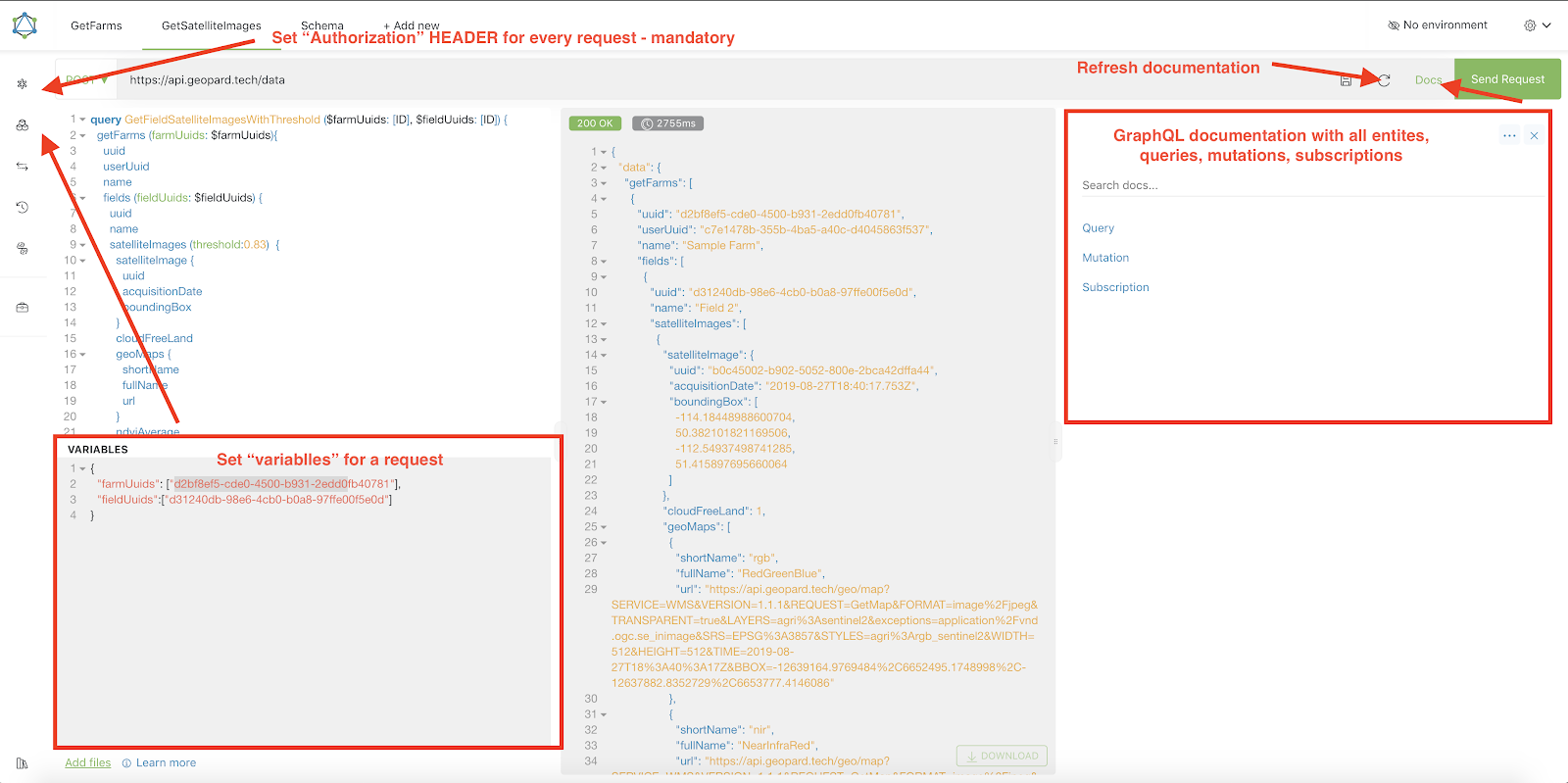
2. Każde żądanie musi być uwierzytelnione za pomocą `Authorization` NAGŁÓWKA, w którym należy umieścić wymagany token. Na potrzeby szybkiego testowania wartość `Authorization` NAGŁÓWKA można uzyskać z żądań wysyłanych po zalogowaniu do GeoPard Agriculture.\
\&#xNAN;*Krótkie wyjaśnienie znajduje się na zrzucie ekranu poniżej.*
3. Główny punkt końcowy GraphQL znajduje się pod adresem [`https://api.geopard.tech/data`](https://api.geopard.tech/data).\
\&#xNAN;*Krótkie wyjaśnienie znajduje się na zrzucie ekranu poniżej.*
4. Dostęp do schematu GraphQL można uzyskać za pomocą przycisku „Docs” w interfejsie Altair. Ta sekcja umożliwia przeglądanie wszystkich dostępnych zapytań, mutacji i subskrypcji. Zawiera również informacje o różnych encjach i ich strukturach, zapewniając pełny obraz konfiguracji GraphQL systemu.\
\&#xNAN;*Krótkie wyjaśnienie znajduje się na zrzucie ekranu poniżej.*
5. Sprawdź w konsoli deweloperskiej przeglądarki, czy żądania wychodzące działają prawidłowo. Możesz zastosować filtry żądań, takie jak `/data`.
6. Schemat jest dostępny pod tym [ADRESEM](https://docs.geopard.tech/geopard-tutorials/pl/dokumentacja-api/geopard-api-data-schema.md).
7. Do przesyłania plików używamy [tych punktów końcowych](https://docs.geopard.tech/geopard-tutorials/pl/dokumentacja-api/geopard-api-requests-overview/55.-upload-zip-files-over-6-mb.md).
8. Aby uzyskać dostęp do danych rastrowych i wektorowych, korzystamy z formatów OGC WMS (obrazy rastrowe do szybkiego renderowania) oraz WFS (`shp`, `geojson`). Więcej informacji znajdziesz w sekcji [Geo Endpoint](https://docs.geopard.tech/geopard-tutorials/pl/dokumentacja-api/geo-endpoints-for-spatial-data-access.md)s.
{% hint style="info" %}
Na zrzucie ekranu poniżej przedstawiono krótką instrukcję z poradami dotyczącymi obsługi Altair.
{% endhint %}
Altair: krótki przewodnik
---
# Agent Instructions
This documentation is published with GitBook. GitBook is the documentation platform designed so that both humans and AI agents can read, navigate, and reason over technical content effectively. Learn more at gitbook.com.
## Querying This Documentation
If you need additional information that is not directly available in this page, you can query the documentation by asking a question.
Perform an HTTP GET request on the following URL with the `ask` and `goal` query parameters:
```
GET https://docs.geopard.tech/geopard-tutorials/pl/dokumentacja-api/getting-started-with-the-geopard-api.md?ask=&goal=
```
`ask` is the immediate question: it should be specific, self-contained, and written in natural language.
`goal` is what the user is ultimately trying to achieve, the reason they need the answer. Sharing it helps GitBook give you a better, more relevant answer. A goal is most helpful when it describes the outcome the user wants rather than restating the question. For example, with `ask=how do I create an API token`, a goal like `automate deployments from our CI pipeline` lets GitBook tailor the answer to that use case.
The response will contain a direct answer to the question and relevant excerpts and sources from the documentation.
Use this mechanism when the answer is not explicitly present in the current page, you need clarification or additional context, or you want to retrieve related documentation sections.