> For the complete documentation index, see [llms.txt](https://docs.geopard.tech/geopard-tutorials/llms.txt). Markdown versions of documentation pages are available by appending `.md` to page URLs; this page is available as [Markdown](https://docs.geopard.tech/geopard-tutorials/nor/produktomvisning-nettapp/sonekart-og-analyser/relativ-variasjonsfaktor.md).
# Relativ variasjonsfaktor
Kvantifiser romlig variasjon relativt til gjennomsnittet for å sammenligne variasjon på tvers av skifter og datasett.
Å oppdage endringer som har skjedd i feltet i løpet av de siste én–to ukene eller én–to månedene, eller til og med over et par år, hjelper til med å få innsikt i avlingsutviklingen.
Relativ variasjonsfaktor eller Relativ variasjonsindeks kan brukes til å:
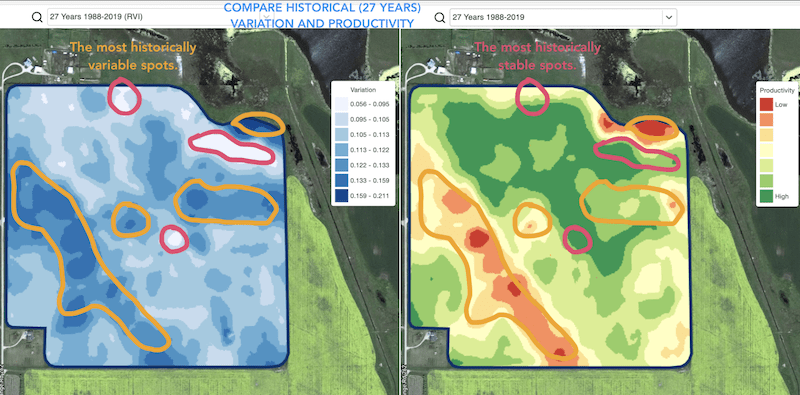
* finne steder med lignende utvikling over 5–10–20 år og plassere forsøk i områder med like forhold for å redusere sannsynligheten for feil
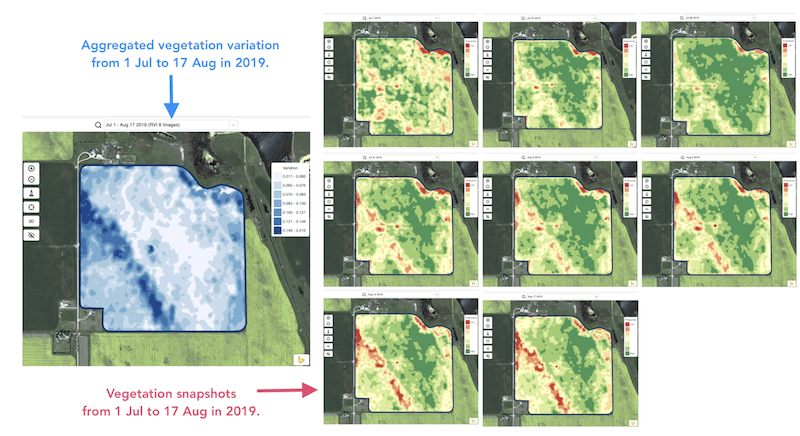
* følge endringene gjennom sesongen og vurdere avlingsprestasjonen under veksten
* gjenkjenne de skadede områdene etter en værkatastrofe eller et sykdoms- eller skadedyrangrep og beregne de skadede arealene
* oppdage forskjellen mellom de to siste bildene og følge med på avlingsprestasjonen.
GeoPard sin Relative Variation Index (RVI) dekker alle disse tilfellene og mange andre. RVI gir mer innsikt i avlingsutviklingen når den brukes sammen med sesongbaserte og historiske forvaltningssoner.
Velg ganske enkelt feltet ditt og satellittbildene for å følge endringene over dem og få innsikt i hvert enkelt punkt i feltet ditt.
---
# Agent Instructions
This documentation is published with GitBook. GitBook is the documentation platform designed so that both humans and AI agents can read, navigate, and reason over technical content effectively. Learn more at gitbook.com.
## Querying This Documentation
If you need additional information that is not directly available in this page, you can query the documentation by asking a question.
Perform an HTTP GET request on the following URL with the `ask` and `goal` query parameters:
```
GET https://docs.geopard.tech/geopard-tutorials/nor/produktomvisning-nettapp/sonekart-og-analyser/relativ-variasjonsfaktor.md?ask=&goal=
```
`ask` is the immediate question: it should be specific, self-contained, and written in natural language.
`goal` is what the user is ultimately trying to achieve, the reason they need the answer. Sharing it helps GitBook give you a better, more relevant answer. A goal is most helpful when it describes the outcome the user wants rather than restating the question. For example, with `ask=how do I create an API token`, a goal like `automate deployments from our CI pipeline` lets GitBook tailor the answer to that use case.
The response will contain a direct answer to the question and relevant excerpts and sources from the documentation.
Use this mechanism when the answer is not explicitly present in the current page, you need clarification or additional context, or you want to retrieve related documentation sections.