> For the complete documentation index, see [llms.txt](https://docs.geopard.tech/geopard-tutorials/llms.txt). Markdown versions of documentation pages are available by appending `.md` to page URLs; this page is available as [Markdown](https://docs.geopard.tech/geopard-tutorials/nor/produktomvisning-nettapp/sonekart-og-analyser/lag-et-sonekart-ved-hjelp-av-jord-avlings-eller-behandlingsdata.md).
# Lag et sonekart ved hjelp av jord-, avlings- eller behandlingsdata
Hvis du vil opprette et sonekart fra et datasett, må du først laste opp dataene til skiftet.
1. Velg skiftet i listen, klikk på **Opprett sonekart** knappen, velg **Enkeltlag**, og klikk deretter på **Neste**.
2. Velg **Jorddata** -typen for å fortsette. Du kan også bruke avlingsdata eller data som-applisert.
3. I neste steg velger du det spesifikke jorddatasettet du vil bruke, og klikker på **Neste**.
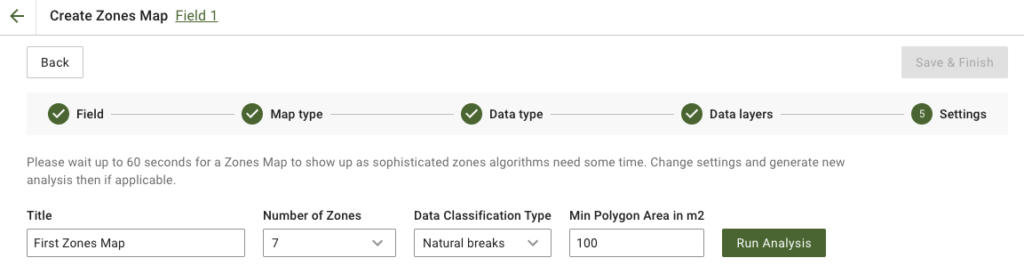
4. I neste steg kan du redigere tittelen, endre antall soner, [velge en datatypeklassifisering](/geopard-tutorials/nor/produktomvisning-nettapp/sonekart-og-analyser/bruk-av-dataklassifisering.md), og angi minimum polygonareal i kvadratmeter. Klikk på **Kjør analyse** for å fortsette.
Analysen kan ta opptil 60 sekunder, avhengig av параметrene du har angitt.
5. Når den er ferdig, klikker du på **Lagre og fullfør**.
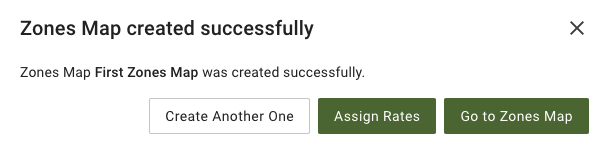
Etter at den er lagret, vil du se følgende melding:
Du kan opprette et nytt sonekart, tildele satser eller åpne sonekartet du nettopp opprettet. Hvis du åpner det, vil du se en lignende visning.
---
# Agent Instructions
This documentation is published with GitBook. GitBook is the documentation platform designed so that both humans and AI agents can read, navigate, and reason over technical content effectively. Learn more at gitbook.com.
## Querying This Documentation
If you need additional information that is not directly available in this page, you can query the documentation dynamically by asking a question.
Perform an HTTP GET request on the current page URL with the `ask` query parameter, and the optional `goal` query parameter:
```
GET https://docs.geopard.tech/geopard-tutorials/nor/produktomvisning-nettapp/sonekart-og-analyser/lag-et-sonekart-ved-hjelp-av-jord-avlings-eller-behandlingsdata.md?ask=&goal=
```
`ask` is the immediate question: it should be specific, self-contained, and written in natural language.
`goal` is optional and describes the broader end goal you are ultimately trying to accomplish on behalf of the user. GitBook uses it to tailor the answer towards what is most useful for that goal.
The response will contain a direct answer to the question and relevant excerpts and sources from the documentation.
Use this mechanism when the answer is not explicitly present in the current page, you need clarification or additional context, or you want to retrieve related documentation sections.