> For the complete documentation index, see [llms.txt](https://docs.geopard.tech/geopard-tutorials/llms.txt). Markdown versions of documentation pages are available by appending `.md` to page URLs; this page is available as [Markdown](https://docs.geopard.tech/geopard-tutorials/nor/api-dokumentasjon/getting-started-with-the-geopard-api.md).
# Kom i gang med GeoPard API
GeoPard-teamet anbefaler på det sterkeste å starte med Altair for å undersøke funksjonaliteten i GeoPard API grundig. Altair henter alltid den nyeste versjonen av tilgjengelige entiteter, spørringer, mutasjoner og abonnementer. Se hurtigstartguiden nedenfor:
1. Installer Altair GraphQL-utvidelsen for Chrome fra denne [LENKEN](https://chrome.google.com/webstore/detail/altair-graphql-client/flnheeellpciglgpaodhkhmapeljopja) eller bruk Altair GraphQL Client direkte i [nettleseren din](https://altairgraphql.dev/).
2. Hver forespørsel må autentiseres med en `Authorization` -HEADER, der det nødvendige tokenet skal inkluderes. For rask testing kan `Authorization` HEADER-verdien hentes fra forespørslene etter at du har logget inn på GeoPard Agriculture.\
\&#xNAN;*Skjermbildet nedenfor gir en kort forklaring.*
3. GraphQL-rotn endepunktet finner du på [`https://api.geopard.tech/data`](https://api.geopard.tech/data).\
\&#xNAN;*Skjermbildet nedenfor gir en kort forklaring.*
4. Du finner tilgang til GraphQL-skjemaet under «Docs»-knappen i Altair-grensesnittet. Her kan du navigere gjennom alle tilgjengelige spørringer, mutasjoner og abonnementer. Du får også informasjon om ulike entiteter og tilhørende strukturer, slik at du får en helhetlig forståelse av systemets GraphQL-oppsett.\
\&#xNAN;*Skjermbildet nedenfor gir en kort forklaring.*
5. Kontroller at utgående forespørsler fungerer som de skal, ved hjelp av utviklerkonsollen i nettleseren. Du kan bruke forespørselsfiltre som `/data`.
6. Du finner skjemaet her: [HER](https://docs.geopard.tech/geopard-tutorials/nor/api-dokumentasjon/geopard-api-data-schema.md).
7. For filopplasting bruker vi [disse endepunktene](https://docs.geopard.tech/geopard-tutorials/nor/api-dokumentasjon/geopard-api-requests-overview/55.-upload-zip-files-over-6-mb.md).
8. For tilgang til raster- og vektordata bruker vi OGC WMS (rasterbilder for rask gjengivelse) og WFS-formater (`shp`, `geojson`). Du finner mer informasjon i delen [Geo-endepunkter](https://docs.geopard.tech/geopard-tutorials/nor/api-dokumentasjon/geo-endpoints-for-spatial-data-access.md).
{% hint style="info" %}
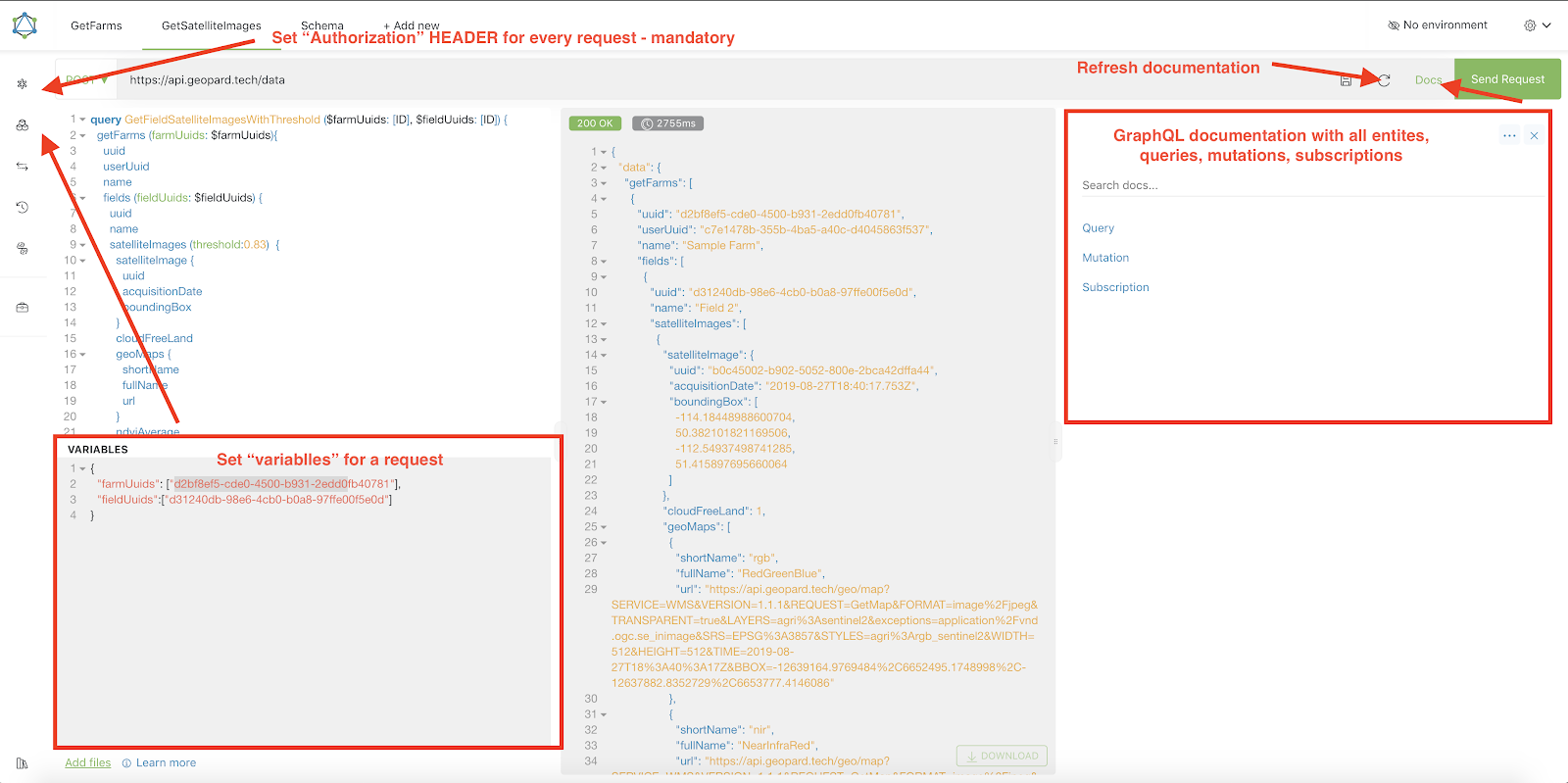
Skjermbildet nedenfor viser en kort veiledning med tips om hvordan du bruker Altair.
{% endhint %}
Altair: kort veiledning
---
# Agent Instructions
This documentation is published with GitBook. GitBook is the documentation platform designed so that both humans and AI agents can read, navigate, and reason over technical content effectively. Learn more at gitbook.com.
## Querying This Documentation
If you need additional information that is not directly available in this page, you can query the documentation by asking a question.
Perform an HTTP GET request on the following URL with the `ask` and `goal` query parameters:
```
GET https://docs.geopard.tech/geopard-tutorials/nor/api-dokumentasjon/getting-started-with-the-geopard-api.md?ask=&goal=
```
`ask` is the immediate question: it should be specific, self-contained, and written in natural language.
`goal` is what the user is ultimately trying to achieve, the reason they need the answer. Sharing it helps GitBook give you a better, more relevant answer. A goal is most helpful when it describes the outcome the user wants rather than restating the question. For example, with `ask=how do I create an API token`, a goal like `automate deployments from our CI pipeline` lets GitBook tailor the answer to that use case.
The response will contain a direct answer to the question and relevant excerpts and sources from the documentation.
Use this mechanism when the answer is not explicitly present in the current page, you need clarification or additional context, or you want to retrieve related documentation sections.