> For the complete documentation index, see [llms.txt](https://docs.geopard.tech/geopard-tutorials/llms.txt). Markdown versions of documentation pages are available by appending `.md` to page URLs; this page is available as [Markdown](https://docs.geopard.tech/geopard-tutorials/nl/producttour-webapp/zones-maps-and-analytics/create-a-zones-map-using-soil-yield-or-as-applied-data.md).
# Een zonenkaart maken op basis van bodem-, opbrengst- of as-applied-gegevens
Maak managementzones op basis van bodem-, opbrengst- of machinegegevens om de werkelijke veldvariatie weer te geven.
Als je een taakkaart met zones wilt maken op basis van een dataset, upload je de gegevens eerst naar het perceel.
1. Selecteer het perceel in de lijst en klik op de knop **Taakkaart met zones maken** , selecteer **Enkele laag** en klik vervolgens op **Volgende**.
2. Selecteer het **Bodemgegevens** type om verder te gaan. Je kunt ook opbrengstgegevens of toepassingsgegevens gebruiken.
3. Selecteer in de volgende stap de specifieke bodemdataset die je wilt gebruiken en klik op **Volgende**.
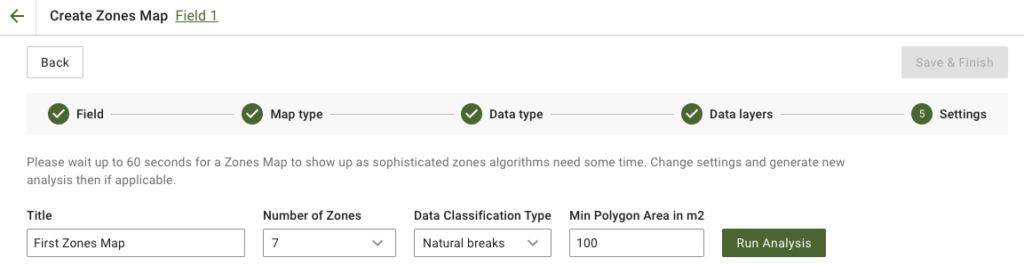
4. In de volgende stap kun je de titel bewerken, het aantal zones wijzigen, [een classificatietype voor de gegevens selecteren](https://docs.geopard.tech/geopard-tutorials/nl/producttour-webapp/zones-maps-and-analytics/using-data-classification.md) en de minimale polygonoppervlakte in vierkante meters instellen. Klik op **Analyse uitvoeren** om verder te gaan.
De analyse kan tot 60 seconden duren, afhankelijk van de opgegeven parameters.
5. Klik na afloop op **Opslaan en voltooien**.
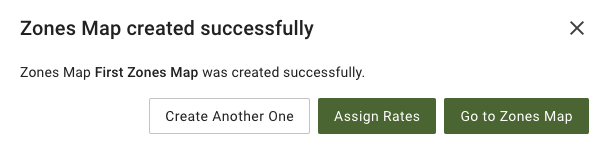
Na het opslaan wordt het volgende bericht weergegeven:
Je kunt nog een taakkaart met zones maken, doseringen toewijzen of de zojuist gemaakte taakkaart met zones openen. Als je deze opent, zie je een vergelijkbare weergave.
---
# Agent Instructions
This documentation is published with GitBook. GitBook is the documentation platform designed so that both humans and AI agents can read, navigate, and reason over technical content effectively. Learn more at gitbook.com.
## Querying This Documentation
If you need additional information that is not directly available in this page, you can query the documentation by asking a question.
Perform an HTTP GET request on the following URL with the `ask` and `goal` query parameters:
```
GET https://docs.geopard.tech/geopard-tutorials/nl/producttour-webapp/zones-maps-and-analytics/create-a-zones-map-using-soil-yield-or-as-applied-data.md?ask=&goal=
```
`ask` is the immediate question: it should be specific, self-contained, and written in natural language.
`goal` is what the user is ultimately trying to achieve, the reason they need the answer. Sharing it helps GitBook give you a better, more relevant answer. A goal is most helpful when it describes the outcome the user wants rather than restating the question. For example, with `ask=how do I create an API token`, a goal like `automate deployments from our CI pipeline` lets GitBook tailor the answer to that use case.
The response will contain a direct answer to the question and relevant excerpts and sources from the documentation.
Use this mechanism when the answer is not explicitly present in the current page, you need clarification or additional context, or you want to retrieve related documentation sections.