> For the complete documentation index, see [llms.txt](https://docs.geopard.tech/geopard-tutorials/llms.txt). Markdown versions of documentation pages are available by appending `.md` to page URLs; this page is available as [Markdown](https://docs.geopard.tech/geopard-tutorials/nl/producttour-webapp/zonenkaarten-en-analyses/relatieve-variatiefactor.md).
# Relatieve-variatiefactor
Kwantificeer ruimtelijke variatie ten opzichte van het gemiddelde om variatie tussen percelen en datasets te vergelijken.
Het detecteren van veranderingen die in het veld hebben plaatsgevonden in de afgelopen één-twee weken, of één-twee maanden, of zelfs een paar jaar, helpt om inzicht te krijgen in de gewasontwikkeling.
De Relatieve Variatiefactor of Relatieve Variatie-index kan worden gebruikt om:
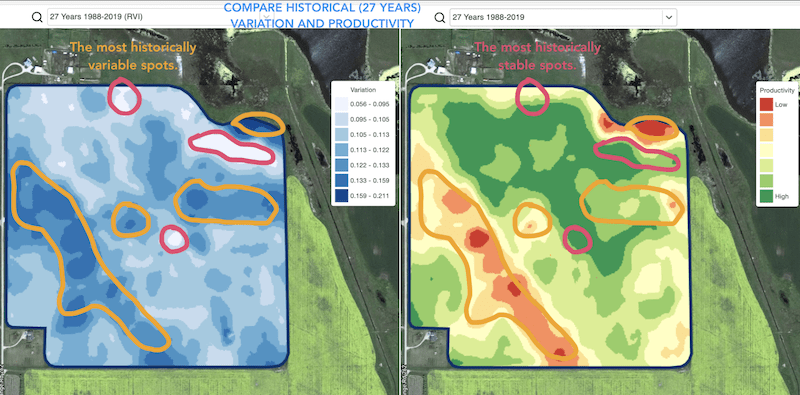
* plekken te lokaliseren met vergelijkbare prestaties over 5-10-20 jaar en de proefvelden te plaatsen in gebieden met vergelijkbare omstandigheden om de kans op fouten te verkleinen
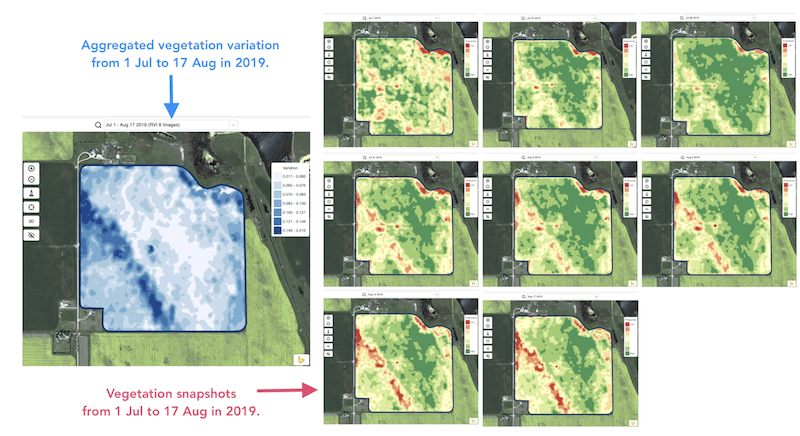
* de veranderingen tijdens het seizoen te volgen en de gewasprestaties tijdens de groei te evalueren
* de beschadigde gebieden na een weersramp of een ziekte- of plaagdruk te herkennen en de beschadigde oppervlakken te berekenen
* het verschil tussen de laatste twee beelden te detecteren en de gewasprestaties te controleren.
GeoPard’s Relatieve Variatie-index (RVI) dekt al deze gevallen en nog veel meer. De RVI geeft meer inzicht in de gewasontwikkeling wanneer deze samen wordt gebruikt met seizoensgebonden en historische managementzones.
Kies eenvoudigweg uw perceel en satellietbeelden om de veranderingen daarin te volgen en inzicht te krijgen in elke plek op uw veld.
---
# Agent Instructions
This documentation is published with GitBook. GitBook is the documentation platform designed so that both humans and AI agents can read, navigate, and reason over technical content effectively. Learn more at gitbook.com.
## Querying This Documentation
If you need additional information that is not directly available in this page, you can query the documentation by asking a question.
Perform an HTTP GET request on the following URL with the `ask` and `goal` query parameters:
```
GET https://docs.geopard.tech/geopard-tutorials/nl/producttour-webapp/zonenkaarten-en-analyses/relatieve-variatiefactor.md?ask=&goal=
```
`ask` is the immediate question: it should be specific, self-contained, and written in natural language.
`goal` is what the user is ultimately trying to achieve, the reason they need the answer. Sharing it helps GitBook give you a better, more relevant answer. A goal is most helpful when it describes the outcome the user wants rather than restating the question. For example, with `ask=how do I create an API token`, a goal like `automate deployments from our CI pipeline` lets GitBook tailor the answer to that use case.
The response will contain a direct answer to the question and relevant excerpts and sources from the documentation.
Use this mechanism when the answer is not explicitly present in the current page, you need clarification or additional context, or you want to retrieve related documentation sections.