> For the complete documentation index, see [llms.txt](https://docs.geopard.tech/geopard-tutorials/llms.txt). Markdown versions of documentation pages are available by appending `.md` to page URLs; this page is available as [Markdown](https://docs.geopard.tech/geopard-tutorials/nl/api-documentatie/aan-de-slag-met-de-geopard-api.md).
# Aan de slag met de GeoPard API
Het GeoPard-team raadt sterk aan te beginnen met Altair om de functionaliteiten van de GeoPard API grondig te verkennen. Deze haalt consequent de meest recente versie op van beschikbare entiteiten, queries, mutaties en subscriptions. Raadpleeg de quick-startgids hieronder:
1. Installeer de Altair GraphQL Chrome-extensie vanuit deze [LINK](https://chrome.google.com/webstore/detail/altair-graphql-client/flnheeellpciglgpaodhkhmapeljopja) of gebruik Altair GraphQL Client rechtstreeks in [uw browser](https://altairgraphql.dev/).
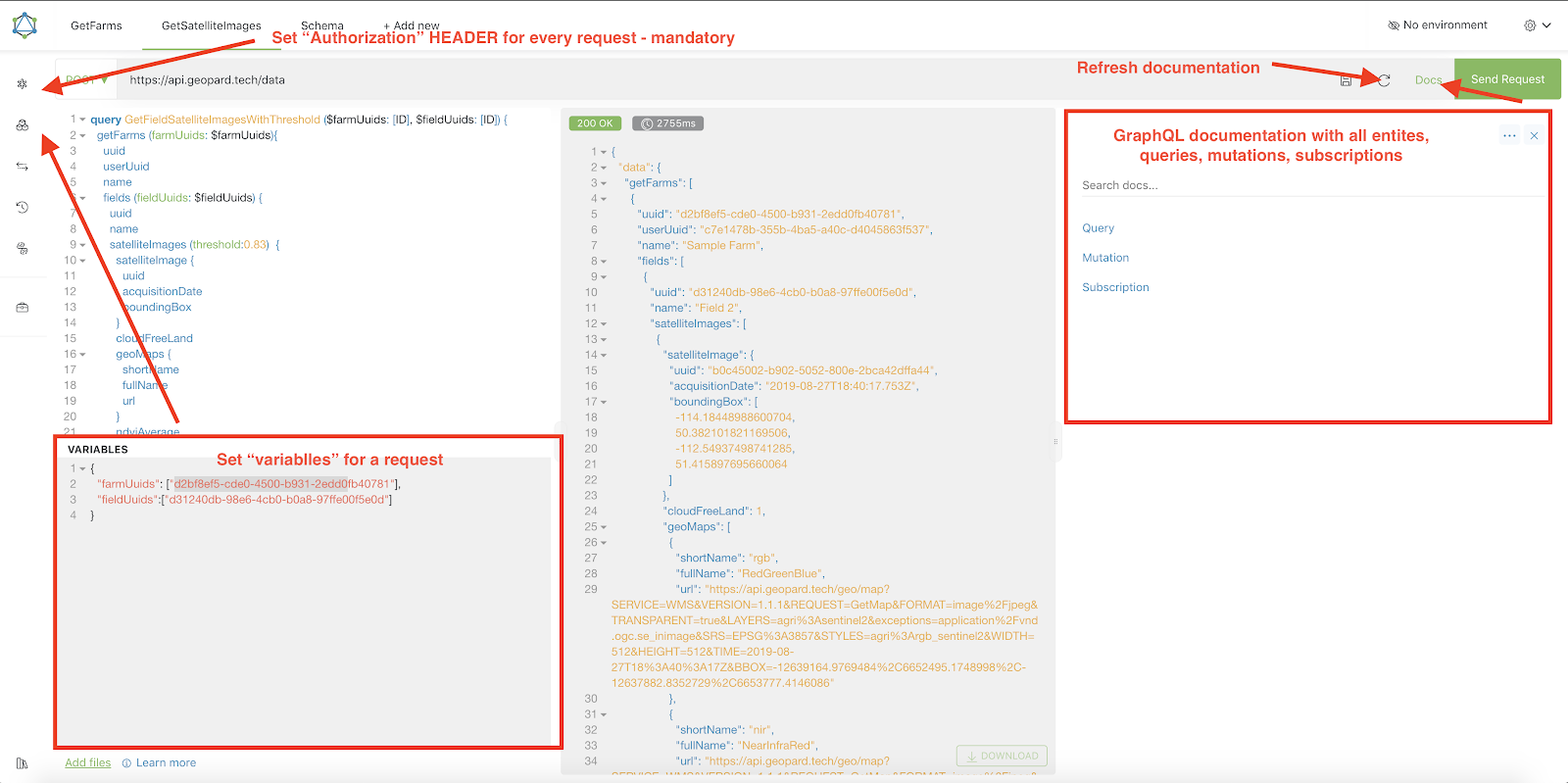
2. Elke aanvraag moet worden geauthenticeerd met een `Autorisatie` HEADER, waarin de vereiste token moet worden opgenomen. Voor snelle tests kan de `Autorisatie` HEADER-waarde worden verkregen uit de aanvragen na inloggen in GeoPard Agriculture.\
\&#xNAN;*Een korte uitleg staat in de screenshot hieronder.*
3. Het Root GraphQL-eindpunt bevindt zich op [`https://api.geopard.tech/data`](https://api.geopard.tech/data).\
\&#xNAN;*Een korte uitleg staat in de screenshot hieronder.*
4. Toegang tot het GraphQL-schema is te vinden onder de knop "Docs" in de Altair-interface. In deze sectie kunt u navigeren door alle beschikbare Queries, Mutaties en Subscriptions. Daarnaast biedt het inzicht in verschillende entiteiten en hun respectieve structuren, waardoor u een volledig beeld krijgt van de GraphQL-opzet van het systeem.\
\&#xNAN;*Een korte uitleg staat in de screenshot hieronder.*
5. Controleer of uitgaande aanvragen correct werken met behulp van de ontwikkelconsole van uw browser. U kunt aanvraagfilters toepassen zoals `/data`.
6. Het schema kan worden geopend via deze [HIER](/geopard-tutorials/nl/api-documentatie/geopard-api-dataschema.md).
7. Voor het uploaden van bestanden gebruiken wij [deze eindpunten](/geopard-tutorials/nl/api-documentatie/overzicht-van-geopard-api-verzoeken/55.-zipbestanden-uploaden-meer-dan-6-mb.md).
8. Voor toegang tot raster- en vectordata gebruiken we OGC WMS (rasterafbeeldingen voor snelle weergave) en WFS-formaten (`shp`, `geojson`). Raadpleeg voor meer informatie onze [Geo-endpoint](/geopard-tutorials/nl/api-documentatie/geo-eindpunten-voor-toegang-tot-ruimtelijke-data.md)-sectie.
{% hint style="info" %}
Een korte gids met tips over het gebruik van Altair is uitgelicht in de screenshot hieronder.
{% endhint %}
Altrair: Korte gids
---
# Agent Instructions
This documentation is published with GitBook. GitBook is the documentation platform designed so that both humans and AI agents can read, navigate, and reason over technical content effectively. Learn more at gitbook.com.
## Querying This Documentation
If you need additional information that is not directly available in this page, you can query the documentation by asking a question.
Perform an HTTP GET request on the following URL with the `ask` and `goal` query parameters:
```
GET https://docs.geopard.tech/geopard-tutorials/nl/api-documentatie/aan-de-slag-met-de-geopard-api.md?ask=&goal=
```
`ask` is the immediate question: it should be specific, self-contained, and written in natural language.
`goal` is what the user is ultimately trying to achieve, the reason they need the answer. Sharing it helps GitBook give you a better, more relevant answer. A goal is most helpful when it describes the outcome the user wants rather than restating the question. For example, with `ask=how do I create an API token`, a goal like `automate deployments from our CI pipeline` lets GitBook tailor the answer to that use case.
The response will contain a direct answer to the question and relevant excerpts and sources from the documentation.
Use this mechanism when the answer is not explicitly present in the current page, you need clarification or additional context, or you want to retrieve related documentation sections.