> For the complete documentation index, see [llms.txt](https://docs.geopard.tech/geopard-tutorials/llms.txt). Markdown versions of documentation pages are available by appending `.md` to page URLs; this page is available as [Markdown](https://docs.geopard.tech/geopard-tutorials/lva/produkta-apskats-timekla-lietotne/zonu-kartes-un-analitika/relativas-variacijas-faktors.md).
# Relatīvās variācijas faktors
Kvantificējiet telpisko variāciju attiecībā pret vidējo, lai salīdzinātu mainīgumu starp laukiem un datu kopām.
Laukā notikušo izmaiņu noteikšana pēdējo vienas-divu nedēļu, vienas-divu mēnešu vai pat pāris gadu laikā palīdz gūt ieskatu kultūraugu attīstībā.
Relatīvās variācijas faktoru jeb Relatīvās variācijas indeksu var izmantot, lai:
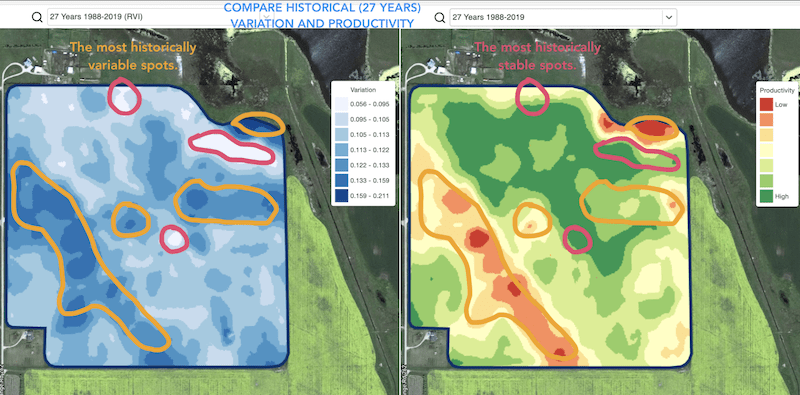
* atrastu vietas ar līdzīgu ražību 5–10–20 gadu griezumā un izvietotu izmēģinājumus vietās ar līdzīgiem apstākļiem, tā samazinot kļūdas iespējamību
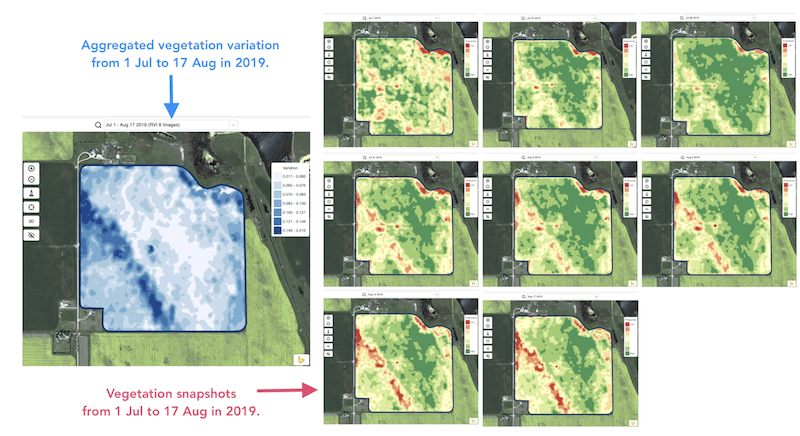
* sekotu izmaiņām sezonas laikā un novērtētu kultūraugu ražību augšanas gaitā
* atpazītu bojātās platības pēc laikapstākļu stihijas, slimības vai kaitēkļu uzbrukuma un aprēķinātu bojāto platību
* noteiktu atšķirību starp pēdējiem diviem attēliem un kontrolētu kultūraugu ražību.
GeoPard Relatīvās variācijas indekss (RVI) aptver visus šos gadījumus un vēl daudzus citus. RVI sniegs dziļāku ieskatu kultūraugu attīstībā, ja to lietos kopā ar sezonas un vēsturiskajām apsaimniekošanas zonām.
Vienkārši izvēlieties savu lauku un satelītattēlus, lai sekotu izmaiņām tajos un gūtu ieskatu par katru vietu jūsu laukā.
---
# Agent Instructions
This documentation is published with GitBook. GitBook is the documentation platform designed so that both humans and AI agents can read, navigate, and reason over technical content effectively. Learn more at gitbook.com.
## Querying This Documentation
If you need additional information that is not directly available in this page, you can query the documentation by asking a question.
Perform an HTTP GET request on the following URL with the `ask` and `goal` query parameters:
```
GET https://docs.geopard.tech/geopard-tutorials/lva/produkta-apskats-timekla-lietotne/zonu-kartes-un-analitika/relativas-variacijas-faktors.md?ask=&goal=
```
`ask` is the immediate question: it should be specific, self-contained, and written in natural language.
`goal` is what the user is ultimately trying to achieve, the reason they need the answer. Sharing it helps GitBook give you a better, more relevant answer. A goal is most helpful when it describes the outcome the user wants rather than restating the question. For example, with `ask=how do I create an API token`, a goal like `automate deployments from our CI pipeline` lets GitBook tailor the answer to that use case.
The response will contain a direct answer to the question and relevant excerpts and sources from the documentation.
Use this mechanism when the answer is not explicitly present in the current page, you need clarification or additional context, or you want to retrieve related documentation sections.