> For the complete documentation index, see [llms.txt](https://docs.geopard.tech/geopard-tutorials/llms.txt). Markdown versions of documentation pages are available by appending `.md` to page URLs; this page is available as [Markdown](https://docs.geopard.tech/geopard-tutorials/lva/produkta-apskats-timekla-lietotne/zonu-kartes-un-analitika/izveidot-zonu-karti-izmantojot-satelitattelus.md).
# Izveidot zonu karti, izmantojot satelītattēlus
Veidojiet apsaimniekošanas zonas no satelītattēliem, lai mērķētu mainīgumu un vadītu mainīgās normas lēmumus.
1. Sarakstā izvēlieties lauku, noklikšķiniet uz **Izveidot zonu karti** poga, atlasiet **Vienslāņa**, un pēc tam noklikšķiniet uz **Tālāk**.
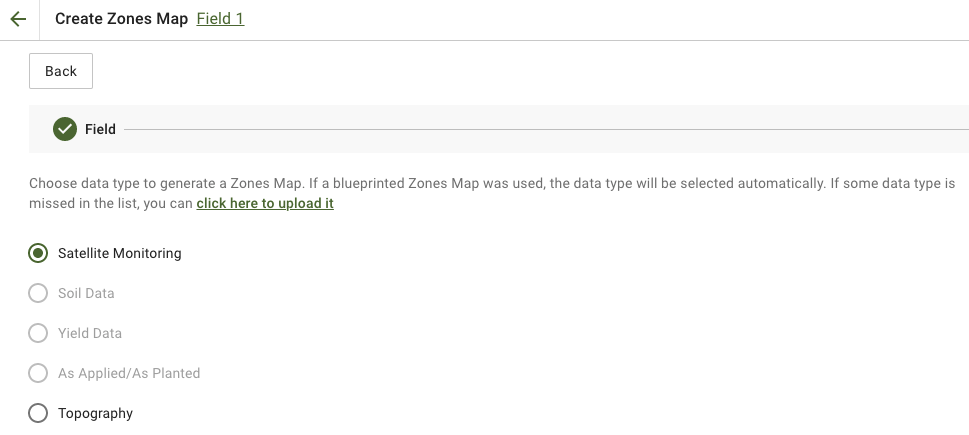
2. Atlasīt **Satelītu monitorings** datu tipu, lai turpinātu.
3. Nākamajā solī varat atlasīt satelītattēlu. Varat filtrēt pēc mēneša, gada, pakalpojumu sniedzēja vai NDVI, kā arī pārslēgties starp attēlu skatiem, piemēram, NIR un EVI2. The **Šeit ir īss indeksu veidu apraksts** saite skaidro pieejamos indeksus. Ja nepieciešams mainīt indeksu, noklikšķiniet uz bultiņas blakus **EVI2**. Pēc tam noklikšķiniet **Tālāk**.
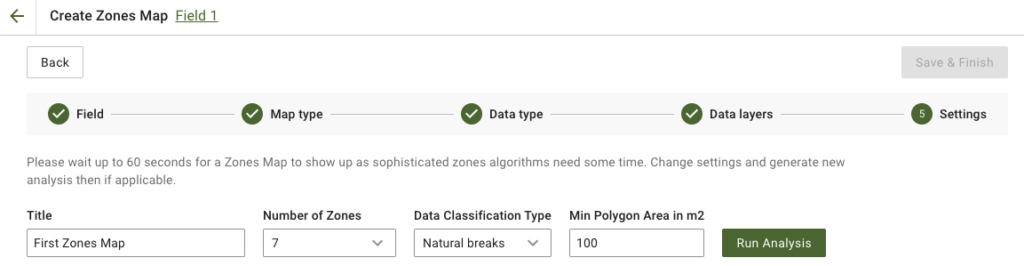
4. Nākamajā solī varat rediģēt virsrakstu, mainīt zonu skaitu, [atlasīt datu klasifikācijas tipu](/geopard-tutorials/lva/produkta-apskats-timekla-lietotne/zonu-kartes-un-analitika/izmantojot-datu-klasifikaciju.md), un definēt minimālo poligona laukumu kvadrātmetros. Noklikšķiniet uz **Palaist analīzi** lai turpinātu.
Analīze var ilgt līdz 60 sekundēm atkarībā no norādītajiem parametriem.
5. Kad tā būs pabeigta, noklikšķiniet uz **Saglabāt un pabeigt**.
Pēc saglabāšanas jūs redzēsiet šādu ziņojumu:
Varat izveidot citu zonu karti, piešķirt normas vai atvērt tikko izveidoto zonu karti. Ja to atvērsiet, redzēsiet līdzīgu skatu.
---
# Agent Instructions
This documentation is published with GitBook. GitBook is the documentation platform designed so that both humans and AI agents can read, navigate, and reason over technical content effectively. Learn more at gitbook.com.
## Querying This Documentation
If you need additional information that is not directly available in this page, you can query the documentation by asking a question.
Perform an HTTP GET request on the following URL with the `ask` and `goal` query parameters:
```
GET https://docs.geopard.tech/geopard-tutorials/lva/produkta-apskats-timekla-lietotne/zonu-kartes-un-analitika/izveidot-zonu-karti-izmantojot-satelitattelus.md?ask=&goal=
```
`ask` is the immediate question: it should be specific, self-contained, and written in natural language.
`goal` is what the user is ultimately trying to achieve, the reason they need the answer. Sharing it helps GitBook give you a better, more relevant answer. A goal is most helpful when it describes the outcome the user wants rather than restating the question. For example, with `ask=how do I create an API token`, a goal like `automate deployments from our CI pipeline` lets GitBook tailor the answer to that use case.
The response will contain a direct answer to the question and relevant excerpts and sources from the documentation.
Use this mechanism when the answer is not explicitly present in the current page, you need clarification or additional context, or you want to retrieve related documentation sections.