> For the complete documentation index, see [llms.txt](https://docs.geopard.tech/geopard-tutorials/llms.txt). Markdown versions of documentation pages are available by appending `.md` to page URLs; this page is available as [Markdown](https://docs.geopard.tech/geopard-tutorials/lva/produkta-apskats-timekla-lietotne/john-deere-operations-center-integracija/datu-koplietosanas-iespejas/1.-darbinieka-koplietosana.md).

# 1. "Darbinieka" koplietošana

Kopīgojiet John Deere datus ar darbiniekiem, lai viņi varētu strādāt GeoPard.

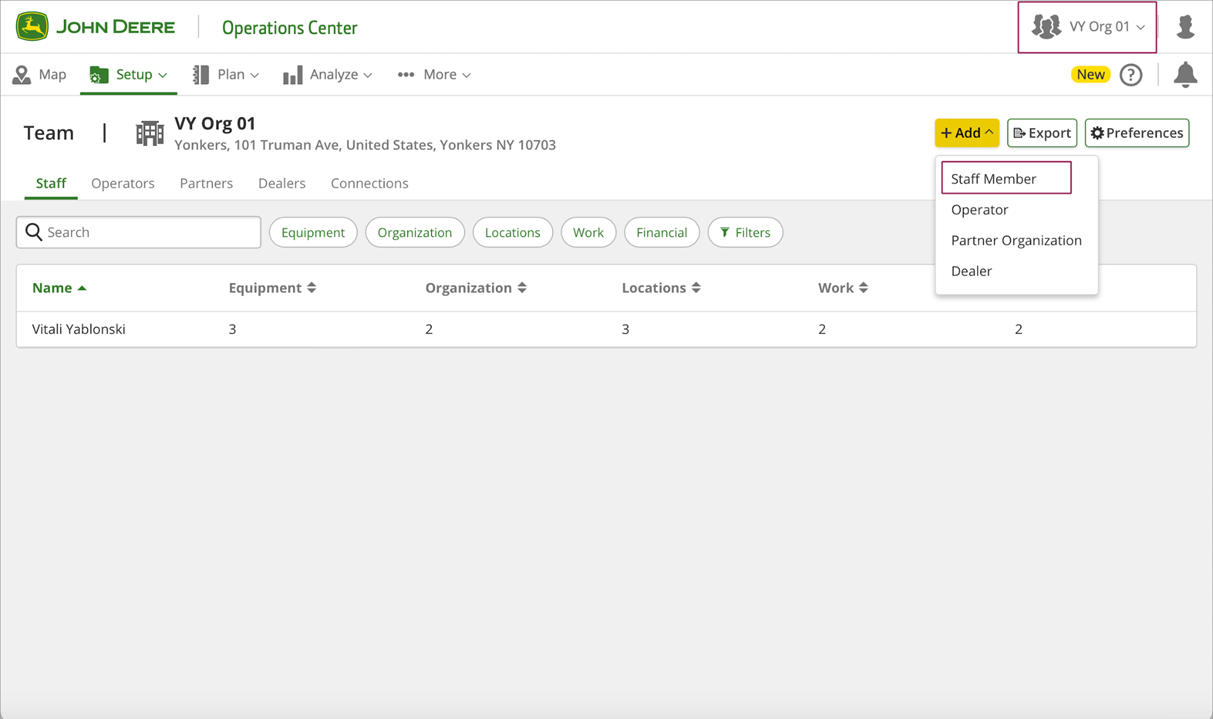
1. Lai kopīgotu organizācijas datus ar darbinieka kontu, organizācijas īpašniekam jāiet uz "Setup" >> "Team" lapu (vai <https://team.deere.com/>), jāizvēlas organizācija (piemēram, VY Org 01) un jānospiež poga "Staff Member".<br>

   <figure><img src="https://1923267647-files.gitbook.io/~/files/v0/b/gitbook-x-prod.appspot.com/o/spaces%2FYICBELdyAXXebKAzfLOR%2Fuploads%2FRYvIvhMVDuNspZs2CmZP%2Fimage.png?alt=media&amp;token=2f724d2e-0ae4-4aba-9e51-1d1b7cc38f36" alt=""><figcaption></figcaption></figure>
2. Ievadiet darbinieka konta e-pasta adresi un nospiediet pogu "Next".<br>

   <figure><img src="https://1923267647-files.gitbook.io/~/files/v0/b/gitbook-x-prod.appspot.com/o/spaces%2FYICBELdyAXXebKAzfLOR%2Fuploads%2FPdsAAlBS71LAUT4xXdv1%2Fimage.png?alt=media&amp;token=2971f5fe-c54c-4186-941c-b56a85ece6cd" alt=""><figcaption></figcaption></figure>
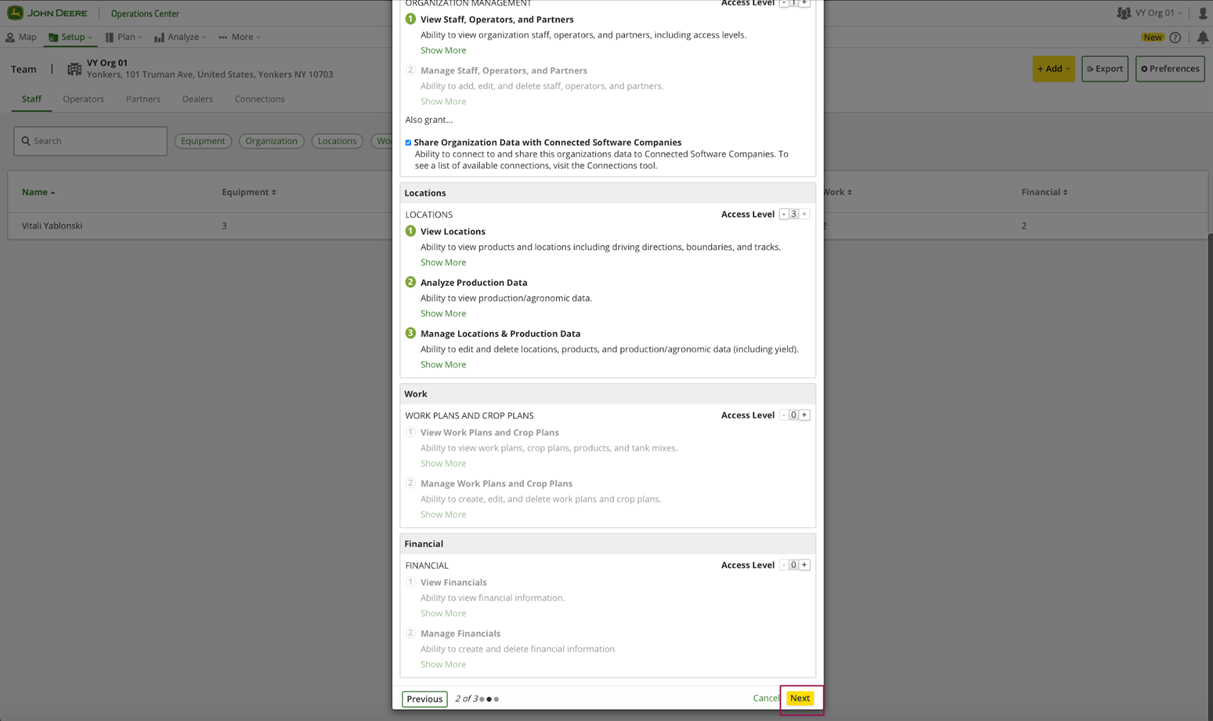
3. Iestatiet <mark style="background-color:green;">"Organization Management"</mark> piekļuves līmeni uz 1 ar <mark style="background-color:green;">"Share Organization Data with Connected Software Companies" izvēles rūtiņu</mark> un <mark style="background-color:green;">"Locations" piekļuves līmeni uz 3</mark>.<br>

   <figure><img src="https://1923267647-files.gitbook.io/~/files/v0/b/gitbook-x-prod.appspot.com/o/spaces%2FYICBELdyAXXebKAzfLOR%2Fuploads%2FYXk1BPNgszoRQ3CxG5D8%2Fimage.png?alt=media&amp;token=c639df00-16dd-4718-89fb-e8c6fd71f02e" alt=""><figcaption></figcaption></figure>
4. Noklikšķiniet uz pogas "Next".<br>

   <figure><img src="https://1923267647-files.gitbook.io/~/files/v0/b/gitbook-x-prod.appspot.com/o/spaces%2FYICBELdyAXXebKAzfLOR%2Fuploads%2FaGnOoYQb76m0Mkv5zBTU%2Fimage.png?alt=media&amp;token=ad411211-8aca-413d-8d30-3756398ff86f" alt=""><figcaption></figcaption></figure>
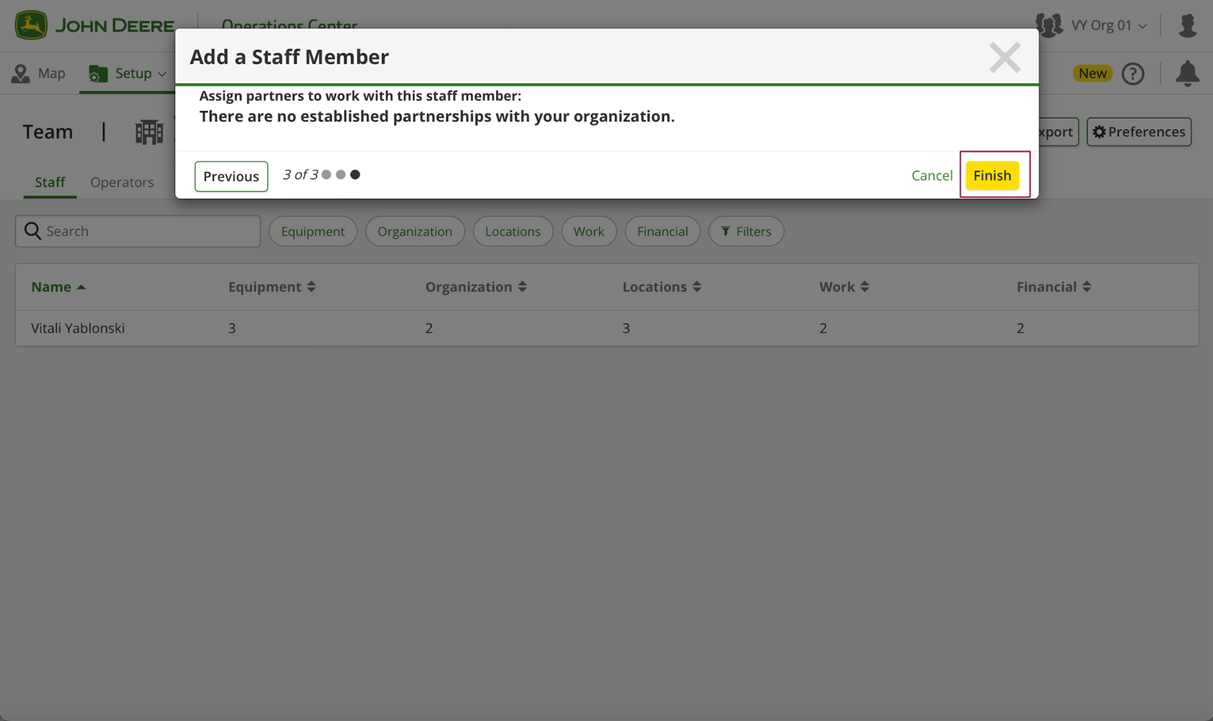
5. Noklikšķiniet uz pogas "Finish".<br>

   <figure><img src="https://1923267647-files.gitbook.io/~/files/v0/b/gitbook-x-prod.appspot.com/o/spaces%2FYICBELdyAXXebKAzfLOR%2Fuploads%2FUEJxQXiWKqNGm2vz8fo3%2Fimage.png?alt=media&amp;token=108d774d-6fe0-4029-ad23-3a3ba2401ce3" alt=""><figcaption></figcaption></figure>
6. Tabula rāda pieprasījuma rezultātu: apstiprināts/noraidīts/pending.<br>

   <figure><img src="https://1923267647-files.gitbook.io/~/files/v0/b/gitbook-x-prod.appspot.com/o/spaces%2FYICBELdyAXXebKAzfLOR%2Fuploads%2FggifaL6ZyOngyqaXjsab%2Fimage.png?alt=media&amp;token=931eebcd-0633-48a3-adf6-6ef210c04e21" alt=""><figcaption></figcaption></figure>
7. Pēc tam darbinieka konts saņem e-pasta paziņojumu par to un apstiprinājuma uznirstošo logu pirmajai pieteikšanās reizei John Deere Operations Center.\
   Darbiniekam jānoklikšķina uz pogas "Accept".<br>

   <figure><img src="https://1923267647-files.gitbook.io/~/files/v0/b/gitbook-x-prod.appspot.com/o/spaces%2FYICBELdyAXXebKAzfLOR%2Fuploads%2FbqzjsZuxjs6is5gCBMeW%2Fimage.png?alt=media&amp;token=54aa427e-2d7a-4798-8837-cf20b426a262" alt=""><figcaption></figcaption></figure>
8. Pēc apstiprināšanas darbiniekam jāredz jauna organizācija (piemēram, VY Org 01).<br>

   <figure><img src="https://1923267647-files.gitbook.io/~/files/v0/b/gitbook-x-prod.appspot.com/o/spaces%2FYICBELdyAXXebKAzfLOR%2Fuploads%2Fj74vyeUH5tPW6hxSdkwK%2Fimage.png?alt=media&amp;token=a9c39452-2f73-4e13-8ef3-4b2b5de6bd1c" alt=""><figcaption></figcaption></figure>
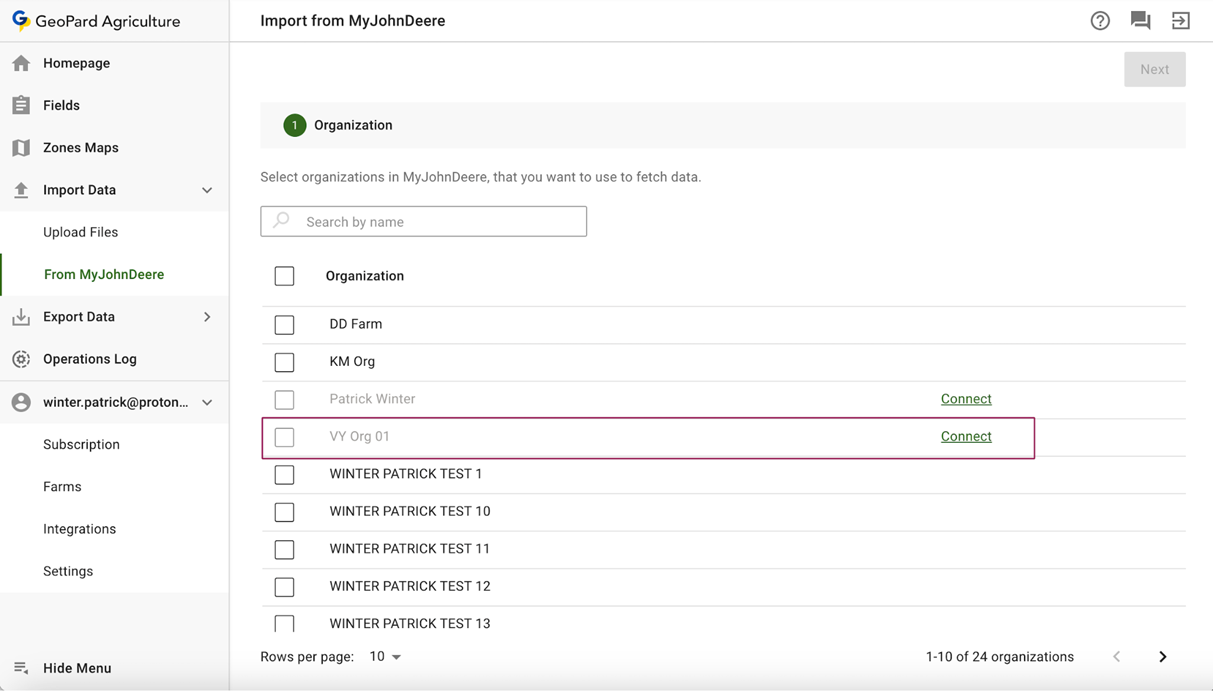
9. GeoPard lietotnei jāparāda darbinieka jaunā organizācija, pēc tam darbiniekam jānoklikšķina uz saites "Connect" (piemēram, VY Org 01).<br>

   <figure><img src="https://1923267647-files.gitbook.io/~/files/v0/b/gitbook-x-prod.appspot.com/o/spaces%2FYICBELdyAXXebKAzfLOR%2Fuploads%2FEqnSqOhA40OHE40JAUem%2Fimage.png?alt=media&amp;token=e542ffb7-19b9-40e3-b7e6-bd5589b39119" alt=""><figcaption></figcaption></figure>
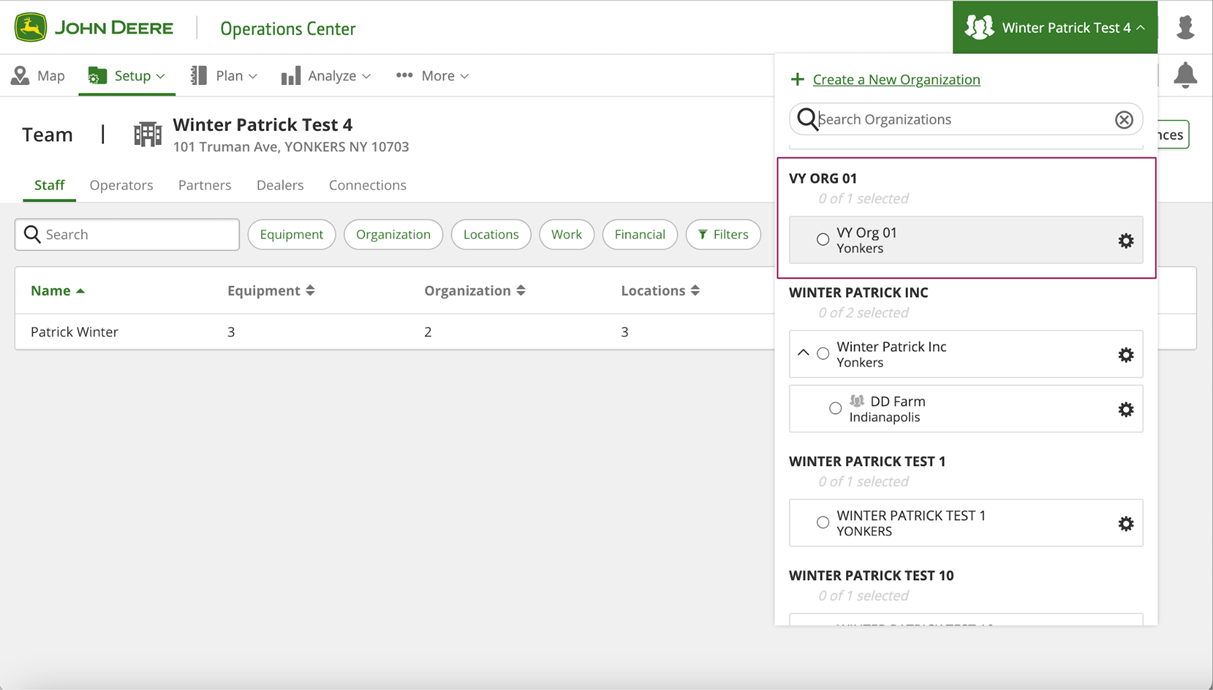
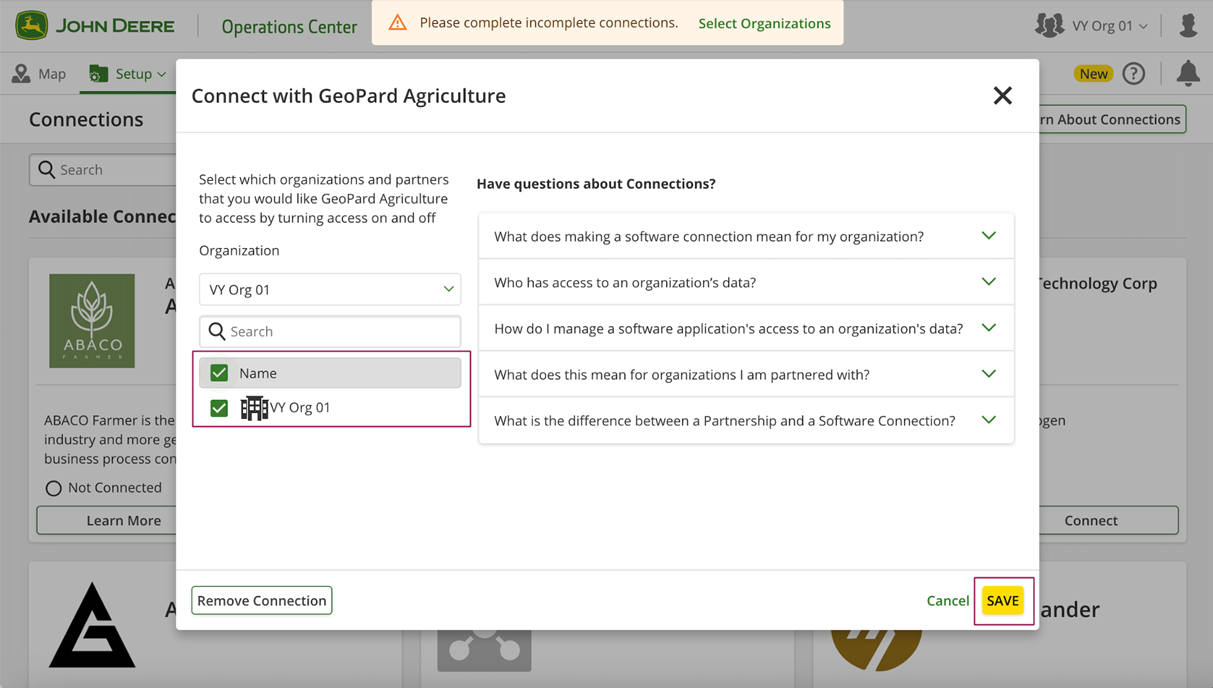
10. Darbiniekam sarakstā jāizvēlas jaunā organizācija (piemēram, VY Org 01).<br>

    <figure><img src="https://1923267647-files.gitbook.io/~/files/v0/b/gitbook-x-prod.appspot.com/o/spaces%2FYICBELdyAXXebKAzfLOR%2Fuploads%2Fa22B8z0WUxv6vDLF1D6Z%2Fimage.png?alt=media&amp;token=132d98a3-0c22-425c-96f4-37952c1e4d7c" alt=""><figcaption></figcaption></figure>
11. Noklikšķiniet uz pogas "Save".<br>

    <figure><img src="https://1923267647-files.gitbook.io/~/files/v0/b/gitbook-x-prod.appspot.com/o/spaces%2FYICBELdyAXXebKAzfLOR%2Fuploads%2FLxh5hHstCQIG0hOUP7Z0%2Fimage.png?alt=media&amp;token=4f20c485-8f71-4653-ad14-0b523412336e" alt=""><figcaption></figcaption></figure>
12. Pēc tam GeoPard lietotne ir gatava darbam ar jauno organizāciju.<br>

    <figure><img src="https://1923267647-files.gitbook.io/~/files/v0/b/gitbook-x-prod.appspot.com/o/spaces%2FYICBELdyAXXebKAzfLOR%2Fuploads%2Fy8T29aZ02uQ0fyMggFdC%2Fimage.png?alt=media&amp;token=cefc9539-9af9-4d6d-a698-373049c21425" alt=""><figcaption></figcaption></figure>


---

# Agent Instructions
This documentation is published with GitBook. GitBook is the documentation platform designed so that both humans and AI agents can read, navigate, and reason over technical content effectively. Learn more at gitbook.com.

## Querying This Documentation
If you need additional information that is not directly available in this page, you can query the documentation by asking a question.

Perform an HTTP GET request on the following URL with the `ask` and `goal` query parameters:

```
GET https://docs.geopard.tech/geopard-tutorials/lva/produkta-apskats-timekla-lietotne/john-deere-operations-center-integracija/datu-koplietosanas-iespejas/1.-darbinieka-koplietosana.md?ask=<question>&goal=<user_goal>
```

`ask` is the immediate question: it should be specific, self-contained, and written in natural language.
`goal` is what the user is ultimately trying to achieve, the reason they need the answer. Sharing it helps GitBook give you a better, more relevant answer. A goal is most helpful when it describes the outcome the user wants rather than restating the question. For example, with `ask=how do I create an API token`, a goal like `automate deployments from our CI pipeline` lets GitBook tailor the answer to that use case.

The response will contain a direct answer to the question and relevant excerpts and sources from the documentation.

Use this mechanism when the answer is not explicitly present in the current page, you need clarification or additional context, or you want to retrieve related documentation sections.