> For the complete documentation index, see [llms.txt](https://docs.geopard.tech/geopard-tutorials/llms.txt). Markdown versions of documentation pages are available by appending `.md` to page URLs; this page is available as [Markdown](https://docs.geopard.tech/geopard-tutorials/lva/produkta-apskats-timekla-lietotne/importet-precizas-lauksaimniecibas-datus/tehnikas-patentetie-formati.md).
# Tehnikas patentētie formāti
Skatiet atbalstītos tehnikas failu formātus lauka darbu un agronomisko datu importēšanai.
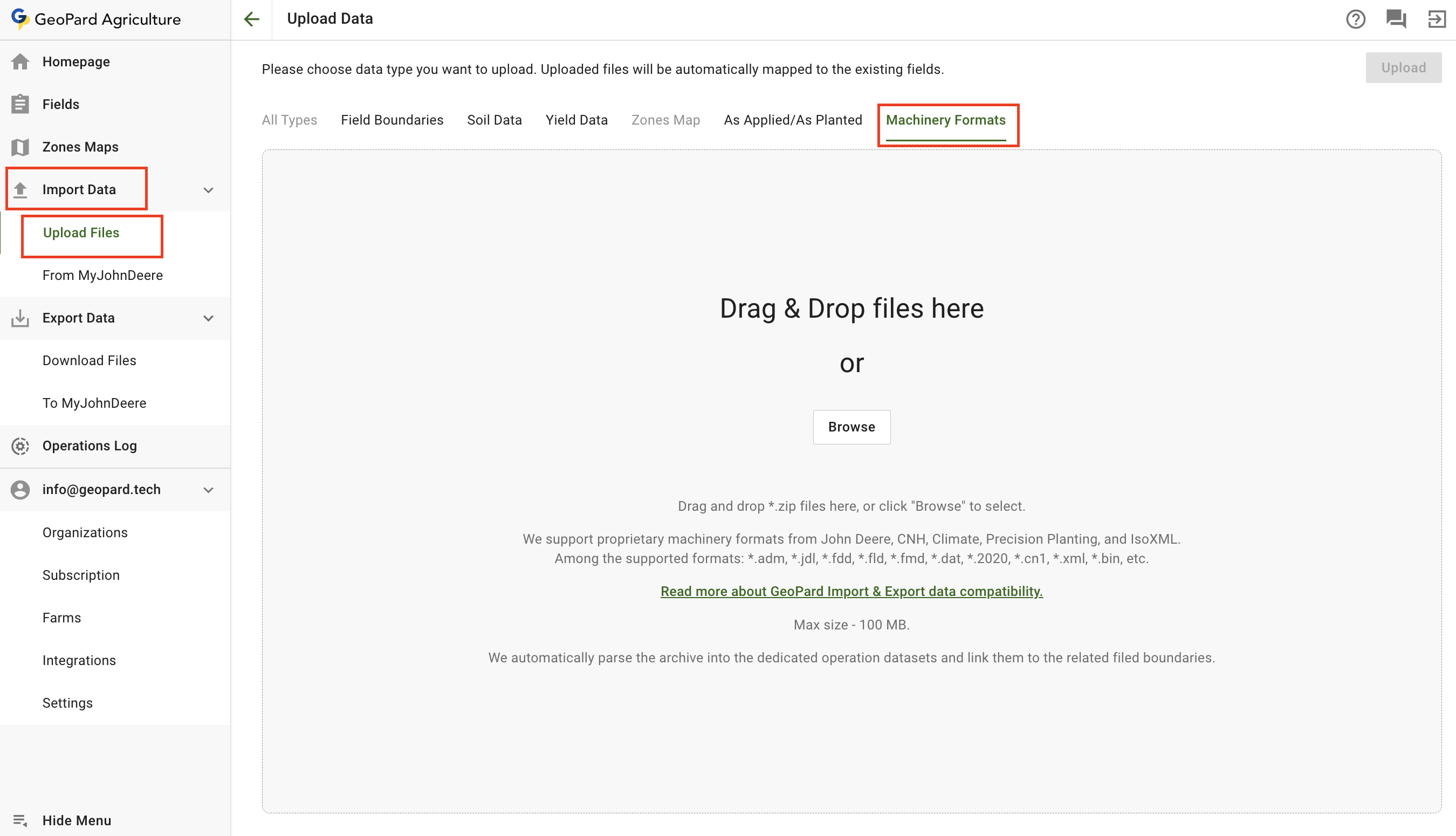
Lai augšupielādētu failus tehnikas patentētajos formātos, izvēlieties **Datu imports** izvēlni un **Failu augšupielāde** vienumu. Pēc tam izvēlieties **Tehnikas formāti**.
Ņemiet vērā, ka ir daži ierobežojumi:
* GeoPard atbalsta patentētos tehnikas formātus no John Deere, CNH, Climate, Precision Planting un IsoXML.
* Starp atbalstītajiem formātiem: \*.adm, \*.jdl, \*.fdd, \*.fld, \*.fmd, \*.dat, \*.2020, \*.cn1, \*.xml, \*.bin u. c.
[Lasiet vairāk par GeoPard Importa un Eksporta datu saderību.](https://geopard.tech/data-compatibility/)
* Maksimālais izmērs — 100 MB.
* GeoPard automātiski parsē arhīvu tam paredzētajos Operāciju datu kopumos un sasaista tos ar attiecīgajām lauku robežām.
Augšupielādēt tehnikas patentētos failus
1. Izvēlieties saimniecību, kurai vēlaties augšupielādēt datus. Noklikšķiniet **Izkliedēts/iestādīts** cilni.
2. Jūs varat vai nu vilkt un nomest vienu vai vairākus lauka veikšanas datu kopumus panelī, vai noklikšķināt **Pārlūkot** pogas un izvēlēties datu kopu no sava datora.
3. Noklikšķiniet uz **Augšupielādēt** pogu. Pēc tam lietotne pārbaudīs, vai fails atbilst prasībām, un saglabās datus.
Pagaidiet apstiprinājuma dialogu, lai redzētu, ka datu kopa ir veiksmīgi augšupielādēta:
Parsētie datu kopumi būs pieejami kokā attiecīgajās sadaļās turpmākām darbībām.
Ražas datu kopums, parsēts no DAT formāta
---
# Agent Instructions
This documentation is published with GitBook. GitBook is the documentation platform designed so that both humans and AI agents can read, navigate, and reason over technical content effectively. Learn more at gitbook.com.
## Querying This Documentation
If you need additional information that is not directly available in this page, you can query the documentation by asking a question.
Perform an HTTP GET request on the following URL with the `ask` and `goal` query parameters:
```
GET https://docs.geopard.tech/geopard-tutorials/lva/produkta-apskats-timekla-lietotne/importet-precizas-lauksaimniecibas-datus/tehnikas-patentetie-formati.md?ask=&goal=
```
`ask` is the immediate question: it should be specific, self-contained, and written in natural language.
`goal` is what the user is ultimately trying to achieve, the reason they need the answer. Sharing it helps GitBook give you a better, more relevant answer. A goal is most helpful when it describes the outcome the user wants rather than restating the question. For example, with `ask=how do I create an API token`, a goal like `automate deployments from our CI pipeline` lets GitBook tailor the answer to that use case.
The response will contain a direct answer to the question and relevant excerpts and sources from the documentation.
Use this mechanism when the answer is not explicitly present in the current page, you need clarification or additional context, or you want to retrieve related documentation sections.