> For the complete documentation index, see [llms.txt](https://docs.geopard.tech/geopard-tutorials/llms.txt). Markdown versions of documentation pages are available by appending `.md` to page URLs; this page is available as [Markdown](https://docs.geopard.tech/geopard-tutorials/lva/gis-atrie-padomi/qgis-change-string-to-number-values-in-the-shapefile.md).
# QGIS: teksta lauka pārvēršana skaitliskā laukā shapefile failā
Izmantojiet QGIS lauku kalkulatorā to\_real() vai to\_int(), lai teksta vērtības pārvērstu skaitļos, saglabātu decimāldaļas un labotu normas vai ražības kolonnas, kuras neimportējas.
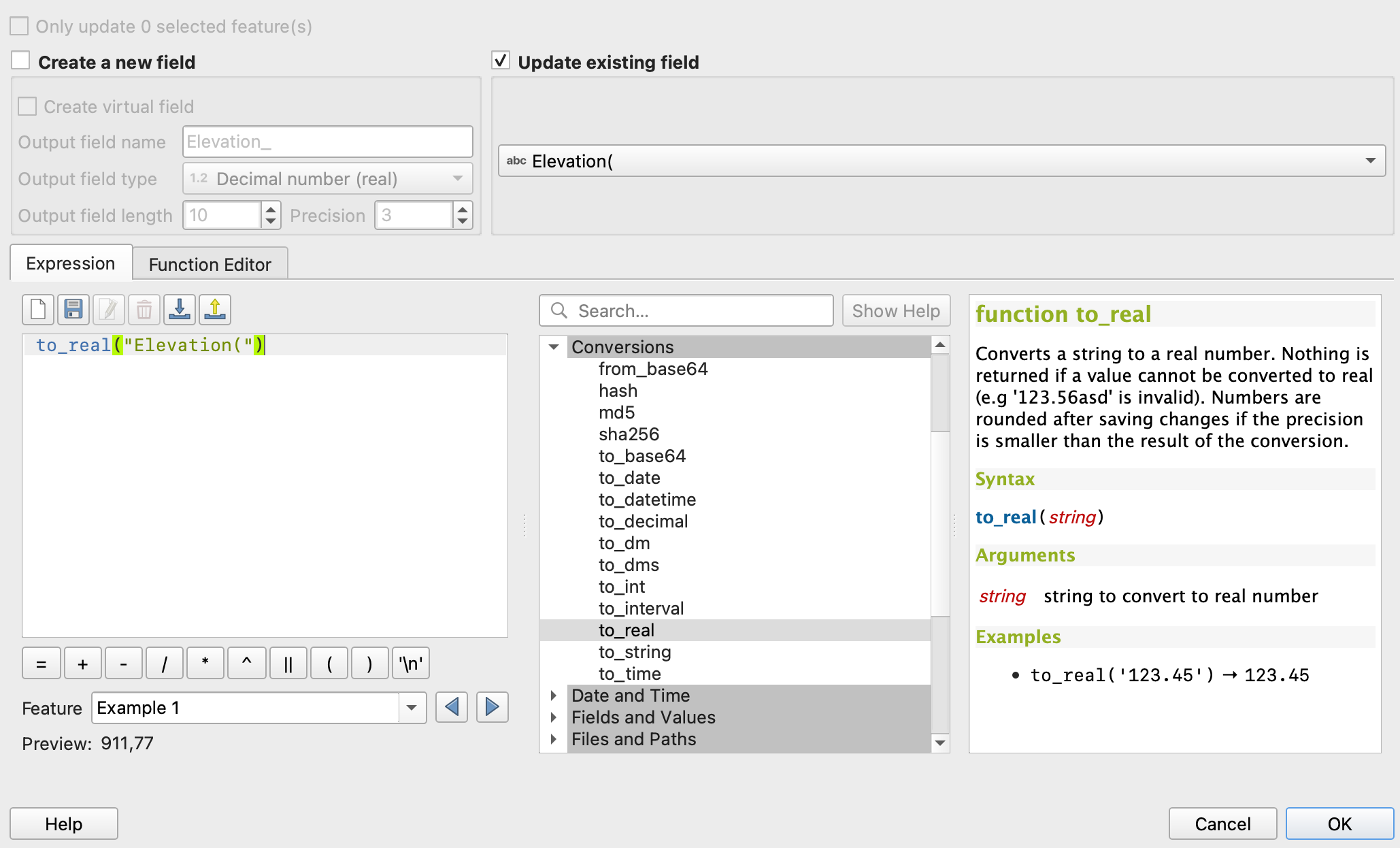
Atveriet atribūtu tabulu, palaidiet lauku kalkulatoru, izveidojiet jaunu decimāldaļu lauku un ievadiet `to_real("your_field")`. Izmantojiet `to_int()` veseliem skaitļiem. Ja pēc saglabāšanas decimāldaļas pazūd, iestatiet izvades lauka garumu uz 0 vai precizitāti, kas ir lielāka par nulli. Parasti ražas vai izsējas normas kolonna kartē netiek iekrāsota vai importēta kā norma tāpēc, ka skaitļi ir saglabāti kā teksts.
{% hint style="success" %}
Augšupielādējiet izlaboto failu un skatiet to kartē: [Sākt bez maksas](https://app.geopard.tech/auth/sign-up?utm_source=docs\&utm_medium=cta\&utm_campaign=qgis-change-string-to-number-values-in-the-shapefile)
{% endhint %}
QGIS vidē virkni var pārveidot par skaitli, izmantojot rīku “Lauku kalkulators”. Vispirms atveriet modificējamā slāņa atribūtu tabulu. Pēc tam noklikšķiniet uz pogas “Atvērt lauku kalkulatoru”. Lodziņā “Izteiksme” ievadiet to\_real(, kam seko pārveidojamā virknes lauka nosaukums un aizverošā iekava. Piemēram, lai virknes lauku ar nosaukumu “string\_field” pārveidotu par skaitlisku lauku, lodziņā “Izteiksme” ievadiet to\_real("string\_field"). Varat arī mainīt izvades lauka nosaukumu un datu tipu, atlasot atbilstošās opcijas. Visbeidzot noklikšķiniet uz “Labi”, lai pabeigtu pārveidošanu. Sākotnējais virknes lauks paliks atribūtu tabulā, bet tabulai tiks pievienots jauns skaitlisks lauks.
1. Atveriet “Rekvizīti”
2. Dodieties uz “Lauku kalkulators”
3. Atzīmējiet “Atjaunināt esošo lauku”
4. to\_real("attributeName")
5. Saglabājiet labojumus
6. Atkārtojiet to pašu katram atribūtam
{% hint style="success" %}
Augšupielādējiet izlaboto failu un skatiet to kartē: [Sākt bez maksas](https://app.geopard.tech/auth/sign-up?utm_source=docs\&utm_medium=cta\&utm_campaign=qgis-change-string-to-number-values-in-the-shapefile)
{% endhint %}
---
# Agent Instructions
This documentation is published with GitBook. GitBook is the documentation platform designed so that both humans and AI agents can read, navigate, and reason over technical content effectively. Learn more at gitbook.com.
## Querying This Documentation
If you need additional information that is not directly available in this page, you can query the documentation by asking a question.
Perform an HTTP GET request on the following URL with the `ask` and `goal` query parameters:
```
GET https://docs.geopard.tech/geopard-tutorials/lva/gis-atrie-padomi/qgis-change-string-to-number-values-in-the-shapefile.md?ask=&goal=
```
`ask` is the immediate question: it should be specific, self-contained, and written in natural language.
`goal` is what the user is ultimately trying to achieve, the reason they need the answer. Sharing it helps GitBook give you a better, more relevant answer. A goal is most helpful when it describes the outcome the user wants rather than restating the question. For example, with `ask=how do I create an API token`, a goal like `automate deployments from our CI pipeline` lets GitBook tailor the answer to that use case.
The response will contain a direct answer to the question and relevant excerpts and sources from the documentation.
Use this mechanism when the answer is not explicitly present in the current page, you need clarification or additional context, or you want to retrieve related documentation sections.