> For the complete documentation index, see [llms.txt](https://docs.geopard.tech/geopard-tutorials/llms.txt). Markdown versions of documentation pages are available by appending `.md` to page URLs; this page is available as [Markdown](https://docs.geopard.tech/geopard-tutorials/lva/api-dokumentacija/darba-saksana-ar-geopard-api.md).
# Darba sākšana ar GeoPard API
GeoPard komanda stingri iesaka sākt ar Altair, lai rūpīgi izpētītu GeoPard API funkcionalitāti. Tas vienmēr izgūst pieejamo entītiju, vaicājumu, mutāciju un abonementu jaunāko versiju. Lūdzu, skatiet tālāk norādīto ātrās darba uzsākšanas ceļvedi:
1. Instalējiet Altair GraphQL Chrome paplašinājumu no šī [SAITE](https://chrome.google.com/webstore/detail/altair-graphql-client/flnheeellpciglgpaodhkhmapeljopja) vai, alternatīvi, lietojiet Altair GraphQL klientu tieši savā [pārlūkprogrammā](https://altairgraphql.dev/).
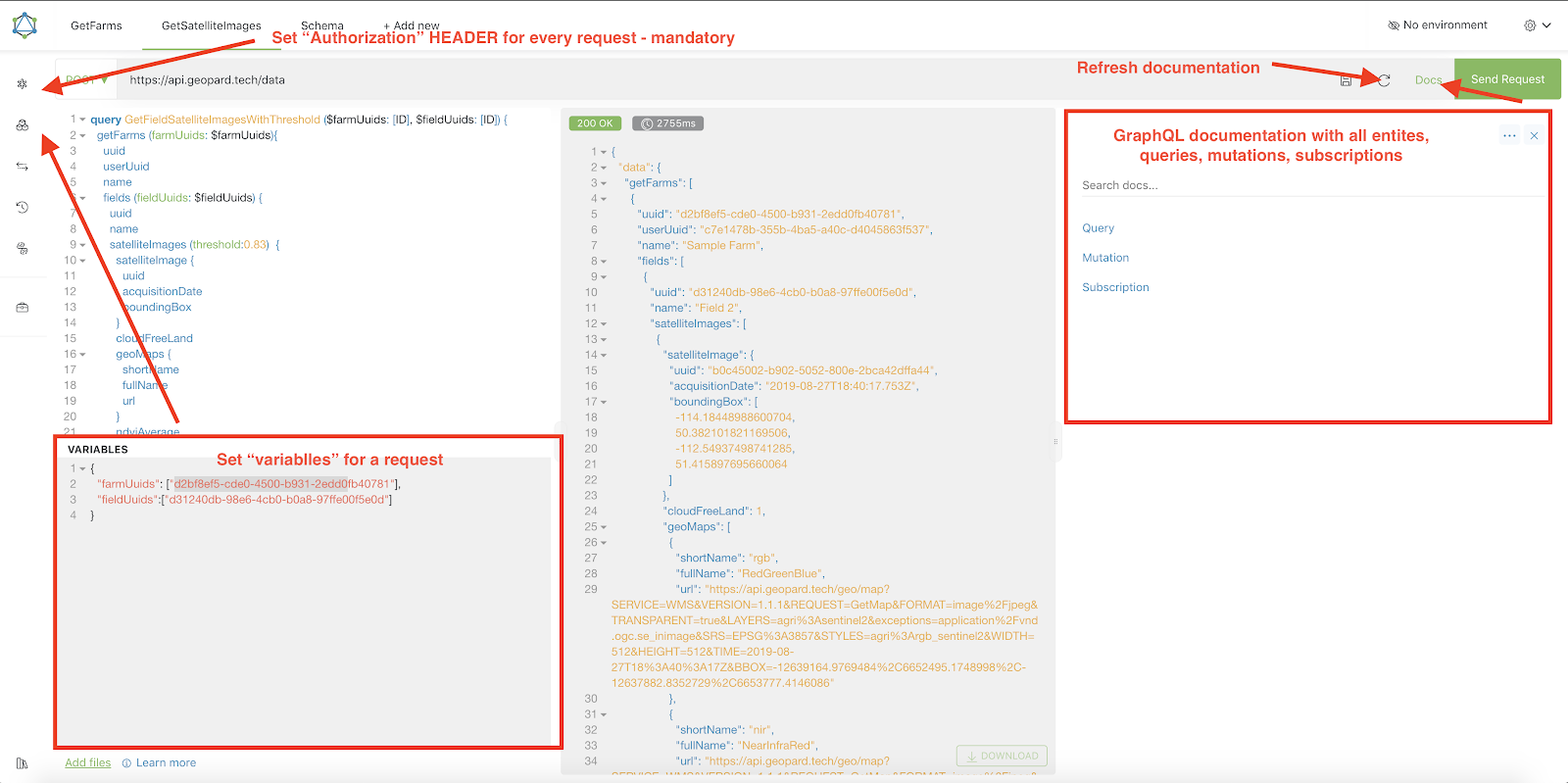
2. Katrs pieprasījums ir jāautentificē ar `Autorizācija` GALVENIETI, kur jāiekļauj nepieciešamais žetons. Ātrai testēšanai `Autorizācija` GALVENIETES vērtību var iegūt no pieprasījumiem pēc pieteikšanās GeoPard Agriculture.\
\&#xNAN;*Īss skaidrojums ir redzams zemāk esošajā ekrānattēlā.*
3. GraphQL saknes galapunkts atrodas [`https://api.geopard.tech/data`](https://api.geopard.tech/data).\
\&#xNAN;*Īss skaidrojums ir redzams zemāk esošajā ekrānattēlā.*
4. Piekļuvi GraphQL shēmai var atrast Altair saskarnē zem pogas "Docs". Šī sadaļa ļauj pārvietoties pa visiem pieejamajiem Queries, Mutations un Subscriptions. Turklāt tā sniedz ieskatu dažādās entītijās un to attiecīgajās struktūrās, nodrošinot visaptverošu izpratni par sistēmas GraphQL uzbūvi.\
\&#xNAN;*Īss skaidrojums ir redzams zemāk esošajā ekrānattēlā.*
5. Pārliecinieties, ka izejošie pieprasījumi darbojas pareizi, izmantojot pārlūkprogrammas izstrādātāja konsoli. Varat lietot pieprasījumu filtrus, piemēram, `/data`.
6. Shēmai var piekļūt no šī [ŠEIT](/geopard-tutorials/lva/api-dokumentacija/geopard-api-datu-shema.md).
7. Failu augšupielādei mēs izmantojam [šos galapunktus](/geopard-tutorials/lva/api-dokumentacija/geopard-api-pieprasijumu-parskats/55.-augsupieladet-zip-failus-virs-6-mb.md).
8. Lai piekļūtu rastra un vektordatiem, mēs izmantojam OGC WMS (rastra attēli ātrai attēlošanai) un WFS formātus (`shp`, `geojson`). Lai iegūtu vairāk informācijas, lūdzu, skatiet mūsu [Geo Endpoint](/geopard-tutorials/lva/api-dokumentacija/geo-galapunkti-telpisko-datu-piekluvei.md)u sadaļu.
{% hint style="info" %}
Īss ceļvedis ar padomiem, kā lietot Altair, ir izcelts zemāk esošajā ekrānattēlā.
{% endhint %}
Altrair: Īss ceļvedis
---
# Agent Instructions
This documentation is published with GitBook. GitBook is the documentation platform designed so that both humans and AI agents can read, navigate, and reason over technical content effectively. Learn more at gitbook.com.
## Querying This Documentation
If you need additional information that is not directly available in this page, you can query the documentation by asking a question.
Perform an HTTP GET request on the following URL with the `ask` and `goal` query parameters:
```
GET https://docs.geopard.tech/geopard-tutorials/lva/api-dokumentacija/darba-saksana-ar-geopard-api.md?ask=&goal=
```
`ask` is the immediate question: it should be specific, self-contained, and written in natural language.
`goal` is what the user is ultimately trying to achieve, the reason they need the answer. Sharing it helps GitBook give you a better, more relevant answer. A goal is most helpful when it describes the outcome the user wants rather than restating the question. For example, with `ask=how do I create an API token`, a goal like `automate deployments from our CI pipeline` lets GitBook tailor the answer to that use case.
The response will contain a direct answer to the question and relevant excerpts and sources from the documentation.
Use this mechanism when the answer is not explicitly present in the current page, you need clarification or additional context, or you want to retrieve related documentation sections.