> For the complete documentation index, see [llms.txt](https://docs.geopard.tech/geopard-tutorials/llms.txt). Markdown versions of documentation pages are available by appending `.md` to page URLs; this page is available as [Markdown](https://docs.geopard.tech/geopard-tutorials/jpn/tsu-webapuri/john-deere-operations-center-lian-xie.md).
# John Deere Operations Center連携
GeoPardは、John Deere Operations Centerとの双方向自動連携を業界最高水準で提供します。
John Deere Operations Center アカウントをお持ちの場合、GeoPard と簡単に連携して、追加機能と利点を利用できます。まずは app.geopard.tech にアクセスして、100ヘクタール(250エーカー)の範囲を含む無料トライアルに登録してください。
GeoPard は、MyJohnDeere Operation Center のユーザー(農家および販売店)に高度な自動分析を提供します
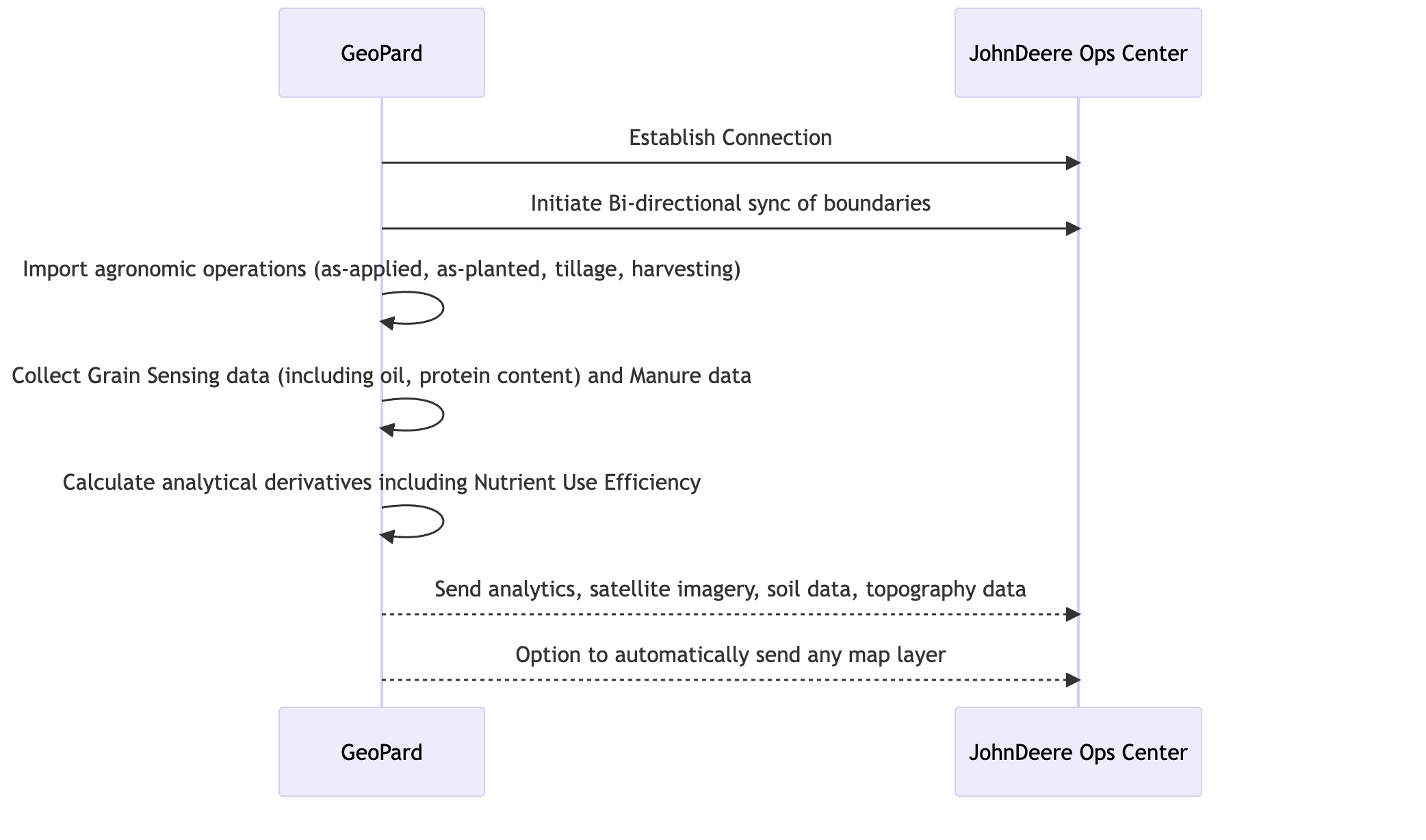
### 自動双方向連携でサポートされる機能
1. [MyJohnDeere Operations Center に接続](/geopard-tutorials/jpn/tsu-webapuri/john-deere-operations-center-lian-xie/2-john-deere-operations-centerni.md) GeoPard で
2. [MyJohnDeere Organizations に接続](/geopard-tutorials/jpn/tsu-webapuri/john-deere-operations-center-lian-xie/3-john-deereni.md)
3. [MyJohnDeere Operations Center からインポート ](/geopard-tutorials/jpn/tsu-webapuri/john-deere-operations-center-lian-xie/4-john-deere-operations-centerkarageopardherimi.md)GeoPard へ
* 圃場境界
* 作業マップ
* *播種(播種実績)*
* *施用実績:散布* 施用した肥料/作物保護資材/生育調整剤の
* *GrainSensing データ*、タンパク質・油分含有量を含む [John Deere HarvestLab™ 3000 からの](https://www.deere.com/en/technology-products/precision-ag-technology/data-management/harvest-lab-constituent-sensing/)
* *堆肥データ*
* *収穫*
* *耕起*
* *完全な履歴アーカイブ*
4. GeoPard から John Deere Operations Center へエクスポート
* [圃場境界](/geopard-tutorials/jpn/tsu-webapuri/john-deere-operations-center-lian-xie/7-wojohn-deere-operations-centerheekusupto.md)
* [圃場を John Deere Operations Center と同期](/geopard-tutorials/jpn/tsu-webapuri/john-deere-operations-center-lian-xie/11-wojohn-deere-operations-centerto.md)
* [作業計画としての VRA マップ](/geopard-tutorials/jpn/tsu-webapuri/john-deere-operations-center-lian-xie/8-rxmappuwotoshitejohn-deere-operations-centerheekusupto.md) 用
* Rx 播種
* Rx 施肥(近日公開)
* 作物保護(近日公開)
* 植物生長調整剤(近日公開)
* [ファイルとしての VRA マップ](/geopard-tutorials/jpn/tsu-webapuri/john-deere-operations-center-lian-xie/6-rxmappuwofairutoshitejohn-deere-operations-centerheekusupto.md) 用
* Rx 播種
* Rx 施肥
* 作物保護
* 植物生長調整剤
* 管理ゾーン(例:圃場ポテンシャルマップ)
* LIDAR または GPS データに基づく地形マップ
* サンプリングまたはスキャンによる土壌マップ([電気伝導度](https://geopard.tech/blog/k9s011204i-high-density-sensor-data/)、Veris/EM38/DualEM、 [SoilOptix](https://geopard.tech/blog/brrck2udr1-soiloptix-data-analysis-in-precision-agr/), [TopSoilMapper](https://geopard.tech/blog/agte3p8ec1-analyze-geoprospectors-topsoilmapper-dat/)).
* Landsat、Sentinel、Planet の各提供元による RGB、NIR、およびコントラスト/強調植生の衛星画像
* 式ベースの分析; [詳細](https://geopard.tech/blog/equation-based-analytics-precision/) NUE、ROI マップ、目標値対施用量の計算について
5. [自動データ同期](/geopard-tutorials/jpn/tsu-webapuri/john-deere-operations-center-lian-xie/5-dtawo.md)\
以下の機能は、GeoPard の John Deere 連携ページで1つずつ設定できます。
* GeoPard は新しく収集された作業マップを継続的に監視し、自動的にダウンロードして既存の圃場境界に紐づけます。\
追跡可能な作業マップには、 *播種*, *散布*, *収穫*、および *耕起*.
* GeoPard は、すべての変更を *圃場境界* ユーザーが加えた変更を Ops Center に戻します。
* GeoPard は次のものを送信します *地形マップ*, *土壌マップ* サンプルとスキャナーによる、 *管理ゾーン*、および *式マップ* を視覚的なマップレイヤーとして John Deere Operations Center に送信します。
6. Climate FieldView とのデータ接続\
これには、John Deere Operations Center を介した GeoPard と FieldView 間のほぼリアルタイムのデータ交換が含まれます。GeoPard は、履歴アーカイブを含む FieldView に保存された作業データを収集し、圃場境界と VRA マップを送信します。
---
# Agent Instructions
This documentation is published with GitBook. GitBook is the documentation platform designed so that both humans and AI agents can read, navigate, and reason over technical content effectively. Learn more at gitbook.com.
## Querying This Documentation
If you need additional information that is not directly available in this page, you can query the documentation by asking a question.
Perform an HTTP GET request on the following URL with the `ask` and `goal` query parameters:
```
GET https://docs.geopard.tech/geopard-tutorials/jpn/tsu-webapuri/john-deere-operations-center-lian-xie.md?ask=&goal=
```
`ask` is the immediate question: it should be specific, self-contained, and written in natural language.
`goal` is what the user is ultimately trying to achieve, the reason they need the answer. Sharing it helps GitBook give you a better, more relevant answer. A goal is most helpful when it describes the outcome the user wants rather than restating the question. For example, with `ask=how do I create an API token`, a goal like `automate deployments from our CI pipeline` lets GitBook tailor the answer to that use case.
The response will contain a direct answer to the question and relevant excerpts and sources from the documentation.
Use this mechanism when the answer is not explicitly present in the current page, you need clarification or additional context, or you want to retrieve related documentation sections.