> For the complete documentation index, see [llms.txt](https://docs.geopard.tech/geopard-tutorials/llms.txt). Markdown versions of documentation pages are available by appending `.md` to page URLs; this page is available as [Markdown](https://docs.geopard.tech/geopard-tutorials/jpn/tsu-webapuri/dtaworimi/rabocsvexcel-sumtorimi.md).
# 土壌ラボ結果(CSV/Excel) - スマート取り込み
GeoPard Agricultureは、土壌ラボ結果の形式の混乱を自動スマート取り込みで真に「解決」する初のプラットフォームです。
## 概要
土壌分析ラボのファイルは、テンプレート、言語、列名、単位がバラバラで、Excel内に複数シートが入っていることさえあり、何かと整っていないことが多いです。Smart Import はこれらのファイルを自動で読み取り、統一されたサンプリングポイントデータに変換して、きれいな分析と推奨作成に使えるようにします。
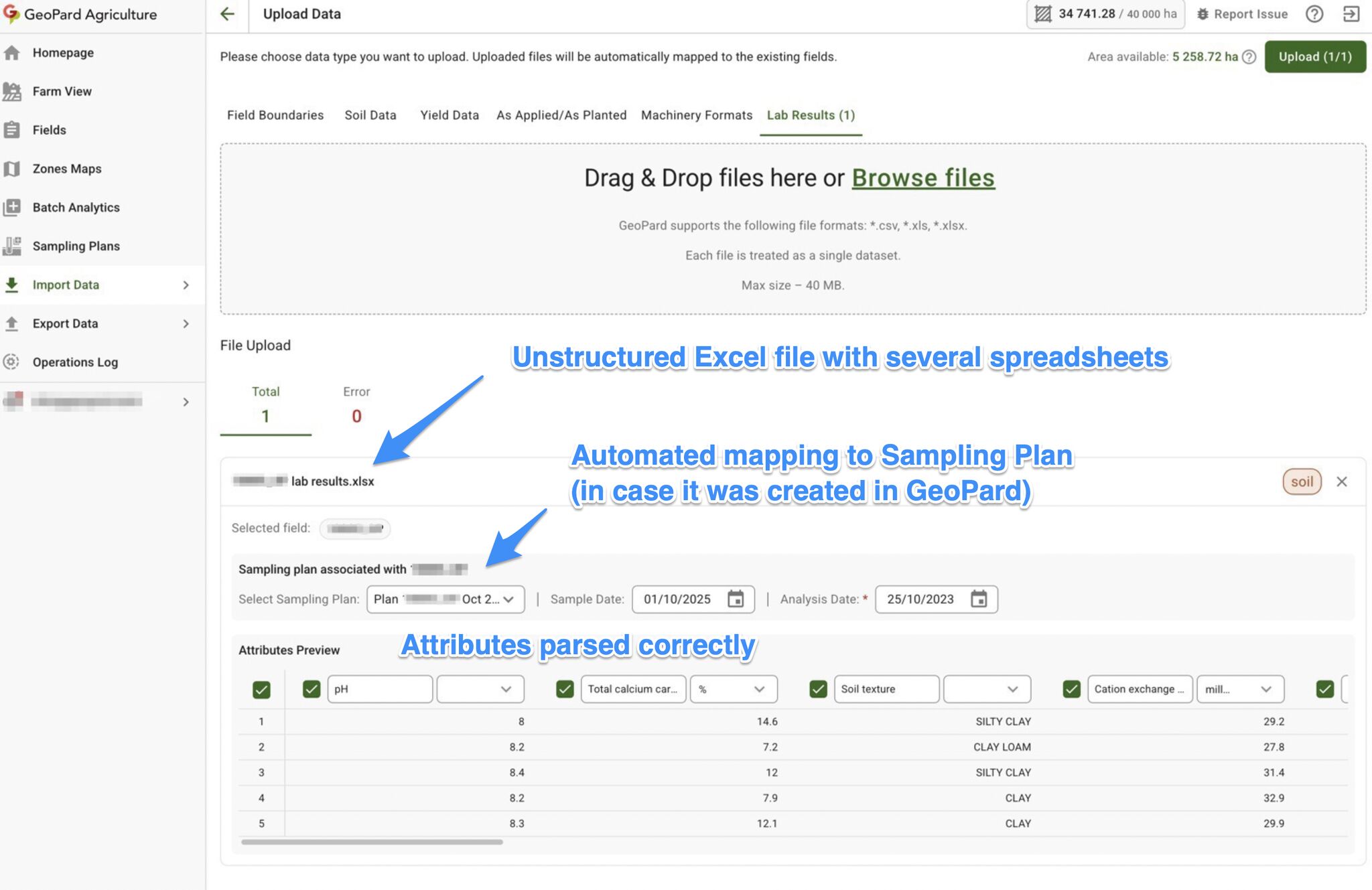
CSV/Excelの土壌分析結果を自動解析
## 対応ファイル
* CSV(.csv)
* Excel(.xls、.xlsx)、複数シートのブックも対応
* 1回のアップロードで複数ファイル可(1ファイル40 MBまで)
## 自動で行われること
* 自動解析:実際の表と見出しを見つけます(「非標準」レイアウトでも対応)
* 多言語対応:各言語や地域独自の名称をまたいで、一般的なラボ項目名を認識します
* スマートマッピング:主要栄養素と微量栄養素を検出し、マッピングのプレビューを作成します(編集可)
* 単位のマッピング+正規化:単位を検出し、統一単位に変換し、異常な単位や混在単位をフラグします
* フィールド照合:GeoPardのサンプリング計画、またはファイル内の座標を使ってポイントを圃場に紐づけます
## GeoPardがラボ結果を圃場に紐づける方法
GeoPardはラボ結果を正しい圃場に4通りの方法で紐づけられます:
1. **サンプリング計画IDとゾーンID**\
一意のサンプリング計画IDとゾーンIDを別々の列に入れてください。GeoPardで作成したサンプリング計画からゾーン別のコンポジットサンプリングを行う場合、これが最も確実な方法です。
2. **ポイント座標(`経度` / `緯度`)**\
経度と緯度を2列で指定します。ポイントが圃場境界内に入っている場合、GeoPardが空間的に照合します。この方法はコアポイントサンプリング専用です。
3. **WKTジオメトリ**\
WKTジオメトリを1列で指定します。GeoPardがジオメトリを圃場境界に空間的に照合します。
4. **圃場名 / 圃場ID**\
圃場名または圃場IDのテキスト列を使います。GeoPardが圃場と照合します `名称`. \
`圃場ID` はGeoPardの圃場UUIDです(ブラウザのURLにある任意の圃場ページで確認できます。例:fieldId]\(#user-content-fn-1)[^1] ).
## インポート方法
1. データをインポート → ファイルをアップロード → ラボ結果
2. CSV/XLS/XLSXをアップロード
3. 圃場 / サンプリング計画(ある場合)+日付を選択
4. プレビューでマッピング+単位を確認
5. アップロード
## 計画機能に接続
最も相性がよいのは [土壌サンプリング - 自動計画](/geopard-tutorials/jpn/tsu-webapuri/sanpuringu.md) または座標付きファイルです。
## すべてのユーザーが利用できます。
[^1]: 圃場のUUID。インポートするExcelまたはCSVファイルに含めておく必要があります。
---
# Agent Instructions
This documentation is published with GitBook. GitBook is the documentation platform designed so that both humans and AI agents can read, navigate, and reason over technical content effectively. Learn more at gitbook.com.
## Querying This Documentation
If you need additional information that is not directly available in this page, you can query the documentation by asking a question.
Perform an HTTP GET request on the following URL with the `ask` and `goal` query parameters:
```
GET https://docs.geopard.tech/geopard-tutorials/jpn/tsu-webapuri/dtaworimi/rabocsvexcel-sumtorimi.md?ask=&goal=
```
`ask` is the immediate question: it should be specific, self-contained, and written in natural language.
`goal` is what the user is ultimately trying to achieve, the reason they need the answer. Sharing it helps GitBook give you a better, more relevant answer. A goal is most helpful when it describes the outcome the user wants rather than restating the question. For example, with `ask=how do I create an API token`, a goal like `automate deployments from our CI pipeline` lets GitBook tailor the answer to that use case.
The response will contain a direct answer to the question and relevant excerpts and sources from the documentation.
Use this mechanism when the answer is not explicitly present in the current page, you need clarification or additional context, or you want to retrieve related documentation sections.