> For the complete documentation index, see [llms.txt](https://docs.geopard.tech/geopard-tutorials/llms.txt). Markdown versions of documentation pages are available by appending `.md` to page URLs; this page is available as [Markdown](https://docs.geopard.tech/geopard-tutorials/jpn/rirsu/release-web-march-2025-improved-zones-workplans-updates-yield-data-enhancements.md).

# Webリリース 2025年3月（ゾーン改善、WorkPlan更新、収量データ強化）

より賢いゾーンマップ、より簡単なデータ取り込み、より良い操作体験！ ゾーンの平滑化、ファイルアップロード、収量属性選択、コスト追跡を改善し、セキュリティとUIも強化しました。

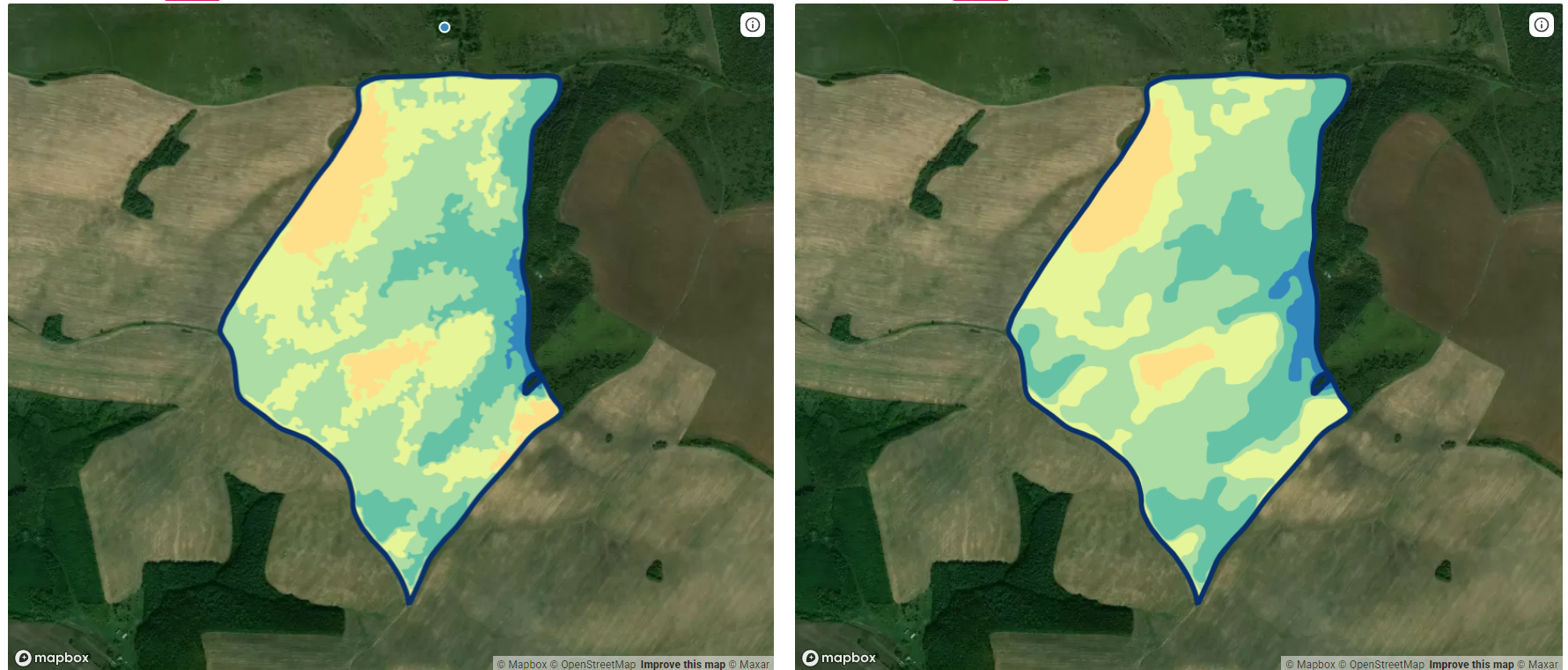
### **より滑らかで正確なゾーンマップ**

当社では、 **ゾーン平滑化アルゴリズム** 高度な **コンピュータービジョン技術**を活用して改良しました。これにより、 **ナチュラルブレイクス、等数、等間隔、およびすべての空間分類** のゾーンがより精緻になり、不要な境界の粗さや不整合が解消されます。

<figure><img src="https://1993076779-files.gitbook.io/~/files/v0/b/gitbook-x-prod.appspot.com/o/spaces%2FYICBELdyAXXebKAzfLOR%2Fuploads%2FXqJvgcdodAPtnqe1qjio%2Fimage%20(1).png?alt=media&amp;token=cd1d6129-b263-498c-8b8c-608b963ef7ac" alt=""><figcaption><p>より滑らかで正確なゾーンマップ</p></figcaption></figure>

### **複数境界ファイルのアップロードに対応**

さらに、 **ファイルアップロードインターフェース** 対応し、 **1つのファイルに複数の圃場境界を含められるようになりました**。ユーザーは次のファイルをアップロードできるようになりました： `.shp`, `.kml`, `.zip`、および `.kmz` 形式で、複数の圃場境界を含むファイルをアップロードできるため、データのインポートがより柔軟かつ効率的になります。

### **EPSG:4326以外の圃場境界をインポート**

ユーザーは圃場境界をシェープファイルとして、 **さまざまな座標系** （CRS）でインポートできるようになりました。ただし、 `.prj` ファイルが含まれている必要があります。この更新により、多様なGISワークフローとの互換性が向上します。

### **低解像度画面でのユーザーエクスペリエンスを改善**

使いやすさを向上させるため、 **マルチレイヤー分析ページ** を刷新しました。 **低解像度の画面**。フィルター、プレビュー、レイアウトコンポーネントが、さまざまな画面サイズにより効率よく適応するようになりました。

<figure><img src="https://1993076779-files.gitbook.io/~/files/v0/b/gitbook-x-prod.appspot.com/o/spaces%2FYICBELdyAXXebKAzfLOR%2Fuploads%2FwfPAKzY6frlrKpv1qbg4%2Fimage.png?alt=media&amp;token=726d6011-90a4-4e22-9139-6d5cb8a3da8f" alt=""><figcaption><p>低解像度画面でのユーザーエクスペリエンスを改善</p></figcaption></figure>

### **収量属性の自動選択**

を開くと、 **収量データセット**、システムが **最も関連性の高い収量属性を自動的に選択するようになりました**。これにより作業効率が向上し、手動での操作が減ります。

<figure><img src="https://1993076779-files.gitbook.io/~/files/v0/b/gitbook-x-prod.appspot.com/o/spaces%2FYICBELdyAXXebKAzfLOR%2Fuploads%2FQ5rAD8pDD2eNiFa1MpTp%2FScreenshot%202025-03-11%20at%2013.56.41.png?alt=media&amp;token=2bf7518c-0598-4900-b2a6-d22199ad84ea" alt=""><figcaption><p>収量属性の自動選択</p></figcaption></figure>

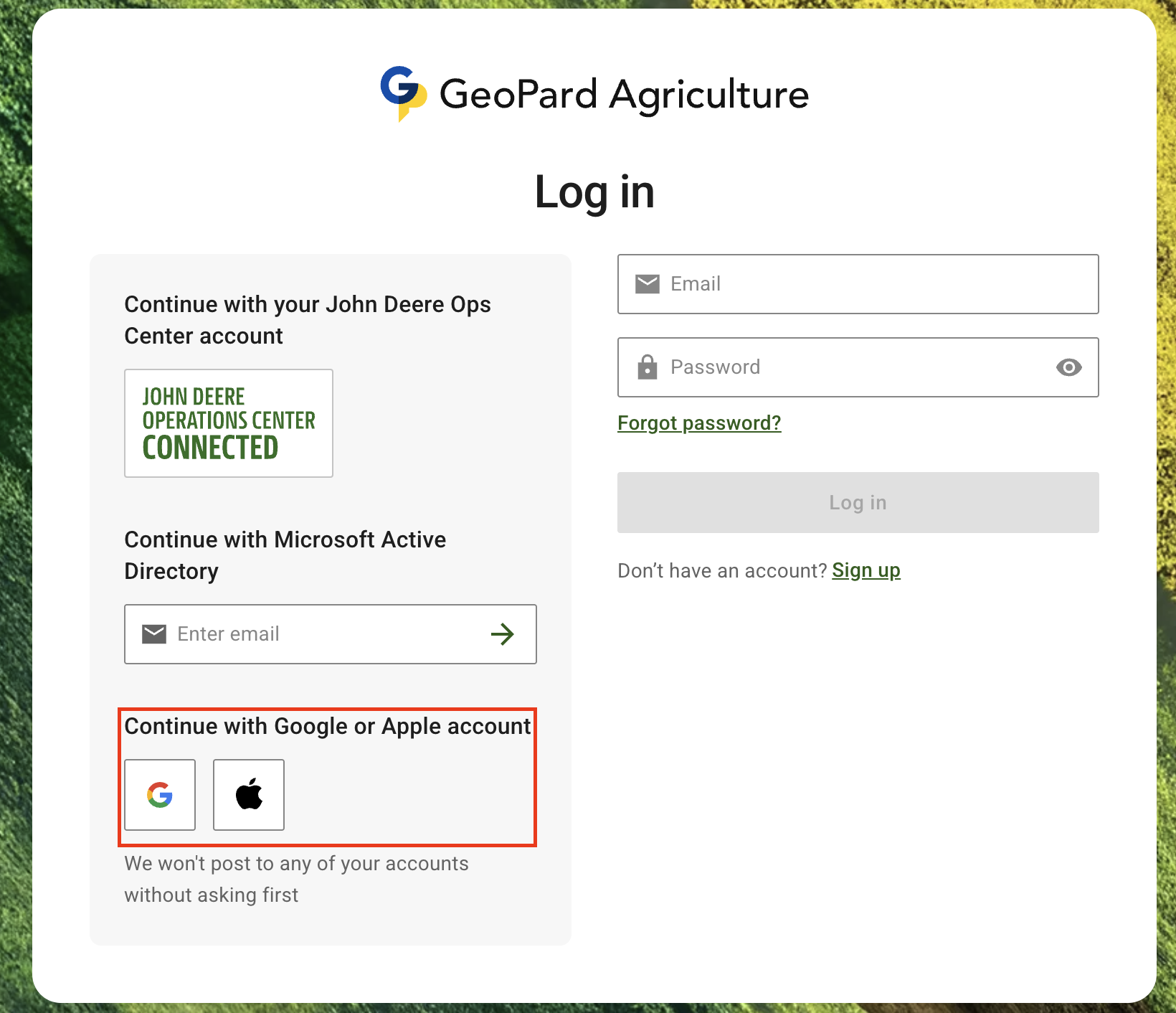
### **Appleでサインイン**

**Appleでサインイン** が復活しました！\
モバイルでApple経由で登録したユーザーは、GeoPardのウェブ版にもシームレスにログインできるようになりました。

<figure><img src="https://1993076779-files.gitbook.io/~/files/v0/b/gitbook-x-prod.appspot.com/o/spaces%2FYICBELdyAXXebKAzfLOR%2Fuploads%2FTSwaSfk3pVHaUjoFuVQv%2FScreenshot%202025-03-11%20at%2013.58.02.png?alt=media&amp;token=98bb1f30-87d2-4b33-a768-dd7c4c86f696" alt="" width="375"><figcaption><p>Appleでサインイン</p></figcaption></figure>

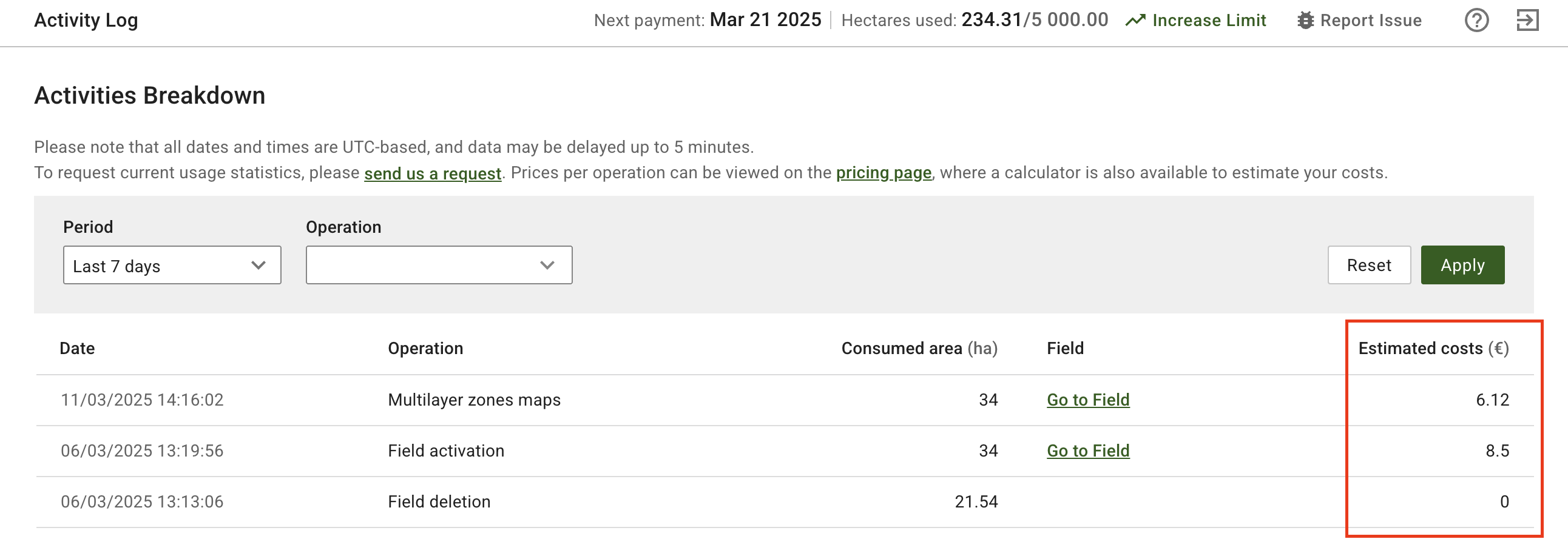
### **作業履歴での推定費用**

従量課金制のユーザーは、 **推定費用** を直接 **作業内訳テーブル**で確認できるようになり、利用状況や費用の把握が容易になりました。

<figure><img src="https://1993076779-files.gitbook.io/~/files/v0/b/gitbook-x-prod.appspot.com/o/spaces%2FYICBELdyAXXebKAzfLOR%2Fuploads%2F1cwOKWbdQIGMe7lcVE2G%2FScreenshot%202025-03-11%20at%2014.21.05.png?alt=media&amp;token=677afb9d-6b04-440f-93a7-35c70a19659d" alt=""><figcaption><p>作業履歴での推定費用</p></figcaption></figure>

### **John Deereの作業計画で任意の単位に対応**

ユーザーは任意の単位を **選択できるようになりました** 作成時に **John Deereの作業計画** 播種、施肥、散布に対応します。これにより、地域ごとの農業計測基準に合わせやすくなります。

<figure><img src="https://1993076779-files.gitbook.io/~/files/v0/b/gitbook-x-prod.appspot.com/o/spaces%2FYICBELdyAXXebKAzfLOR%2Fuploads%2FrDDGFEpUdcYI7vpsrDjZ%2FScreenshot%202025-03-12%20at%2012.46.09.png?alt=media&amp;token=449494fb-4dc3-44ab-8713-4450ee68d104" alt="" width="375"><figcaption><p>John Deereの作業計画で任意の単位に対応</p></figcaption></figure>

### **有料ユーザーの無料トライアルを制限**

次のユーザーは **有料プランが有効** のため、新たに **無料トライアル**を開始できなくなり、意図しないプラン変更を防げます。

### 無料トライアルの対象地域を拡大：英国、南アフリカ、ウクライナ、セルビア

「 **GeoPard無料トライアル** が新たに利用可能になりました： **英国（UK）、南アフリカ（ZA）、ウクライナ、セルビア**。これにより、より多くのユーザーにご利用いただけるようになりました。

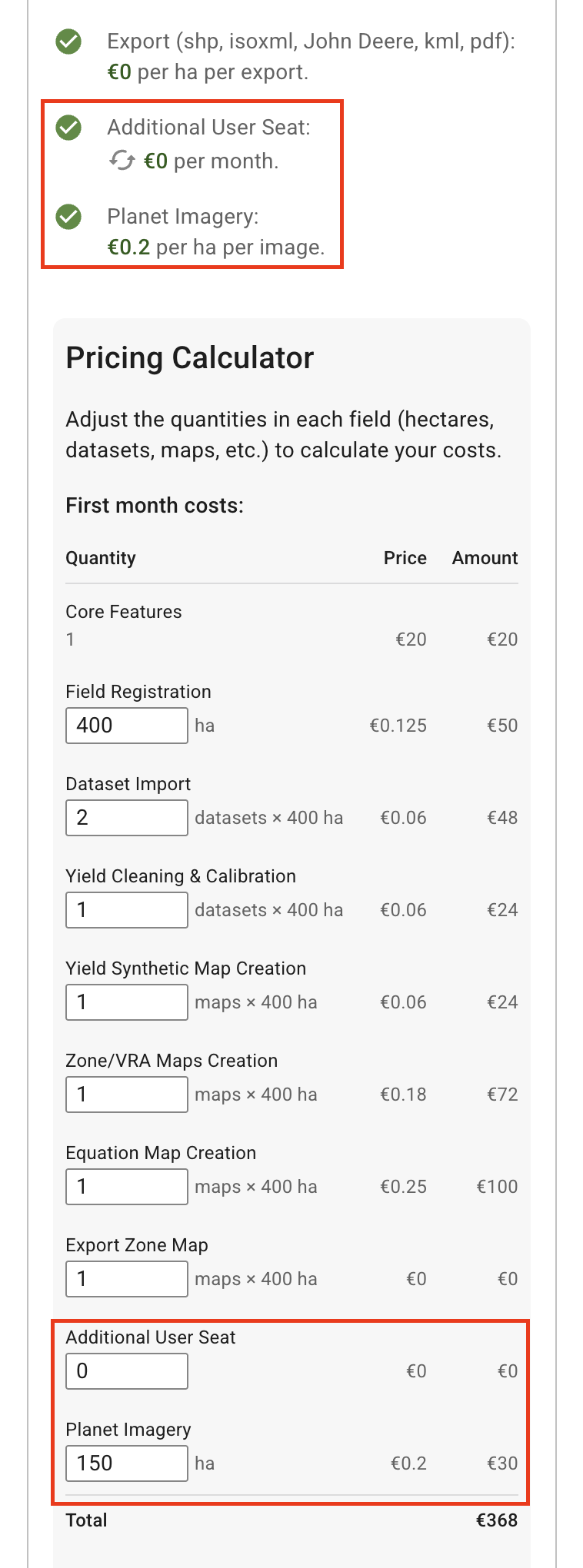
### **初月費用計算ツールの更新**

「 **初月費用計算ツール** に新たに追加されたのは、 **「追加ユーザー枠」** および **「Planet Imagery」** 従量課金プランの料金見積もりをより正確にするための料金。

<figure><img src="https://1993076779-files.gitbook.io/~/files/v0/b/gitbook-x-prod.appspot.com/o/spaces%2FYICBELdyAXXebKAzfLOR%2Fuploads%2FGcG82UOE0m3XYsqCMxJY%2FScreenshot%202025-03-11%20at%2014.19.39.png?alt=media&amp;token=d4bab948-0547-40c6-9f30-3c9de491411e" alt="" width="375"><figcaption><p>初月費用計算ツールの更新</p></figcaption></figure>

***

### **バグ修正と改善**

* スパムやボットによるアカウント登録を防ぐため、アカウント作成時にCAPTCHA認証を実施します。
* 「フィールドをアップロード」ボタンを押すと、間違ったタブが開く
* 問題の報告に添付ファイルが含まれない
* Appleログインのメールメッセージが正しくない
* ログイン後のリダイレクトに関する問題
* 料金計算ツールのUIに関する問題
* サブスクリプションが重複して作成される
* その `env` クエリパラメーター `setGeoMaps` 誤ってエンコードされることはなくなりました。

***

**GeoPard Agricultureをご利用いただき、ありがとうございます！** 🚜 🌱\
詳しくは、こちらをご覧ください [当社のドキュメント](https://docs.geopard.tech/) または [お問い合わせ](mailto:info@geopard.tech).


---

# Agent Instructions
This documentation is published with GitBook. GitBook is the documentation platform designed so that both humans and AI agents can read, navigate, and reason over technical content effectively. Learn more at gitbook.com.

## Querying This Documentation
If you need additional information that is not directly available in this page, you can query the documentation by asking a question.

Perform an HTTP GET request on the following URL with the `ask` and `goal` query parameters:

```
GET https://docs.geopard.tech/geopard-tutorials/jpn/rirsu/release-web-march-2025-improved-zones-workplans-updates-yield-data-enhancements.md?ask=<question>&goal=<user_goal>
```

`ask` is the immediate question: it should be specific, self-contained, and written in natural language.
`goal` is what the user is ultimately trying to achieve, the reason they need the answer. Sharing it helps GitBook give you a better, more relevant answer. A goal is most helpful when it describes the outcome the user wants rather than restating the question. For example, with `ask=how do I create an API token`, a goal like `automate deployments from our CI pipeline` lets GitBook tailor the answer to that use case.

The response will contain a direct answer to the question and relevant excerpts and sources from the documentation.

Use this mechanism when the answer is not explicitly present in the current page, you need clarification or additional context, or you want to retrieve related documentation sections.