> For the complete documentation index, see [llms.txt](https://docs.geopard.tech/geopard-tutorials/llms.txt). Markdown versions of documentation pages are available by appending `.md` to page URLs; this page is available as [Markdown](https://docs.geopard.tech/geopard-tutorials/jpn/rirsu/webrirsu-20248dtareiypurebynishitaznzn.md).
# Webリリース 2024年8月(データレイヤープレビュー、空間的に局在化したゾーン、再利用可能ゾーン)
このアップデートでは、ゾーンマップ作成時のデータレイヤープレビューが改善され、最大50個の空間的に局在化したゾーンをサポートしました。
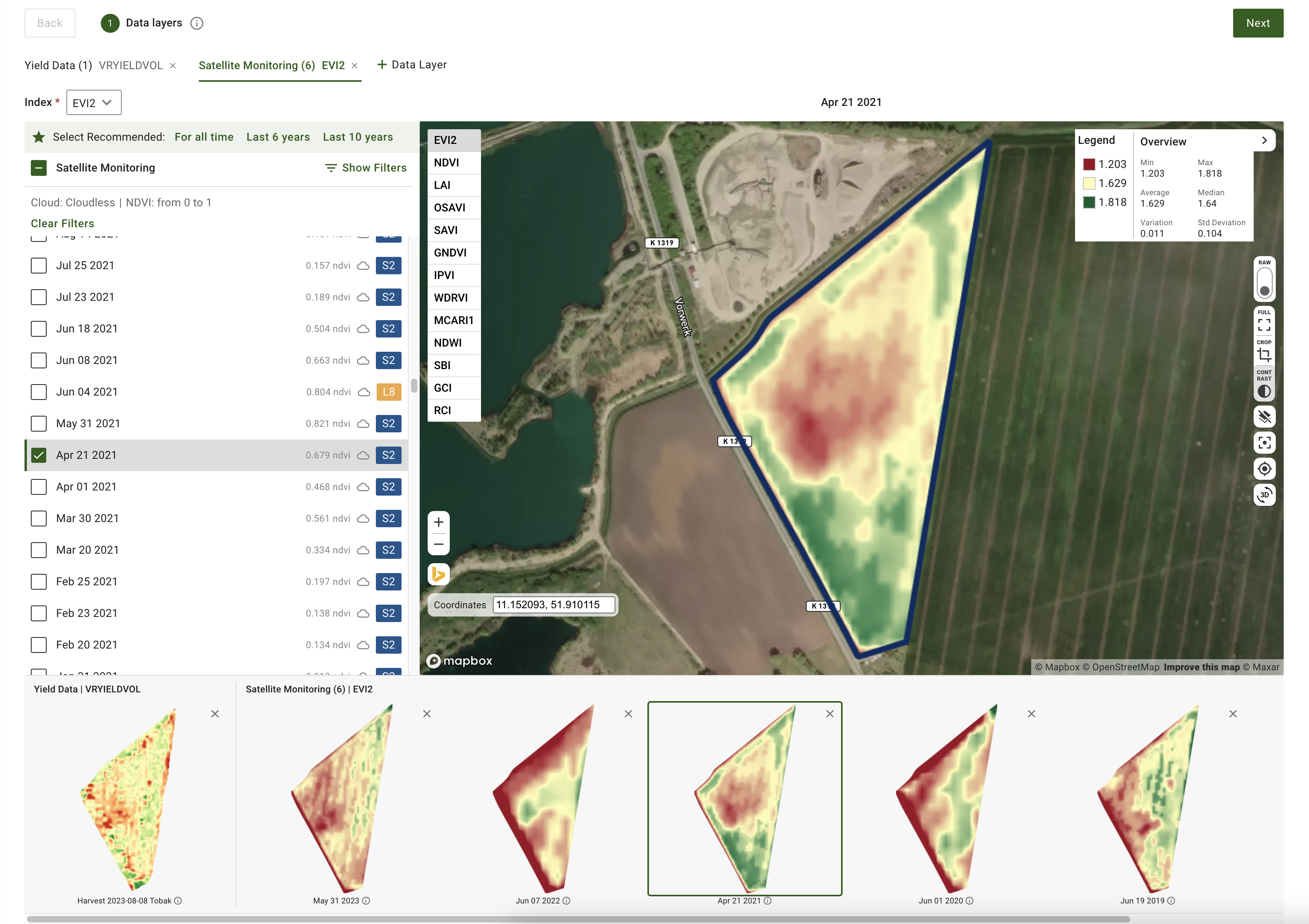
### ゾーンマップ作成のためのデータレイヤープレビューを強化
これからは、ゾーンマップを作成する際に、衛星画像や土壌、収量、散布履歴などのデータセットを含む、選択したデータレイヤーをプレビューできます。 ゾーンマップ作成の「データレイヤー」ステップでは、ページ下部にこれらのレイヤーのサムネイルプレビューが表示されます。各プレビューには、衛星画像の日付またはデータセット名のラベルが付いています。ツールチップからレイヤーを削除したり、詳細を開いたりすることもできます。アクティブな衛星画像またはデータセット名は地図の上に表示され、選択内容を追いやすくなります。
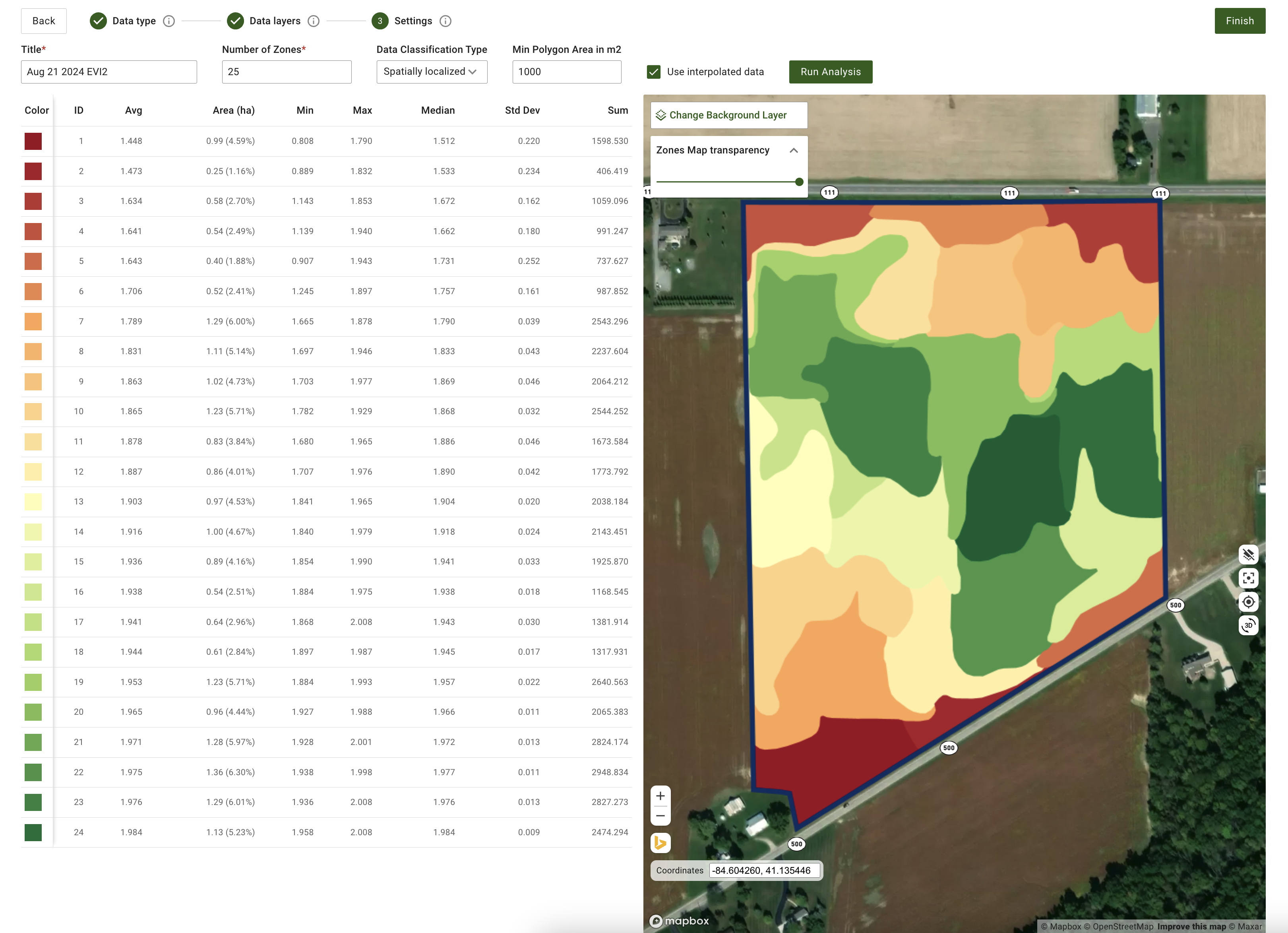
### 空間的に局所化されたゾーンマップ生成のための操作設定を更新
空間的に局所化されたゾーンの生成に、より柔軟性を追加しました。システムは現在 3ゾーンから50ゾーンまでの範囲で、11ゾーンを超えるゾーン作成をサポートしています。入力欄に希望するゾーン数を直接入力するだけです。この更新により、よりきめ細かな制御が可能になり、十分な地理空間の粒度を確保できます。
空間的に局所化されたゾーンマップ生成のための操作設定を更新
### 追加の機能改善と修正
これらの機能に加えて、 ソフトウェアエンジニアリングチームはGeoPardコアの改善を継続しています。今月の改善には、 自動テストのカバレッジ拡大 および クラウドインフラの最適化 が含まれ、全体的なパフォーマンス向上につなげています。
---
# Agent Instructions
This documentation is published with GitBook. GitBook is the documentation platform designed so that both humans and AI agents can read, navigate, and reason over technical content effectively. Learn more at gitbook.com.
## Querying This Documentation
If you need additional information that is not directly available in this page, you can query the documentation by asking a question.
Perform an HTTP GET request on the following URL with the `ask` and `goal` query parameters:
```
GET https://docs.geopard.tech/geopard-tutorials/jpn/rirsu/webrirsu-20248dtareiypurebynishitaznzn.md?ask=&goal=
```
`ask` is the immediate question: it should be specific, self-contained, and written in natural language.
`goal` is what the user is ultimately trying to achieve, the reason they need the answer. Sharing it helps GitBook give you a better, more relevant answer. A goal is most helpful when it describes the outcome the user wants rather than restating the question. For example, with `ask=how do I create an API token`, a goal like `automate deployments from our CI pipeline` lets GitBook tailor the answer to that use case.
The response will contain a direct answer to the question and relevant excerpts and sources from the documentation.
Use this mechanism when the answer is not explicitly present in the current page, you need clarification or additional context, or you want to retrieve related documentation sections.