> For the complete documentation index, see [llms.txt](https://docs.geopard.tech/geopard-tutorials/llms.txt). Markdown versions of documentation pages are available by appending `.md` to page URLs; this page is available as [Markdown](https://docs.geopard.tech/geopard-tutorials/jpn/rirsu/release-web-april-2024-batch-equation-maps-and-enhanced-layer-transparency.md).

# Webリリース 2024年4月（バッチ方程式マップとレイヤー透明度の強化）

このリリースでは、方程式マップの一括生成や、さまざまなアセットとのやり取りを改善する強化されたレイヤー透明度コントロールなど、GeoPardに新機能と改善を導入しました。

### 数式マップの一括生成

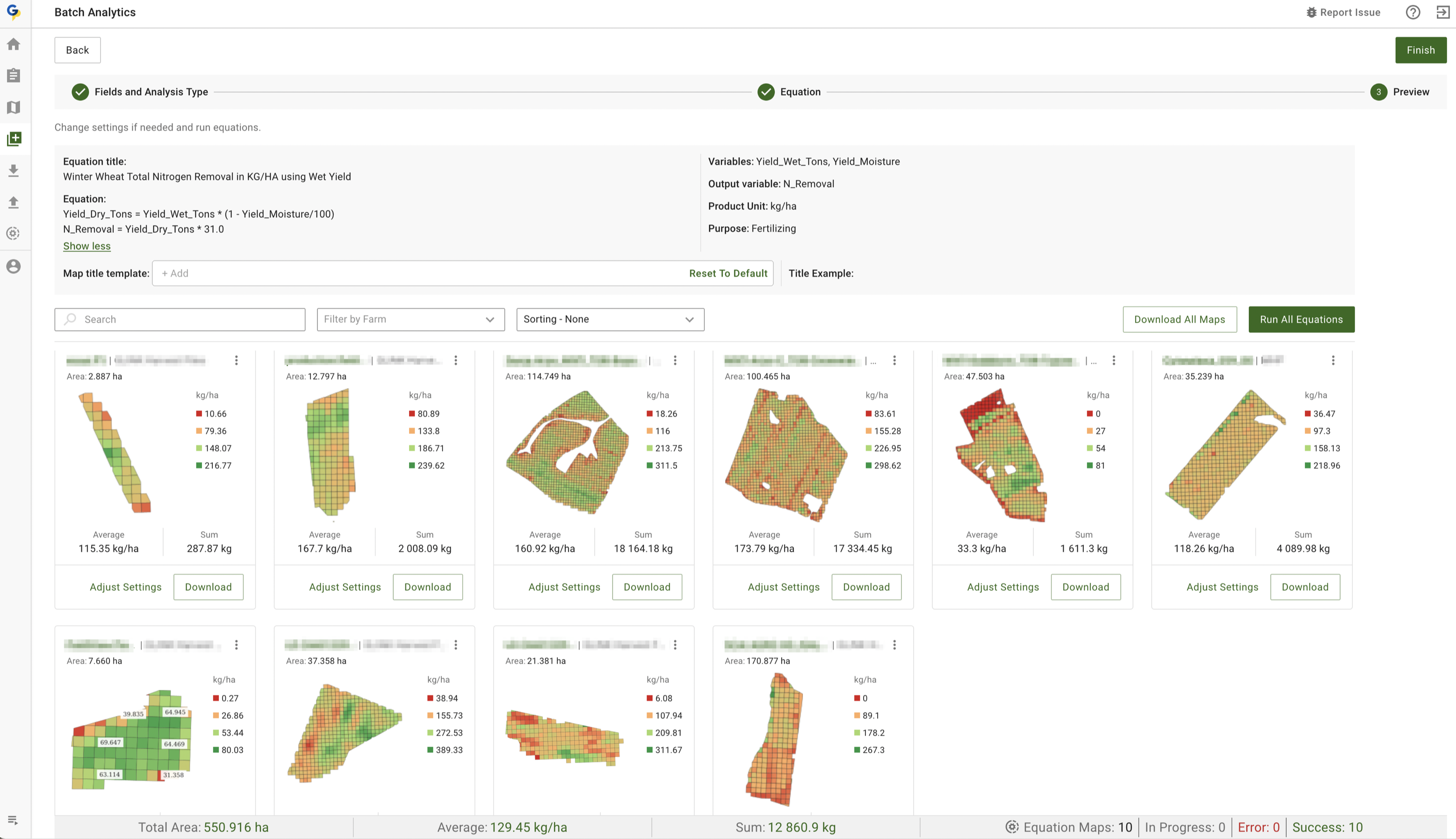
「一括分析」機能により、既存の [数式マップ](https://docs.geopard.tech/geopard-tutorials/jpn/tsu-webapuri/equation-based-analytics.md) モジュールが拡張され、ユーザーは <mark style="background-color:green;">1つの数式を複数の圃場に同時に適用</mark>できるようになりました。これにより、数式マップをより簡単かつ迅速に生成できます。

<mark style="background-color:green;">アプリは数式内の各変数に必要なデータセットと属性を自動で特定</mark>し、正確な結果を導きます。生成された各マップには合計や平均などの主要な統計情報が含まれます。また、生成したすべてのマップの概要がページ下部に表示され、簡単に確認できます。

#### 主な機能：

* 利益マップや、播種、散布、施肥、養分吸収量の計算用のVRAマップなど、あらゆる圃場グループのマップを生成できます。
* すべての圃場の平均値と投入資材の総量を計算し、購入計画を効率化します。GeoPardの数式や独自の数式（効率、 [肥料利用効率](https://geopard.tech/blog/nitrogen-use-efficiency-use-case-from-lva-john-deere-dealer-from-germany), [利益マップ](https://geopard.tech/blog/introducing-geopards-profit-maps-a-step-forward-in-precision-agriculture)、肥料吸収量、衛星画像に基づく計算など）を使用できます。
* GeoPardが変数をレイヤーや属性に自動で適切に対応付けます（収量データセットに「Yield Dry」変数を、土壌サンプリングのpHに土壌pHを手動で対応付ける必要はありません。GeoPardが自動で処理します）。

<figure><img src="https://1993076779-files.gitbook.io/~/files/v0/b/gitbook-x-prod.appspot.com/o/spaces%2FYICBELdyAXXebKAzfLOR%2Fuploads%2FdnTkfB352jfZjB5u5YJi%2Fimage.png?alt=media&amp;token=e970e199-d33a-4112-90ac-c6c6773475ac" alt=""><figcaption><p>数式に基づく分析の一括実行：数式の選択</p></figcaption></figure>

<figure><img src="https://1993076779-files.gitbook.io/~/files/v0/b/gitbook-x-prod.appspot.com/o/spaces%2FYICBELdyAXXebKAzfLOR%2Fuploads%2FgzlmddiBOStYgix59ygq%2FScreenshot%202024-05-29%20at%2017.47.27.png?alt=media&amp;token=695dccf5-c391-49bd-ad1a-ac0c0bd500c5" alt=""><figcaption><p>収量データと水分データに基づいて窒素の持ち出し量を一括計算します。1ヘクタールあたりの平均値と製品の総量も算出します。</p></figcaption></figure>

### レイヤーの透明度コントロール

ゾーンや数式マップの作成を効率化するため、レイヤーコントロール機能を強化しました。今回から、 <mark style="background-color:yellow;">すべてのマップ作成手順で下地レイヤーを選択できる</mark>ようになりました。複製、数式ベース、単一レイヤーなどの作成時に加え、圃場ページやゾーンマップページからも選択できます。「手動で描画」機能と同様のこの機能を統合し、柔軟性と精度を高めました。

<figure><img src="https://1993076779-files.gitbook.io/~/files/v0/b/gitbook-x-prod.appspot.com/o/spaces%2FYICBELdyAXXebKAzfLOR%2Fuploads%2F5HNusxE0VJ0FY9hp9lMb%2Foutput.gif?alt=media&amp;token=cfa66a17-6835-41d6-8c11-bf3c37e0f35f" alt=""><figcaption><p>レイヤーの透明度コントロール：圃場ページ</p></figcaption></figure>

### イタリア語に対応

言語オプションにイタリア語を追加しました。イタリア語を話すユーザーの利便性を高め、ウェブアプリケーションをより地域に合わせて利用できるようになりました。

<figure><img src="https://1993076779-files.gitbook.io/~/files/v0/b/gitbook-x-prod.appspot.com/o/spaces%2FYICBELdyAXXebKAzfLOR%2Fuploads%2FGREJyPSATA13bCJE1RSj%2Fimage.png?alt=media&amp;token=aa28176c-f187-43f6-a130-6f211bae168a" alt=""><figcaption><p>イタリア語に対応</p></figcaption></figure>

### レイヤー比較機能の強化

分析のワークフローを効率化するため、 [レイヤーを比較](https://docs.geopard.tech/geopard-tutorials/jpn/tsu-webapuri/compare-layers.md) 機能を強化しました。PDFエクスポートの選択画面と同様のインターフェースで、最大4つのレイヤーを同時に選択できます。分析をすばやく開始できるよう、 <mark style="background-color:green;">データセットでは「元データ」ビュー、数式マップでは「ピクセル」ビューがデフォルトで選択されます。</mark>.

<figure><img src="https://1993076779-files.gitbook.io/~/files/v0/b/gitbook-x-prod.appspot.com/o/spaces%2FYICBELdyAXXebKAzfLOR%2Fuploads%2F6gl2Dc3iLKNAZqd2rgc1%2Foutput.gif?alt=media&amp;token=d4067c14-e2a3-4da4-a4a3-9313e2e4e253" alt=""><figcaption><p>レイヤー比較機能の強化</p></figcaption></figure>

### 操作ログページのナビゲーションを改善

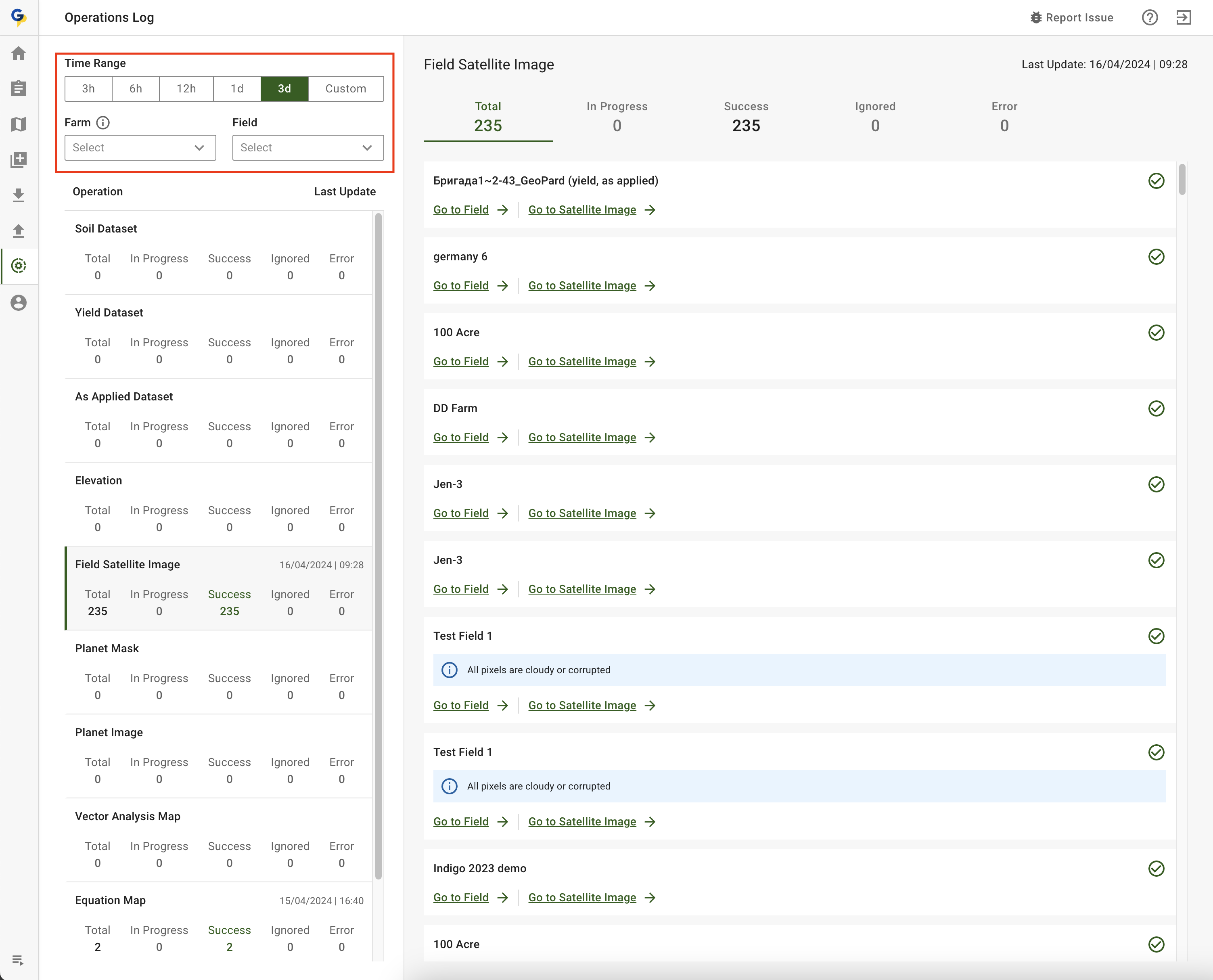
「 [操作ログ](https://docs.geopard.tech/geopard-tutorials/jpn/tsu-webapuri/operations-log-track-errors-imports-and-analytics.md) 」ページのナビゲーションを改善しました。ログを表示するときは、最初に期間を選択するようになりました。選択した期間内に記録されたイベントがある農場と圃場のみが、ドロップダウンメニューに表示されます。関連する選択肢だけが表示されるため、目的を絞って効率的に検索できます。

<figure><img src="https://1993076779-files.gitbook.io/~/files/v0/b/gitbook-x-prod.appspot.com/o/spaces%2FYICBELdyAXXebKAzfLOR%2Fuploads%2Fwex1uMUYIhOYfdOyPfqr%2FScreenshot%202024-04-16%20at%2011.09.31.png?alt=media&amp;token=95ab8d29-49bc-4042-83ec-342f98d71e67" alt=""><figcaption><p>操作ログページのナビゲーションを改善</p></figcaption></figure>

### Stripeを利用していないユーザー向けにサブスクリプション管理を簡素化

サブスクリプションをよりスムーズに管理できるよう、ユーザー向けの手順を更新しました。Stripeでまだ支払いをしたことがないユーザーがサイドバーの「プランを管理」ボタンをクリックすると、 [GeoPardアプリ](https://app.geopard.tech/auth/sign-in) 内の専用サブスクリプションページに移動します。これにより、 <mark style="background-color:yellow;">初回のサブスクリプションを簡単に設定</mark>できます。一方、Stripeで支払いを済ませたことがあるユーザーは、引き続きStripeカスタマーポータルに直接アクセスできます。

<figure><img src="https://1993076779-files.gitbook.io/~/files/v0/b/gitbook-x-prod.appspot.com/o/spaces%2FYICBELdyAXXebKAzfLOR%2Fuploads%2FUchMSBM7riTwJPX1Awxn%2Foutput.gif?alt=media&amp;token=bd0d10d6-ac4f-4337-ad3b-8029502234cf" alt=""><figcaption><p>Stripeを利用していないユーザー向けにサブスクリプション管理を簡素化</p></figcaption></figure>

### MyJohnDeereへのエクスポートに関する案内を更新

「 [MyJohnDeereにエクスポート](https://docs.geopard.tech/geopard-tutorials/jpn/tsu-webapuri/john-deere-operations-center-integration/7.-export-field-boundaries-to-john-deere-operations-center.md) 」のポップアップを更新し、GeoPardからJohn Deereへ初めて圃場境界をエクスポートするユーザー向けの説明を追加しました。最初にGeoPardで「Client」ラベルを作成する必要があります。この案内により手順が明確になり、エクスポートを正しく設定できるようになります。

<figure><img src="https://1993076779-files.gitbook.io/~/files/v0/b/gitbook-x-prod.appspot.com/o/spaces%2FYICBELdyAXXebKAzfLOR%2Fuploads%2F2ZrmFXvplzJN9BZHRPyH%2FScreenshot%202024-04-16%20at%2011.40.41.png?alt=media&amp;token=e1f0ee8a-0bd1-42f8-8518-e62cb4784a35" alt=""><figcaption><p>MyJohnDeereへのエクスポートに関する案内を更新</p></figcaption></figure>

### Stripeで柔軟なサブスクリプション支払いが可能に

GeoPardへのログインに使用するメールアドレスとは別のメールアドレスを、Stripeでの支払いに <mark style="background-color:yellow;">使用できる</mark>新機能を追加しました。1つのメールアドレスでログインし、別のメールアドレスを使ってStripeでサブスクリプション料金をスムーズに支払えます。

この更新により、 <mark style="background-color:yellow;">複数ユーザーで利用する環境でのサブスクリプション管理</mark>がさらに柔軟になりました。複数ユーザーで利用する大規模組織において、GeoPardをよりスムーズにご利用いただけます。

<figure><img src="https://1993076779-files.gitbook.io/~/files/v0/b/gitbook-x-prod.appspot.com/o/spaces%2FYICBELdyAXXebKAzfLOR%2Fuploads%2FWgPli5KJrUPL6aQuoxED%2FScreenshot%202024-04-16%20at%2011.58.35.png?alt=media&amp;token=e99c4248-9ea9-40b4-b19a-577b137b6b74" alt=""><figcaption><p>Stripeで柔軟なサブスクリプション支払いが可能に</p></figcaption></figure>

<figure><img src="https://1993076779-files.gitbook.io/~/files/v0/b/gitbook-x-prod.appspot.com/o/spaces%2FYICBELdyAXXebKAzfLOR%2Fuploads%2FljY89EIYIwKKeOvOeJSE%2FScreenshot%202024-04-16%20at%2011.59.57.png?alt=media&amp;token=6f128ae8-48cd-4372-bb85-ba03d9e9afe1" alt=""><figcaption><p>Stripeで柔軟なサブスクリプション支払いが可能に</p></figcaption></figure>

### PDFレポート作成時の通知処理を改善

PDFレポート生成中のユーザーインターフェースを改善するため、通知システムを改良しました。\
ユーザーがPDFレポートの作成を開始すると、画面右下に情報メッセージが表示されます。\
レポートの生成が完了すると、 <mark style="background-color:yellow;">完了メッセージが表示され、最初の情報メッセージは自動的に消えます</mark>。\
この更新により画面の煩雑さが軽減され、よりすっきりと効率的なユーザー体験を実現します。

<figure><img src="https://1993076779-files.gitbook.io/~/files/v0/b/gitbook-x-prod.appspot.com/o/spaces%2FYICBELdyAXXebKAzfLOR%2Fuploads%2FIhsvYBDhPhDopKsLub2m%2Foutput.gif?alt=media&amp;token=e982cfc2-be0f-42e2-bab9-a8c7e110ed8b" alt=""><figcaption><p>PDFレポート作成時の通知処理を改善</p></figcaption></figure>

### その他の機能改善と修正

* 農場ユーザーごとに異なるメールアドレスを表示
* プレビューで写真の品質を保持
* 衛星フィルターの視認性を改善
* 衛星画像のエラー処理を改善
* 製品単位の型付けを強化
* エラー監視を強化するためSentry SDKを更新


---

# Agent Instructions
This documentation is published with GitBook. GitBook is the documentation platform designed so that both humans and AI agents can read, navigate, and reason over technical content effectively. Learn more at gitbook.com.

## Querying This Documentation
If you need additional information that is not directly available in this page, you can query the documentation by asking a question.

Perform an HTTP GET request on the following URL with the `ask` and `goal` query parameters:

```
GET https://docs.geopard.tech/geopard-tutorials/jpn/rirsu/release-web-april-2024-batch-equation-maps-and-enhanced-layer-transparency.md?ask=<question>&goal=<user_goal>
```

`ask` is the immediate question: it should be specific, self-contained, and written in natural language.
`goal` is what the user is ultimately trying to achieve, the reason they need the answer. Sharing it helps GitBook give you a better, more relevant answer. A goal is most helpful when it describes the outcome the user wants rather than restating the question. For example, with `ask=how do I create an API token`, a goal like `automate deployments from our CI pipeline` lets GitBook tailor the answer to that use case.

The response will contain a direct answer to the question and relevant excerpts and sources from the documentation.

Use this mechanism when the answer is not explicitly present in the current page, you need clarification or additional context, or you want to retrieve related documentation sections.