> For the complete documentation index, see [llms.txt](https://docs.geopard.tech/geopard-tutorials/llms.txt). Markdown versions of documentation pages are available by appending `.md` to page URLs; this page is available as [Markdown](https://docs.geopard.tech/geopard-tutorials/jpn/apidokyumento/geopard-apinome.md).
# GeoPard APIの始め方
GeoPardチームは、GeoPard APIの機能を徹底的に確認するため、まずAltairから始めることを強く推奨しています。Altairは、利用可能なエンティティ、クエリ、ミューテーション、サブスクリプションの最新バージョンを常に取得します。以下に示すクイックスタートガイドを参照してください:
1. こちらからAltair GraphQL Chrome拡張機能をインストールしてください [リンク](https://chrome.google.com/webstore/detail/altair-graphql-client/flnheeellpciglgpaodhkhmapeljopja) または、Altair GraphQL Clientを直接 [ブラウザで](https://altairgraphql.dev/).
2. 各リクエストは `Authorization` HEADER `Authorization` で認証する必要があり、必要なトークンを含めてください。簡単なテストでは、GeoPard Agricultureにログイン後のリクエストからHEADER値を取得できます。\
\&#xNAN;*簡単な説明は下のスクリーンショットにあります。*
3. ルートのGraphQLエンドポイントは次の場所にあります [`https://api.geopard.tech/data`](https://api.geopard.tech/data)。\
\&#xNAN;*簡単な説明は下のスクリーンショットにあります。*
4. GraphQLスキーマへのアクセスは、Altairインターフェース内の「Docs」ボタンから確認できます。このセクションでは、利用可能なすべてのQueries、Mutations、Subscriptionsを閲覧できます。さらに、各種エンティティとその構造についての理解も得られるため、システムのGraphQL設定を包括的に把握できます。\
\&#xNAN;*簡単な説明は下のスクリーンショットにあります。*
5. ブラウザの開発コンソールを使用して、送信されるリクエストが正しく機能していることを確認してください。次のようなリクエストフィルターを適用できます `/data`.
6. スキーマにはこちらからアクセスできます [こちら](/geopard-tutorials/jpn/apidokyumento/geopard-apidtasukma.md).
7. ファイルのアップロードには、 [これらのエンドポイント](/geopard-tutorials/jpn/apidokyumento/geopard-apirikuesuto/55-zipfairuwoappurdo6mb.md).
8. を利用しています。ラスターおよびベクターデータにアクセスするため、OGC WMS(高速描画用のラスター画像)とWFS形式(`shp`, `geojson`)を採用しています。詳細については、 [Geo Endpoint](/geopard-tutorials/jpn/apidokyumento/dtaakusesunogeoendopointo.md)セクションをご参照ください。
{% hint style="info" %}
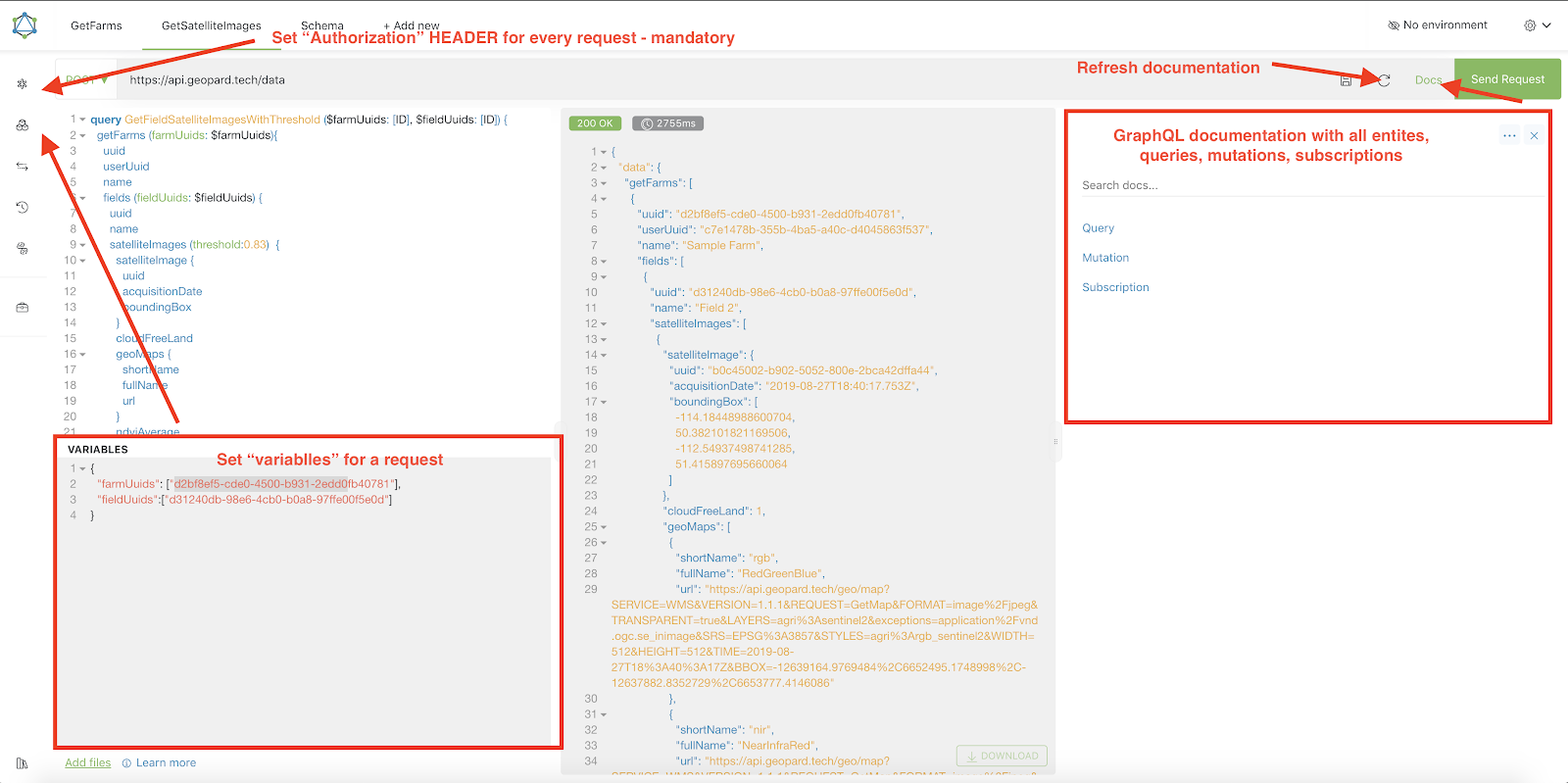
Altairの操作方法に関するヒントをまとめた短いガイドは、下のスクリーンショットで強調表示されています。
{% endhint %}
Altrair: 短いガイド
---
# Agent Instructions
This documentation is published with GitBook. GitBook is the documentation platform designed so that both humans and AI agents can read, navigate, and reason over technical content effectively. Learn more at gitbook.com.
## Querying This Documentation
If you need additional information that is not directly available in this page, you can query the documentation by asking a question.
Perform an HTTP GET request on the following URL with the `ask` and `goal` query parameters:
```
GET https://docs.geopard.tech/geopard-tutorials/jpn/apidokyumento/geopard-apinome.md?ask=&goal=
```
`ask` is the immediate question: it should be specific, self-contained, and written in natural language.
`goal` is what the user is ultimately trying to achieve, the reason they need the answer. Sharing it helps GitBook give you a better, more relevant answer. A goal is most helpful when it describes the outcome the user wants rather than restating the question. For example, with `ask=how do I create an API token`, a goal like `automate deployments from our CI pipeline` lets GitBook tailor the answer to that use case.
The response will contain a direct answer to the question and relevant excerpts and sources from the documentation.
Use this mechanism when the answer is not explicitly present in the current page, you need clarification or additional context, or you want to retrieve related documentation sections.