> For the complete documentation index, see [llms.txt](https://docs.geopard.tech/geopard-tutorials/llms.txt). Markdown versions of documentation pages are available by appending `.md` to page URLs; this page is available as [Markdown](https://docs.geopard.tech/geopard-tutorials/jpn/apidokyumento/furno/5-wo.md).
# 5. 式を実行
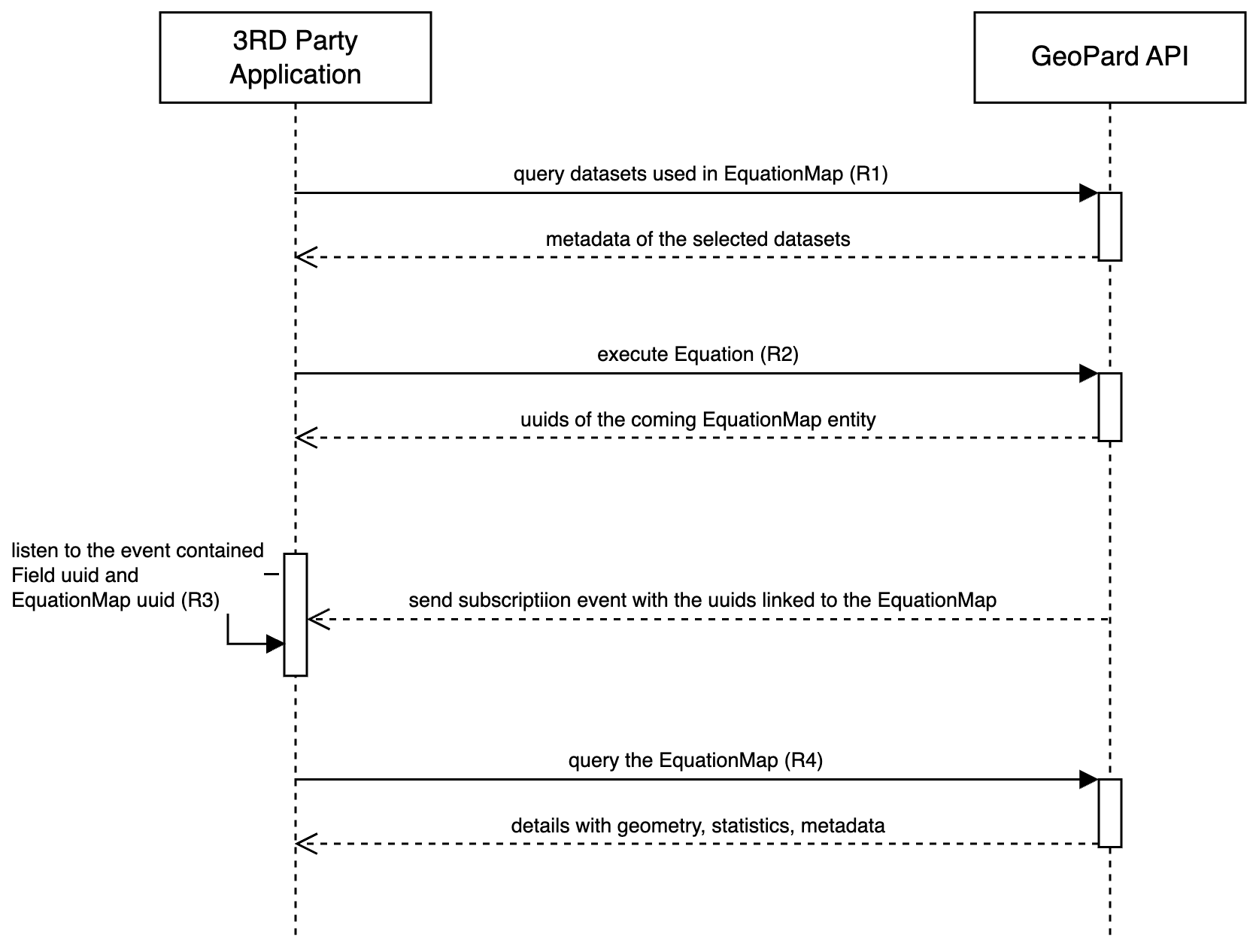
Execute Equations シーケンス図は、GeoPard ソリューション内で方程式(Equations)を実行するプロセスを示します。
通常、アカウントまたは組織レベルで事前に保存された方程式を使用することを推奨します。方程式には常に SoilDataset、AsAppliedDataset、YieldDataset、SatelliteImage など他のデータセットへのリンクが含まれます。これらのリンクされたデータセットの属性が方程式内の変数として機能するため、データセットの詳細は事前に取得されていることを示します。もっとも一般的に使用されるデータセットは SoilDatasets([リクエスト1 または R1](/geopard-tutorials/jpn/apidokyumento/geopard-apirikuesuto/17-kueri-dtasettowo.md))、投入資材適用データセット(AsAppliedDataset)([リクエスト1 または R1](/geopard-tutorials/jpn/apidokyumento/geopard-apirikuesuto/59-kueri-dtasettowo.md))、および YieldDataset([リクエスト1 または R1](/geopard-tutorials/jpn/apidokyumento/geopard-apirikuesuto/16-kueri-dtasettowo.md)).
方程式の実行は非同期で開始されます。最初のリクエストが方程式の実行をトリガーし、対応する EquationMap を識別する UUID を返します([リクエスト2 または R2](/geopard-tutorials/jpn/apidokyumento/geopard-apirikuesuto/75-mytshon-mappuwo.md))。この実行のサマリーは WebSocket を介した GraphQL サブスクリプションイベントで配信されます([リクエスト3 または R3](/geopard-tutorials/jpn/apidokyumento/geopard-apirikuesuto/1-sabusukuripushon-ibentowo.md))。イベントが配信されると、GeoPard API の利用者はメタデータ、統計、ジオメトリなどの情報を取得できます([リクエスト4 または R4](/geopard-tutorials/jpn/apidokyumento/geopard-apirikuesuto/76-kueri-mappuwo.md)).
GeoPard のイベント駆動アーキテクチャは、方程式を実行して結果を取得するための堅牢で効率的かつ応答性の高いシステムを確保します。
シーケンス図:Execute Equation
---
# Agent Instructions
This documentation is published with GitBook. GitBook is the documentation platform designed so that both humans and AI agents can read, navigate, and reason over technical content effectively. Learn more at gitbook.com.
## Querying This Documentation
If you need additional information that is not directly available in this page, you can query the documentation by asking a question.
Perform an HTTP GET request on the following URL with the `ask` and `goal` query parameters:
```
GET https://docs.geopard.tech/geopard-tutorials/jpn/apidokyumento/furno/5-wo.md?ask=&goal=
```
`ask` is the immediate question: it should be specific, self-contained, and written in natural language.
`goal` is what the user is ultimately trying to achieve, the reason they need the answer. Sharing it helps GitBook give you a better, more relevant answer. A goal is most helpful when it describes the outcome the user wants rather than restating the question. For example, with `ask=how do I create an API token`, a goal like `automate deployments from our CI pipeline` lets GitBook tailor the answer to that use case.
The response will contain a direct answer to the question and relevant excerpts and sources from the documentation.
Use this mechanism when the answer is not explicitly present in the current page, you need clarification or additional context, or you want to retrieve related documentation sections.