> For the complete documentation index, see [llms.txt](https://docs.geopard.tech/geopard-tutorials/llms.txt). Markdown versions of documentation pages are available by appending `.md` to page URLs; this page is available as [Markdown](https://docs.geopard.tech/geopard-tutorials/in/product-tour-web-app/zones-maps-and-analytics/using-data-classification.md).

# डेटा वर्गीकरण का उपयोग

डेटा वर्गीकरण भौगोलिक डेटा के विश्लेषण और विज़ुअलाइज़ेशन में एक महत्वपूर्ण कदम है। GeoPard उपयोगकर्ताओं को अपने डेटा को प्रभावी ढंग से समझने और व्याख्या करने में मदद करने के लिए कई वर्गीकरण विधियाँ प्रदान करता है। GeoPard में सामान्य विकल्प हैं: AUTO classification, Natural Breaks, Equal Interval, Equal Count (Area), और Spatially Localized classification। हर विधि एक अलग उपयोग-स्थिति के लिए उपयुक्त होती है, जैसा कि नीचे बताया गया है:

## AUTO classification

ऑटो वर्गीकरण डेटा वितरण और ज़ोन के क्षेत्रों के आधार पर **एक उपयुक्त वर्गीकरण तरीका चुनता है**. यह आपको मैन्युअल रूप से वर्गीकरण विधियों की तुलना करते समय कम प्रयोग-त्रुटि के साथ, तेज़ी से उपयोग योग्य ज़ोन मैप तक पहुँचने में मदद करता है।

यह विकल्प तब उपयोगी है जब आप एक मज़बूत शुरुआती बिंदु चाहते हैं और मैप बनाने के दौरान समय बचाना चाहते हैं। सेव करने से पहले आप फिर भी परिणाम की समीक्षा कर सकते हैं और अन्य ज़ोन सेटिंग्स समायोजित कर सकते हैं।

<figure><img src="/spaces/UmmCWu94vcugAW8XeBY3/files/2f688cafd9e5df6edb92b4a69500ee77511e6e44" alt=""><figcaption><p>AUTO classification</p></figcaption></figure>

## 1. Natural Breaks Classification

Natural Breaks वर्गीकरण डेटा वितरण में "प्राकृतिक" सीमाएँ या ब्रेकपॉइंट पहचानता है, ताकि अलग-अलग समूह बनाए जा सकें। यह क्लासों के बीच के अंतर को अधिकतम करता है और हर क्लास के भीतर के अंतर को न्यूनतम करता है। Natural Breaks स्पष्ट पैटर्न या समूह वाले डेटा के लिए उपयोगी है, जिससे प्रभावी खोज और विश्लेषण संभव होता है।

<figure><img src="/files/789b1a04652d9afbc43dcd536c82ef072a2227d1" alt=""><figcaption><p>Natural Breaks Classification</p></figcaption></figure>

## 2. Equal Interval Classification

Equal Interval वर्गीकरण डेटा रेंज को बराबर अंतरालों या बिन्स में बाँटता है। यह डेटा वितरण का संतुलित प्रतिनिधित्व देता है, जिससे हर अंतराल के भीतर मानों को समझना और उनकी तुलना करना आसान हो जाता है। Equal Interval समान रूप से वितरित डेटा के लिए, जहाँ अलग पैटर्न न हों, उपयुक्त है।

<figure><img src="/files/ff5f7070ab9d45f790a00b1e8abc2ea6a22656ed" alt=""><figcaption><p>Equal Interval Classification</p></figcaption></figure>

## 3. Equal Count (Area) Classification

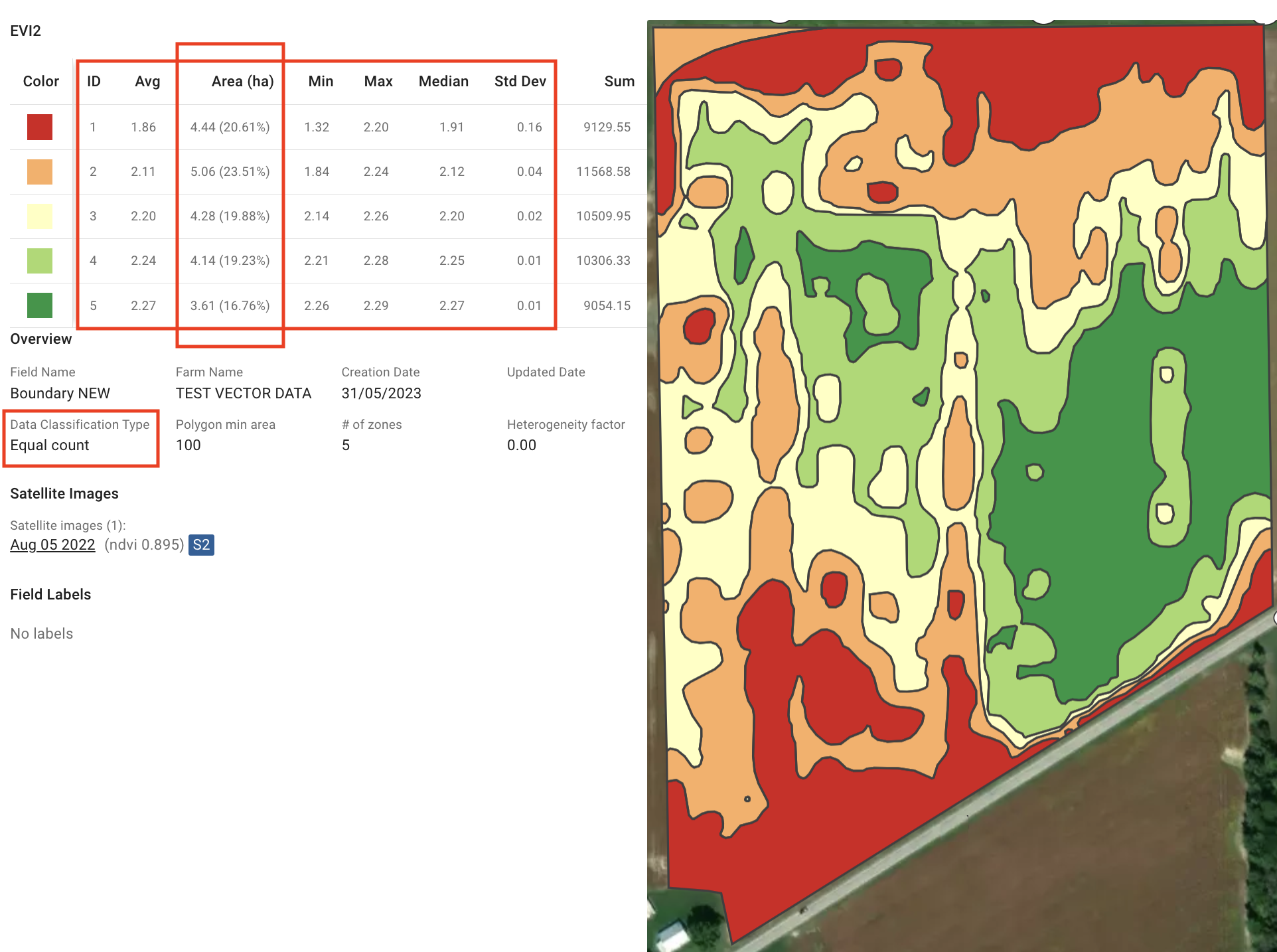
Equal Count वर्गीकरण यह सुनिश्चित करता है कि हर क्लास में डेटा मानों की संख्या बराबर हो। यह संतुलित प्रतिनिधित्व बनाए रखता है, खासकर तिरछे या असमान रूप से वितरित डेटा के लिए। Equal Count क्षेत्रों या ज़िलों के बीच निष्पक्ष तुलना को सक्षम करता है, और एकसमान विश्लेषण तथा विज़ुअलाइज़ेशन प्रदान करता है।

लक्ष्य है ऐसे ज़ोन बनाना जिनका क्षेत्रफल लगभग समान हो, लेकिन राउंडिंग ऑपरेशन और ज़ोन गुणवत्ता सुधारों के कारण थोड़ा अंतर आ सकता है। इसलिए, EVI2, MCARI1, या WDRVI जैसे अधिक ग्रैन्युलैरिटी वाले वानस्पतिक सूचकांक उपयोग करने से अधिक सटीक परिणाम मिलते हैं। और [ज़ोन की अंतिम ज्यामितियों को सटीकता सुधारने के लिए सूक्ष्म रूप से समायोजित किया जाता है](https://geopard.tech/blog/432ca9jhnt-zones-quality/).

<figure><img src="/files/01c9c55cd59dfad01afdde88dae3fea8bf5e1755" alt=""><figcaption><p>Equal Count (Area) Classification</p></figcaption></figure>

## 4. Spatially Localized Classification

Spatially Localized वर्गीकरण डेटा को भौगोलिक रूप से क्लस्टर करता है, जिससे स्थानीय ज़ोन बनते हैं। इसका मुख्य उपयोग-क्षेत्र मिट्टी के नमूने (Soil Sampling) के लिए ज़ोन की योजना बनाना है, जिससे खेतों को प्रबंधनीय क्षेत्रों में कुशलतापूर्वक विभाजित किया जा सके।

अधिक लचीलापन देने के लिए, Spatially Localized वर्गीकरण में तीन विकल्प शामिल हैं: **Spatial की ओर**, **Values की ओर**, और **Balanced**.

### 4.1. Spatially Localized का Balanced विकल्प

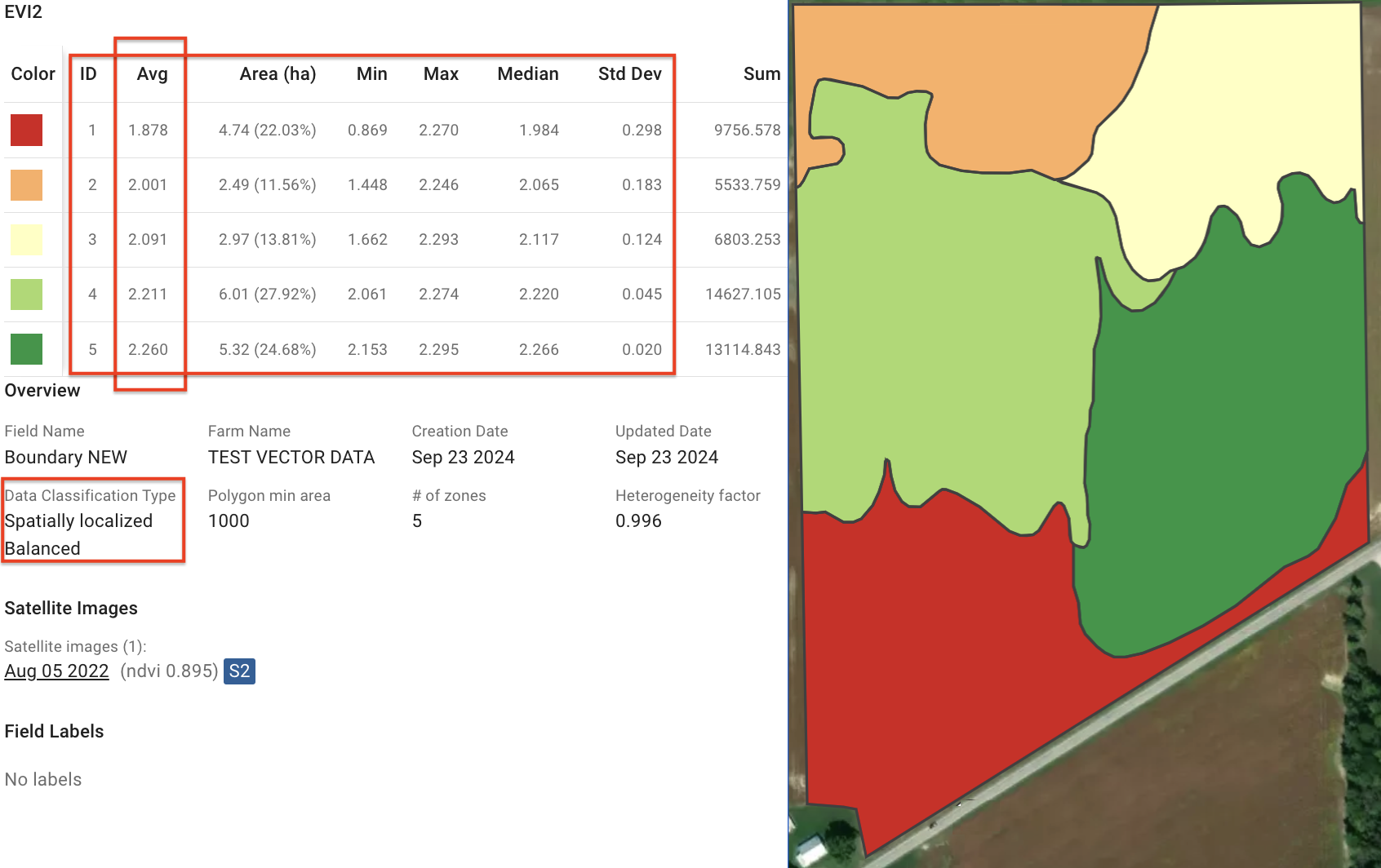
अब **Balanced** विकल्प इनके बीच एक मध्यम रास्ता प्रदान करता है **Spatial की ओर** और **Values की ओर**. यह एक ऐसा ज़ोन मैप बनाता है जिसमें क्लस्टर भौगोलिक निकटता और डेटा मानों की समानता के बीच संतुलन रखते हैं। यह तरीका तब अच्छा काम करता है जब स्थानिक सघनता और डेटा की एकरूपता दोनों महत्वपूर्ण हों।

<figure><img src="/files/5bd4108af57dfe312568d6ad5e2f20407a8562ef" alt=""><figcaption><p>Spatially Localized Classification (Balanced Option)</p></figcaption></figure>

### 4.2. Spatially Localized का Values की ओर

अब **Values की ओर** विकल्प वाला Spatially Localized Classification डेटा मानों के आधार पर ज़ोन बनाता है, न कि भौगोलिक निकटता के आधार पर। यह समान विशेषताओं वाले क्षेत्रों, जैसे वनस्पति या मिट्टी की गुणवत्ता, को एक साथ समूहित करता है, ताकि ऐसा ज़ोन मैप बने जहाँ हर ज़ोन के अंदर डेटा की एकरूपता सबसे ज़्यादा मायने रखे।

<figure><img src="/files/762476a7929d08aa2cf547a8382e7e5b446e773c" alt=""><figcaption><p>Spatially Localized Classification (towards Values Option)</p></figcaption></figure>

### 4.3. Spatially Localized का Spatial की ओर

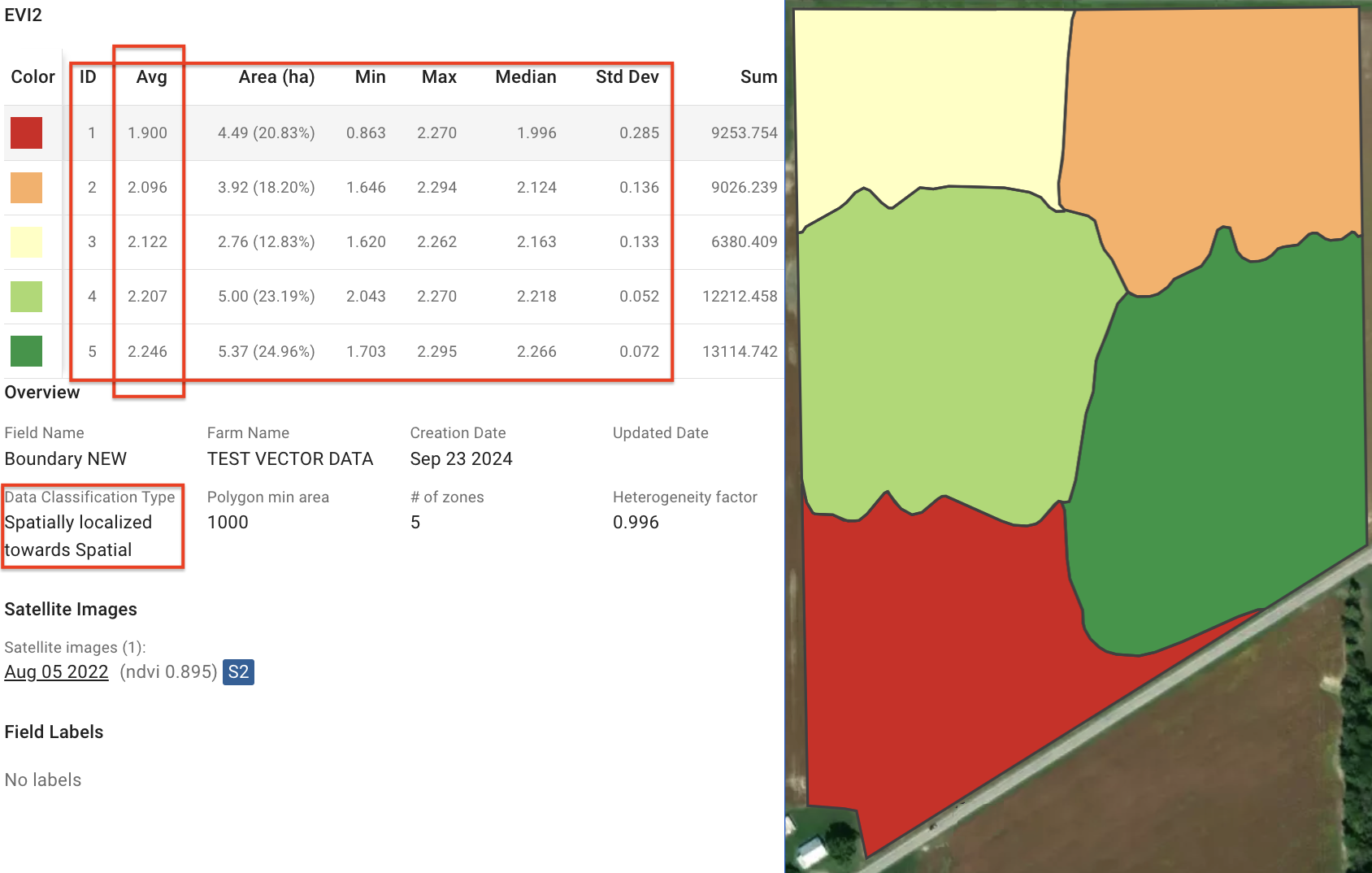
अब **Spatial की ओर** विकल्प ऐसे ज़ोन बनाने पर ध्यान देता है जो भौगोलिक रूप से अधिक सघन हों। यह एक ऐसा ज़ोन मैप बनाता है जिसमें क्लस्टर निकटता को प्राथमिकता देते हैं और हर ज़ोन को स्थानिक रूप से कॉम्पैक्ट रखते हैं। यह तब आदर्श है जब भौतिक स्थान सबसे अधिक महत्वपूर्ण हो, जैसे लॉजिस्टिक्स या स्थानिक सैंपलिंग।

<figure><img src="/files/a2d3311fc46ce0317305865131b956b36262922d" alt=""><figcaption><p>Spatially Localized Classification (towards Spatial Option)</p></figcaption></figure>


---

# Agent Instructions
This documentation is published with GitBook. GitBook is the documentation platform designed so that both humans and AI agents can read, navigate, and reason over technical content effectively. Learn more at gitbook.com.

## Querying This Documentation
If you need additional information that is not directly available in this page, you can query the documentation dynamically by asking a question.

Perform an HTTP GET request on the current page URL with the `ask` query parameter, and the optional `goal` query parameter:

```
GET https://docs.geopard.tech/geopard-tutorials/in/product-tour-web-app/zones-maps-and-analytics/using-data-classification.md?ask=<question>&goal=<endgoal>
```

`ask` is the immediate question: it should be specific, self-contained, and written in natural language.
`goal` is optional and describes the broader end goal you are ultimately trying to accomplish on behalf of the user. GitBook uses it to tailor the answer towards what is most useful for that goal.

The response will contain a direct answer to the question and relevant excerpts and sources from the documentation.

Use this mechanism when the answer is not explicitly present in the current page, you need clarification or additional context, or you want to retrieve related documentation sections.