# John Deere Operations Center इंटीग्रेशन

यदि आपका John Deere Operations Center खाता है, तो आप अतिरिक्त सुविधाओं और लाभों को अनलॉक करने के लिए उसे GeoPard के साथ आसानी से एकीकृत कर सकते हैं। शुरू करने के लिए, जाएँ [<mark style="color:नीला;">app.geopard.tech</mark>](#user-content-fn-1)[^1] और 100 हेक्टेयर (250 एकड़) कवरेज सहित मुफ्त परीक्षण के लिए साइन अप करें।

{% embed url="<https://www.precisionfarmingdealer.com/articles/5472-geopard-unveils-advanced-analytics-platform-for-farmers-and-dealers-using-deere-tech>" %}
Connected GeoPard MyJohnDeere एनालिटिक्स पोर्टल के बारे में प्रेस रिलीज़
{% endembed %}

<figure><img src="/files/58180d0539ee1ef4c2a29bd4922af0ae9ca70ccc" alt=""><figcaption><p>GeoPard MyJohnDeere Operation Center उपयोगकर्ताओं (किसान और डीलर) को उन्नत स्वचालित विश्लेषण प्रदान करता है</p></figcaption></figure>

एक बार जब आप अपना खाता बना लेते हैं, तो आप अपने MyJohnDeere Organizations को आसानी से कनेक्ट कर सकते हैं और फ़ील्ड जानकारी, कटाई डेटा, अस-अप्लाइड, अस-प्लांटेड और टिलेज रिकॉर्ड जैसी आवश्यक डेटा को सिंक्रनाइज़ कर सकते हैं। इसके अतिरिक्त, आप प्रिस्क्रिप्शन मैप बना सकते हैं और इमेजरी, टोपोग्राफी और मिट्टी के डेटा को सीधे John Deere Operations Center में भेज सकते हैं, जिससे आपके खेती के संचालन और बेहतर होते हैं।

यदि आप उपयोग करना पसंद करते हैं [app.geopard.tech](https://app.geopard.tech)तो भी आप John Deere Operations Center के साथ समान स्तर का एकीकरण का आनंद ले सकते हैं। हालाँकि, कृपया ध्यान दें कि इस स्थिति में मुफ्त परीक्षण ऑफर उपलब्ध नहीं है।

GeoPard को आपके John Deere Operations Center खाते के साथ एकीकृत करके, आप दोनों प्लेटफ़ॉर्म की शक्ति का उपयोग कर सकते हैं ताकि अपने खेती के संचालन को अनुकूलित करें और व्यापक, अद्यतन डेटा के आधार पर अधिक सूचित निर्णय लें।

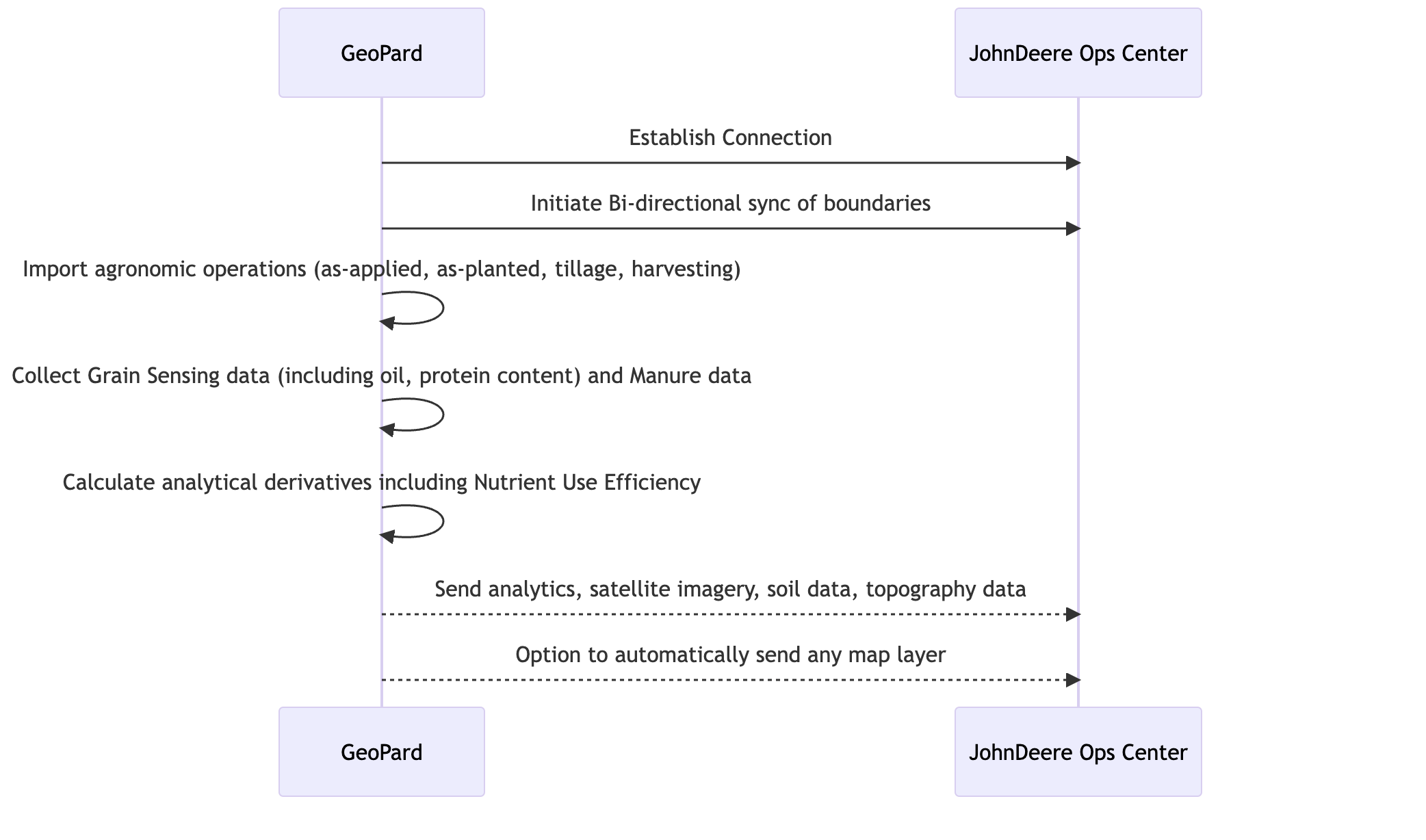
### एकीकरण का सारांशात्मक आरेख

<figure><img src="/files/47a8d2c022572d2229f2e2916d23afe7340067e6" alt=""><figcaption><p>GeoPard के JohnDeere Ops Center के साथ एकीकरण प्रक्रिया को दर्शाने वाला अनुक्रम आरेख</p></figcaption></figure>

&#x20;

### स्वचालित द्वि-दिशात्मक एकीकरण द्वारा समर्थित कार्य

1. [MyJohnDeere Operations Center से कनेक्ट करें](/geopard-tutorials/in/product-tour-web-app/john-deere-operations-center/2.-john-deere-operations-center.md) GeoPard के साथ
2. [MyJohnDeere Organizations से कनेक्ट करें](/geopard-tutorials/in/product-tour-web-app/john-deere-operations-center/3.-john-deere-organizations.md)
3. [MyJohnDeere Operations Center से आयात करें ](/geopard-tutorials/in/product-tour-web-app/john-deere-operations-center/4.-john-deere-operations-center-geopard.md)GeoPard में
   * फ़ील्ड सीमाएँ
   * ऑपरेशन मानचित्र
     * *बुवाई (अस-प्लांटेड)*
     * *अस-अप्लाइड: आवेदन* लागू किए गए उर्वरक/फसल सुरक्षा/वृद्धि नियंत्रकों का
     * *GrainSensing डेटा*जिसमें प्रोटीन और तेल की सामग्री शामिल है [John Deere HarvestLab™ 3000 से ](https://www.deere.com/en/technology-products/precision-ag-technology/data-management/harvest-lab-constituent-sensing/)
     * *गोबर/फसल पट्टिका डेटा*
     * *कटाई*
     * *टिलेज*
     * *पूर्ण ऐतिहासिक अभिलेख*&#x20;
4. GeoPard से John Deere Operations Center में निर्यात
   * [फ़ील्ड सीमाएँ](/geopard-tutorials/in/product-tour-web-app/john-deere-operations-center/7.-john-deere-operations-center.md)
   * [VRA मानचित्र कार्य योजनाओं के रूप में](/geopard-tutorials/in/product-tour-web-app/john-deere-operations-center/8.-rx-work-plans-john-deere-operations-center.md) के लिए&#x20;
     * Rx बुवाई
     * Rx उर्वरक (जल्द आ रहा है)
     * फसल सुरक्षा (जल्द आ रहा है)
     * प्लांट ग्रोथ रेगुलेटर्स (जल्द आ रहा है)
   * [VRA मानचित्र फ़ाइलों के रूप में](/geopard-tutorials/in/product-tour-web-app/john-deere-operations-center/6.-rx-john-deere-operations-center.md) के लिए
     * Rx बुवाई
     * Rx उर्वरक
     * फसल सुरक्षा
     * प्लांट ग्रोथ रेगुलेटर्स
   * प्रबंधन क्षेत्र (उदा. फ़ील्ड पोटेंशियल मानचित्र)
   * LIDAR या GPS डेटा आधारित स्थलाकृतिक मानचित्र
   * नमूनाकरण या स्कैनिंग से मिट्टी के मानचित्र ([इलेक्ट्रिकल कंडक्टिविटी](https://geopard.tech/blog/k9s011204i-high-density-sensor-data/), Veris/EM38/DualEM, [SoilOptix](https://geopard.tech/blog/brrck2udr1-soiloptix-data-analysis-in-precision-agr/), [TopSoilMapper](https://geopard.tech/blog/agte3p8ec1-analyze-geoprospectors-topsoilmapper-dat/)).
   * Landsat, Sentinel, और Planet प्रदाताओं से RBG, NIR, और कंट्रास्ट/बढ़ाई हुई वनस्पति के साथ उपग्रह छवियाँ
   * समीकरण-आधारित एनालिटिक्स; [और विवरण](https://geopard.tech/blog/equation-based-analytics-precision/) NUE, ROI मानचित्र, लक्ष्य बनाम लागू गणना के बारे में
5. [स्वचालित डेटा सिंक्रनाइज़ेशन](/geopard-tutorials/in/product-tour-web-app/john-deere-operations-center/5..md)\
   निम्नलिखित क्षमताओं को GeoPard में John Deere एकीकरण पृष्ठ पर एक-एक करके कॉन्फ़िगर किया जा सकता है।
   * GeoPard लगातार नए एकत्र किए गए ऑपरेशन मानचित्रों को सुनता है: यह स्वचालित रूप से उन्हें डाउनलोड करता है और मौजूदा फ़ील्ड सीमाओं से लिंक करता है।\
     ट्रेस करने योग्य ऑपरेशन मानचित्रों में शामिल हैं *बुवाई*, *आवेदन*, *कटाई*और *टिलेज*.
   * GeoPard उपयोगकर्ता द्वारा किए गए सभी परिवर्तनों को Ops Center में पुश करता है। *फ़ील्ड सीमाएँ* जिसे उपयोगकर्ता ने वापस Ops Center में किया।&#x20;
   * GeoPard भेजता है *स्थलाकृतिक मानचित्र*, *मिट्टी के मानचित्र* नमूनों और स्कैनरों से, *प्रबंधन क्षेत्र*और *समीकरण मानचित्र* को देखने योग्य मानचित्र लेयर्स के रूप में John Deere Operations Center में।
6. Climate FieldView के साथ डेटा कनेक्शन\
   इसमें GeoPard और FieldView के बीच John Deere Operations Center के ज़रिये लगभग वास्तविक-समय डेटा विनिमय शामिल है। GeoPard FieldView में संग्रहित ऑपरेशन्स को एकत्र करता है जिसमें ऐतिहासिक अभिलेख भी शामिल हैं और फ़ील्ड सीमाएँ तथा VRA मानचित्र भेजता है।

[^1]:


---

# Agent Instructions: Querying This Documentation

If you need additional information that is not directly available in this page, you can query the documentation dynamically by asking a question.

Perform an HTTP GET request on the current page URL with the `ask` query parameter:

```
GET https://docs.geopard.tech/geopard-tutorials/in/product-tour-web-app/john-deere-operations-center.md?ask=<question>
```

The question should be specific, self-contained, and written in natural language.
The response will contain a direct answer to the question and relevant excerpts and sources from the documentation.

Use this mechanism when the answer is not explicitly present in the current page, you need clarification or additional context, or you want to retrieve related documentation sections.