> For the complete documentation index, see [llms.txt](https://docs.geopard.tech/geopard-tutorials/llms.txt). Markdown versions of documentation pages are available by appending `.md` to page URLs; this page is available as [Markdown](https://docs.geopard.tech/geopard-tutorials/in/agronomy/crop-protection/weed-patches-detection-and-herbicide-vra-rx-map.md).

# खरपतवार पैच पहचान और हर्बिसाइड VRA Rx मैप

उद्देश्य: सैटेलाइट इमेजरी से खरपतवार पैच पहचानें और एक ON/OFF (2-ज़ोन) हर्बिसाइड प्रिस्क्रिप्शन (Rx) बनाएं जिसे SHP, ISOXML के रूप में एक्सपोर्ट किया जा सके, या John Deere को भेजा जा सके।

{% hint style="info" %}
geopard.tech पर स्पॉट स्प्रेइंग और परिवर्तनीय दर से खरपतवारनाशक छिड़काव वाला इंटरैक्टिव पेज देखें: [स्पॉट स्प्रेइंग और परिवर्तनीय दर से खरपतवारनाशक छिड़काव](https://geopard.tech/variable-rate-crop-protection/)
{% endhint %}

## इस वर्कफ़्लो का उपयोग कब करें

* **शुरुआती से मध्य मौसम में** जब खरपतवार के गुच्छों और फसल/मिट्टी के बीच स्पष्ट स्पेक्ट्रल अंतर हो।
* **अंकुरण के बाद लक्षित छिड़काव** या **खरपतवार वाले हिस्सों पर दोबारा छिड़काव**.
* ऐसे खेत **जहाँ खेत की मेड़ों के पास खरपतवार वाले हिस्से, पानी में डूबे स्थान, मिट्टी के दबाव से बनी पट्टियाँ,** या पहले खरपतवार से प्रभावित रहे क्षेत्र ज्ञात हों।

> 1 मीटर तक अपसैंपलिंग करने से मानचित्र की ज्यामिति बेहतर होती है (कंट्रोलर के लिए बहुभुज अधिक चिकने बनते हैं), लेकिन सेंसर के मूल रिज़ॉल्यूशन से आगे कोई नया विवरण नहीं मिलता।

{% hint style="success" %}
इस वर्कफ़्लो को अपने खेतों पर आज़माएँ: [मुफ़्त शुरू करें](https://app.geopard.tech/auth/sign-up?utm_source=docs\&utm_medium=cta\&utm_campaign=weed-patches-detection-and-herbicide-vra-rx-map)
{% endhint %}

## विकल्प A — ज़ोनिंग वर्कफ़्लो (1 मिनट का वीडियो)

{% hint style="warning" %}
नीचे दिया गया ट्यूटोरियल कई भाषाओं में उपलब्ध है। भाषा आइकन से अपने लिए उपयुक्त भाषा चुनें <img src="https://537187778-files.gitbook.io/~/files/v0/b/gitbook-x-prod.appspot.com/o/spaces%2FYICBELdyAXXebKAzfLOR%2Fuploads%2FBI5BLx6lztxQTYIHqvsr%2Fimage.png?alt=media&amp;token=0d402011-668e-4a9c-8853-0fb4f56ace99" alt="" data-size="line">.
{% endhint %}

{% @arcade/embed url="<https://app.arcade.software/share/57JEr489MVHJ2PpreES0>" flowId="57JEr489MVHJ2PpreES0" %}

{% stepper %}
{% step %}

### छवि चुनें

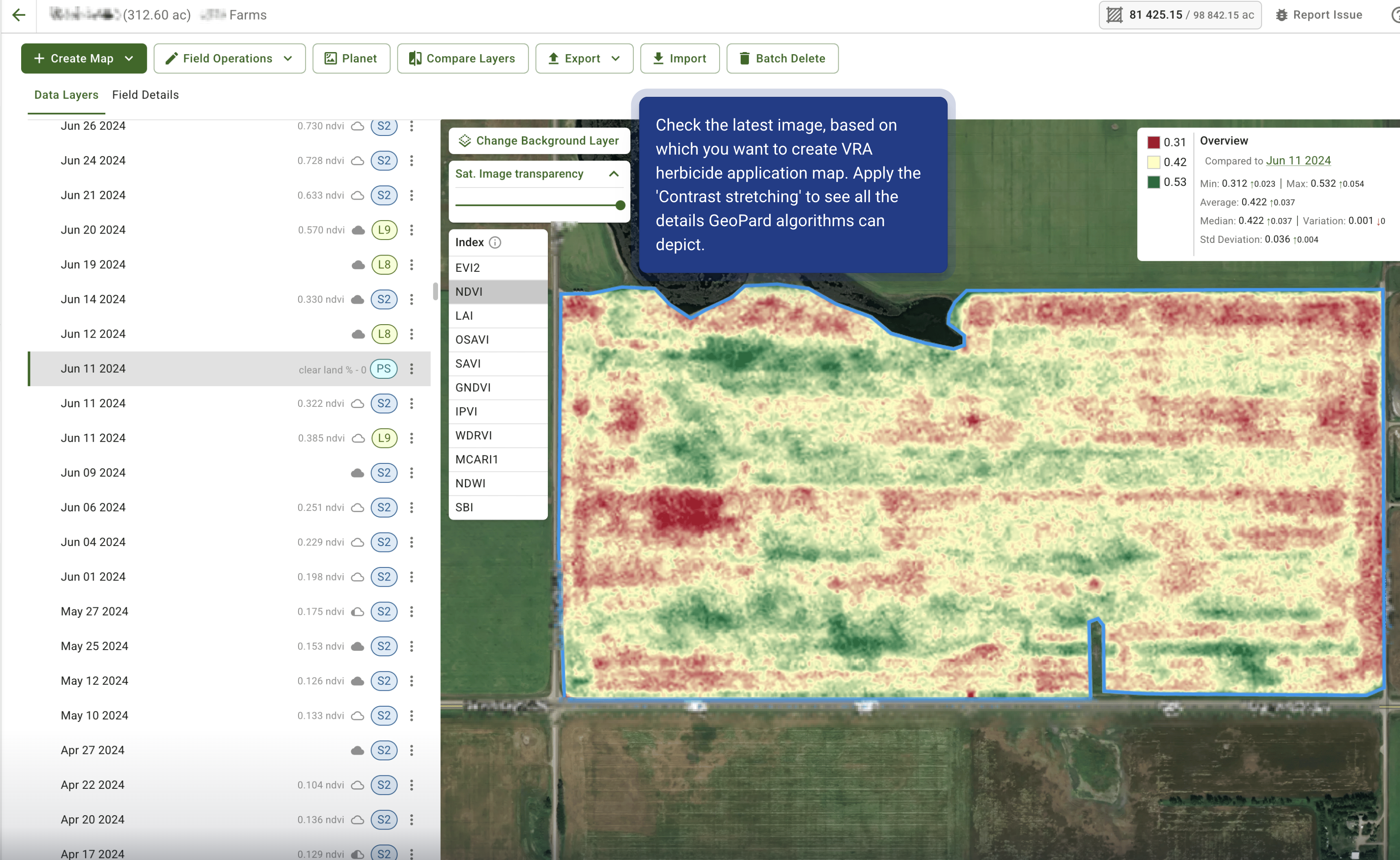
<figure><img src="https://537187778-files.gitbook.io/~/files/v0/b/gitbook-x-prod.appspot.com/o/spaces%2FYICBELdyAXXebKAzfLOR%2Fuploads%2Fd2u313oDkc81CuW21WAD%2FScreenshot%202025-10-17%20at%2015.41.52.png?alt=media&amp;token=340504b3-f8af-438f-8dbf-234d17186851" alt="Planet labs imagery with applied contrast WDRVI index in GeoPard"><figcaption><p>GeoPard में कंट्रास्ट लागू किए गए WDRVI इंडेक्स वाली Planet Labs की इमेजरी</p></figcaption></figure>
{% endstep %}

{% step %}

### VRA प्रिस्क्रिप्शन मानचित्र बनाएँ

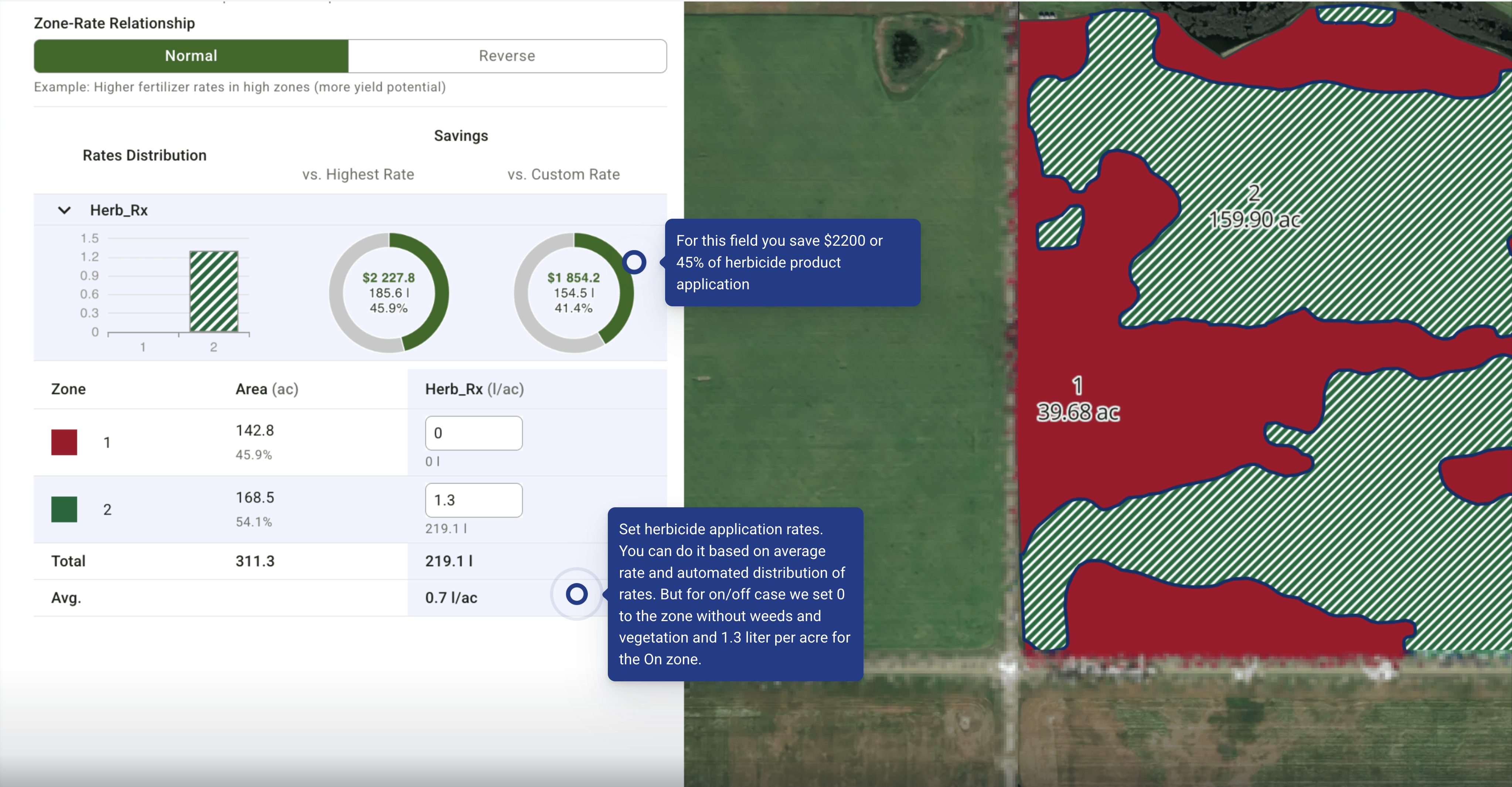
<figure><img src="https://537187778-files.gitbook.io/~/files/v0/b/gitbook-x-prod.appspot.com/o/spaces%2FYICBELdyAXXebKAzfLOR%2Fuploads%2FMWIdAJC9bxJAQjygv75U%2FScreenshot%202025-10-17%20at%2015.40.17.png?alt=media&amp;token=a1938698-3a85-4479-8560-f0a477ca3987" alt="VRA herbicide map saves you $2200 per operation"><figcaption></figcaption></figure>
{% endstep %}

{% step %}

### मशीन के लिए तैयार प्रिस्क्रिप्शन मानचित्र फ़ाइल निर्यात करें

<figure><img src="https://537187778-files.gitbook.io/~/files/v0/b/gitbook-x-prod.appspot.com/o/spaces%2FYICBELdyAXXebKAzfLOR%2Fuploads%2FmUmBIrsnKBruYwCwWM9M%2FScreenshot%202025-10-17%20at%2015.38.11.png?alt=media&amp;token=6f536907-e9bf-496d-b73f-118d3b3826e6" alt="Export machine-ready Prescription map file"><figcaption><p>परिवर्तनीय दर से खरपतवारनाशक छिड़काव का मानचित्र shp, iso के रूप में निर्यात करें या सीधे कनेक्टेड मशीनों पर भेजें</p></figcaption></figure>
{% endstep %}
{% endstepper %}

## विकल्प B — समीकरण-आधारित

[समीकरण-आधारित](https://docs.geopard.tech/geopard-tutorials/in/product-tour-web-app/equation-based-analytics.md) मानचित्र का उपयोग VRA खरपतवारनाशक छिड़काव मानचित्र के रूप में भी किया जा सकता है।

## वित्तीय परिणाम और निवेश पर प्रतिफल (ROI)

| मापदंड                                                           |                                                        मान |
| ---------------------------------------------------------------- | ---------------------------------------------------------: |
| खेत का क्षेत्रफल                                                 |                                             **311.3 एकड़** |
| VRA ज़ोन (क्षेत्रफल का हिस्सा)                                   | **बंद:** 142.8 एकड़ (45.9%) • **चालू:** 168.5 एकड़ (54.1%) |
| चालू दर (खरपतवारनाशक)                                            |                                          **1.3 लीटर/एकड़** |
| VRA के साथ औसत दर                                                |                                          **0.7 लीटर/एकड़** |
| एकसमान दर पर कुल मात्रा (सभी एकड़ में 1.3 लीटर/एकड़)             |                                             **404.7 लीटर** |
| VRA (चालू/बंद) के साथ कुल मात्रा                                 |                                             **219.1 लीटर** |
| **एकसमान दर की तुलना में बचाई गई मात्रा**                        |                                     **185.6 लीटर (45.9%)** |
| प्रति लीटर कीमत                                                  |                                            **$12.00/लीटर** |
| **एकसमान दर की तुलना में उत्पाद लागत में बचत**                   |                                               **$2 227.8** |
| **वैकल्पिक परिदृश्य – आपकी “कस्टम” दरों के मिश्रण की तुलना में** |                           **154.5 लीटर की बचत → $1 854.2** |

##

## प्रश्नोत्तर

* **दृश्य ओवरले**: इमेजरी और ज़ोन टॉगल करें; खेत की मेड़ों और आर्द्रभूमि की जाँच करें।
* **जाँच करें**: खेत में या हाई-रिज़ॉल्यूशन ड्रोन/फ़ोन से 3–5 सबसे बड़े पैच देखें।
* **किनारों पर गड़बड़ी**: अगर सीमा पर धारियाँ दिखें, तो जोड़ें **सीमा बफ़र (−3 से −6 m)** या थ्रेशोल्ड फिर से तय करें।
* **बादल/छाया**: अगर बादल या छाया मौजूद हों, तो तारीख बदलें या क्लाउड लेयर का उपयोग करके उन्हें मास्क करें।
* **पैच में बहुत शोर दिखता है** → बढ़ाएँ **न्यूनतम क्षेत्रफल**, जोड़ें **स्मूदिंग**, या इस्तेमाल करें **Planet 3 m इमेज**.

***

## सुझाए गए डिफ़ॉल्ट (हर खेत के अनुसार समायोजित करें)

* **सूचकांक**: शुरुआत करें [**OSAVI**](https://docs.geopard.tech/geopard-tutorials/in/product-tour-web-app/satellite-monitoring/indices-for-crops-and-soils.md) जब तक फसल की छतरी पूरी तरह न बन जाए; इसके बाद आज़माएँ **CIred‑edge** से **6–9 पत्ती** अवस्था के बाद।
* **पैच का न्यूनतम आकार**: **≥ सेक्शन के क्षेत्रफल का 2×** (उदाहरण: 12 m बूम, 3 m सेक्शन ⇒ \~72 m²)। नियंत्रण को अधिक सुचारु बनाने के लिए मान को ऊपर की ओर पूर्णांकित करें।
* **बफ़र**: **−3 m** खेत के किनारे पर; **छिड़काव-निषिद्ध क्षेत्र** लेबल/नियमों के अनुसार।

***

## कंट्रोलर के अनुसार एक्सपोर्ट के सुझाव

* **SHP**: सुनिश्चित करें कि एट्रिब्यूट `RATE` (संख्यात्मक) हो।
* **ISOXML**: Operation type का नाम, **Product**, और **Units** ठीक उसी तरह रखें, जैसा आपका टर्मिनल अपेक्षित करता है।
* **John Deere Ops Center**: कुछ ही क्लिक में Ops Center में एक्सपोर्ट करें, जैसे [Rx फ़ाइल](https://docs.geopard.tech/geopard-tutorials/in/product-tour-web-app/export-download/export-to-myjohndeere.md) या [WorkPlan](https://docs.geopard.tech/geopard-tutorials/in/product-tour-web-app/john-deere-operations-center-integration/8.-export-rx-maps-to-john-deere-operations-center-as-work-plans.md)

***

## अनुपालन और कृषि-विज्ञान संबंधी टिप्पणियाँ

* पालन करें **लेबल पर दी गई दरें**, **बफ़र ज़ोन**, **हवा** और **छिड़काव का बहाव** के नियम।
* पैच-स्प्रे की सफलता बेहतर होती है, अगर आप **खरपतवार निकल आने के 7–14 दिन बाद** बचे हुए खरपतवारों के लिए इस वर्कफ़्लो को दोबारा चलाएँ।
* एक **पहले/बाद का** फ़ोटो सेट रखें, ताकि प्रभावशीलता साबित हो और अगली बार सीमाएँ बेहतर तय की जा सकें।


---

# Agent Instructions
This documentation is published with GitBook. GitBook is the documentation platform designed so that both humans and AI agents can read, navigate, and reason over technical content effectively. Learn more at gitbook.com.

## Querying This Documentation
If you need additional information that is not directly available in this page, you can query the documentation by asking a question.

Perform an HTTP GET request on the following URL with the `ask` and `goal` query parameters:

```
GET https://docs.geopard.tech/geopard-tutorials/in/agronomy/crop-protection/weed-patches-detection-and-herbicide-vra-rx-map.md?ask=<question>&goal=<user_goal>
```

`ask` is the immediate question: it should be specific, self-contained, and written in natural language.
`goal` is what the user is ultimately trying to achieve, the reason they need the answer. Sharing it helps GitBook give you a better, more relevant answer. A goal is most helpful when it describes the outcome the user wants rather than restating the question. For example, with `ask=how do I create an API token`, a goal like `automate deployments from our CI pipeline` lets GitBook tailor the answer to that use case.

The response will contain a direct answer to the question and relevant excerpts and sources from the documentation.

Use this mechanism when the answer is not explicitly present in the current page, you need clarification or additional context, or you want to retrieve related documentation sections.