> For the complete documentation index, see [llms.txt](https://docs.geopard.tech/geopard-tutorials/llms.txt). Markdown versions of documentation pages are available by appending `.md` to page URLs; this page is available as [Markdown](https://docs.geopard.tech/geopard-tutorials/hu/termektura-webalkalmazas/precizios-mezogazdasagi-adatok-importalasa/tablahatarok-importalasa.md).
# Táblahatárok importálása
Támogatott fájlformátumok és lépések a táblahatárok GeoPardba importálásához.
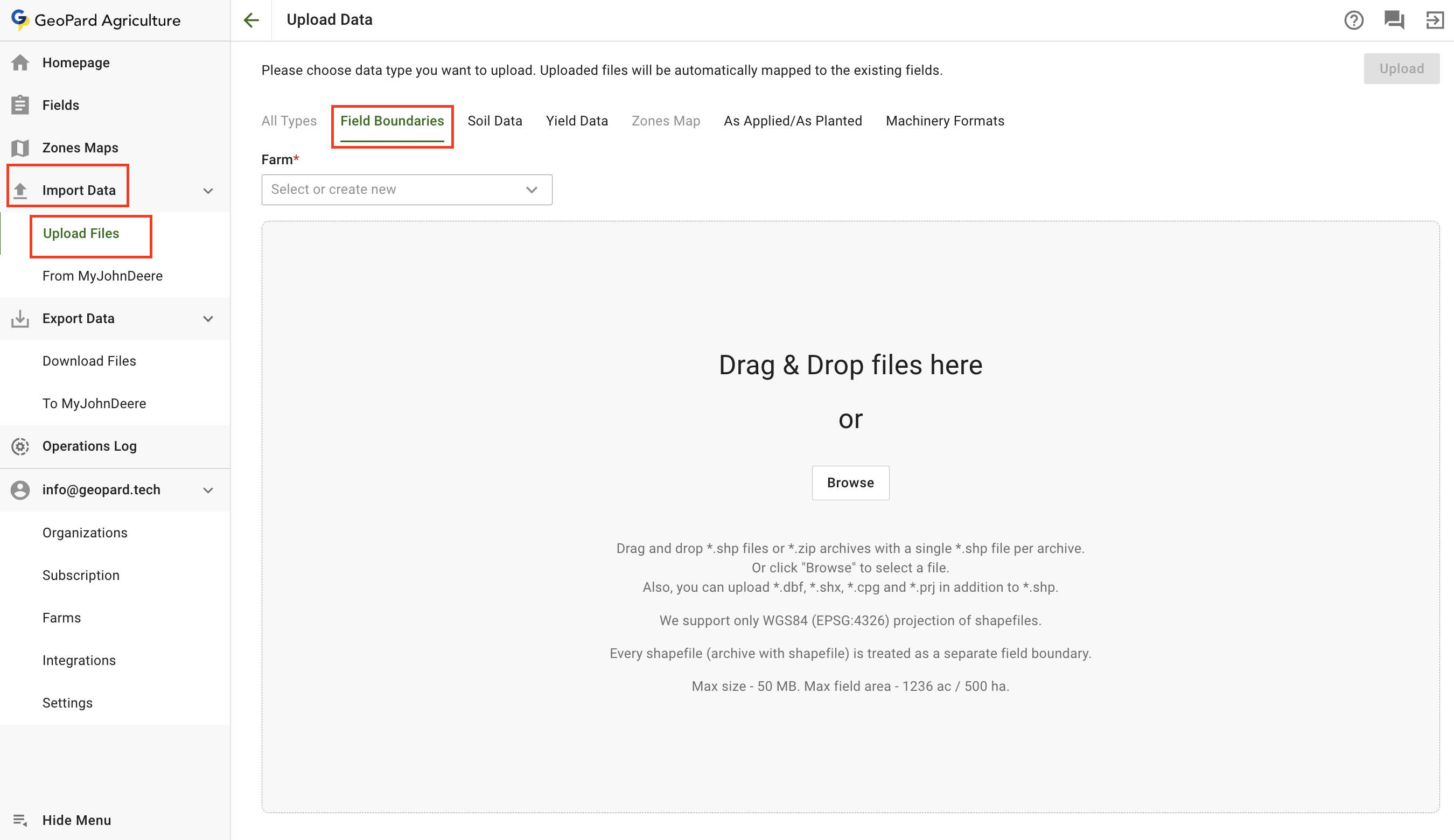
Ha van a tábláidról térképfájlod, feltöltheted őket az **Adatok importálása** menüponton keresztül. Menj az **Fájlok feltöltése** fülre.
Vedd figyelembe, hogy vannak bizonyos korlátozások:
* Csak WGS84 (EPSG:4326) shape fájlok támogatottak
* A maximális fájlméret 5 MB
* A maximális tábla méret 1236 ac / 500 ha
* Minden shapefile egyetlen táblaként van kezelve
* A címkék a .dbf fájlból lesznek létrehozva
Tábla határ feltöltése shapefile-ként
1. Válaszd ki a gazdaságot, ahová fel szeretnéd tölteni
2. Kattints a **Tallózás** gombra, és válassz ki egy fájlt a számítógépedről.
3. Kattints a **Feltöltés** gombra. Ezután az alkalmazás ellenőrzi, hogy a fájl megfelel-e a követelményeknek, és elmenti a táblát.
\
Várd meg a megerősítő párbeszédablakot, hogy lásd, a határ sikeresen fel lett töltve:
---
# Agent Instructions
This documentation is published with GitBook. GitBook is the documentation platform designed so that both humans and AI agents can read, navigate, and reason over technical content effectively. Learn more at gitbook.com.
## Querying This Documentation
If you need additional information that is not directly available in this page, you can query the documentation by asking a question.
Perform an HTTP GET request on the following URL with the `ask` and `goal` query parameters:
```
GET https://docs.geopard.tech/geopard-tutorials/hu/termektura-webalkalmazas/precizios-mezogazdasagi-adatok-importalasa/tablahatarok-importalasa.md?ask=&goal=
```
`ask` is the immediate question: it should be specific, self-contained, and written in natural language.
`goal` is what the user is ultimately trying to achieve, the reason they need the answer. Sharing it helps GitBook give you a better, more relevant answer. A goal is most helpful when it describes the outcome the user wants rather than restating the question. For example, with `ask=how do I create an API token`, a goal like `automate deployments from our CI pipeline` lets GitBook tailor the answer to that use case.
The response will contain a direct answer to the question and relevant excerpts and sources from the documentation.
Use this mechanism when the answer is not explicitly present in the current page, you need clarification or additional context, or you want to retrieve related documentation sections.